
Cyton Board + Cyton Radio Dongle Cannot Connect After Long Storage — Firmware v1.0.0 Issue?

Cyton Board + Cyton Radio Dongle Cannot Connect After Long Storage — Firmware v1.0.0 Issue?
Hello OpenBCI community,
I would like to ask for help troubleshooting an old Cyton Board with Cyton Radio USB Dongle / RFduino.
I am using an Ultramark III system with a Cyton Board and Cyton Radio dongle. This equipment was purchased for our laboratory before 2018 by my late friend. I am now trying to use it again for my research.
Background
The last time I successfully used this system was around July 2018. At that time, I believe I was using OpenBCI GUI v3.4.0 on Windows. If I remember correctly, there were two executable files: OpenBCI Hub.exe and OpenBCI.exe.
At that time, the software and hardware worked well, and I was able to record EEG data.
However, in 2026, when I tried to use the system again, I could not connect to the Cyton Board and could not record any data.
Main Problem
The OpenBCI GUI can detect the Cyton Radio USB dongle, but it cannot connect to the Cyton Board.
The main warning/error message is:
[WARN]: Found a Cyton dongle, but could not connect to the board. Auto-Scanning now...
CytonAutoConnect: Error reading from Serial/COM port
[ERROR]: Unable to connect to Cyton. Please check hardware and power source.
Complete Console Log
Console Log Started at Local Time: 2026-05-30_10-39-37
Screen Resolution: 1680 X 1050
High-DPI Screen Detected: true
Operating System and Version: Mac - 26.5
MacOS Details: MacOS Catalina
JVM Version: 17.0.6
Welcome to the Processing-based OpenBCI GUI!
For more information, please visit: https://docs.openbci.com/Software/OpenBCISoftware/GUIDocs/
OpenBCI_GUI::Setup: GUI v6 Sample Data exists in Documents folder.
Settings: LogFileMaxDuration = 60 minutes
OpenBCI_GUI::Settings: Found and loaded existing GUI-wide Settings from file.
ControlP5 2.3.6 infos, comments, questions at https://github.com/retiutut/controlp5
TopNav: Internet Connection Successful
Local Version: v6.0.0-beta.1, Latest Version: v6.0.0-beta.1
GUI is up to date!
Unpacking to: /Users/nugrohobudi/Library/Caches/JNA/temp/libGanglionLib.dylib
Unpacking to: /Users/nugrohobudi/Library/Caches/JNA/temp/libneurosdk-shared.dylib
Unpacking to: /Users/nugrohobudi/Library/Caches/JNA/temp/libsimpleble-c.dylib
Unpacking to: /Users/nugrohobudi/Library/Caches/JNA/temp/libMuseLib.dylib
Unpacking to: /Users/nugrohobudi/Library/Caches/JNA/temp/libBrainBitLib.dylib
Unpacking to: /Users/nugrohobudi/Library/Caches/JNA/temp/libBoardController.dylib
BrainFlow Version: 5.10.0
OpenBCI_GUI: AuditoryFeedback: Loading Audio...
OpenBCI_GUI: AuditoryFeedback: Done Loading Audio!
CP: Playback History Size = 2
OpenBCI_GUI::Setup: Setup is complete!
sourceList: click!
OpenBCI_GUI: Channel count set to 8
ControlPanel: Found Cyton Dongle on COM port: /dev/cu.usbserial-DB00MEQK

-------------------------------------------------
ControlPanel: Attempting to Auto-Connect to Cyton
-------------------------------------------------

ControlPanel: Found Cyton Dongle on COM port: /dev/cu.usbserial-DB00MEQK
CytonAutoConnect: Error reading from Serial/COM port
[WARN]: Found a Cyton dongle, but could not connect to the board. Auto-Scanning now...
CytonAutoConnect: Error reading from Serial/COM port
...
CytonAutoConnect: Error reading from Serial/COM port
[ERROR]: Unable to connect to Cyton. Please check hardware and power source.
SHUTDOWN HOOK
What I Have Tried
I have already tried the following:
MacBook Air M1
- macOS 26.5
- OpenBCI GUI v6.0.0-beta.1
- Cyton Radio dongle connected using two different USB-C adapters
Windows 10 22H2
- FTDI driver updated through Windows Update
- OpenBCI GUI v6.0.0-beta.1
- Cyton Radio dongle connected directly to the USB port
Windows 10 22H2 with older OpenBCI GUI
- FTDI driver updated through Windows Update
- OpenBCI GUI v3.4.0
- Cyton Radio dongle connected directly to the USB port
Firmware check attempt using terminal program
I tried using a terminal emulator program on Windows 10:
https://sites.google.com/site/terminalbpp/I read in the forum that sending the
?character through a terminal emulator may show the firmware version.- However, I am not sure whether I did it correctly, or whether this method applies to both the Cyton Board and the Cyton Radio dongle.
Changed COM port number in Windows Device Manager
- I changed the Cyton Radio dongle COM port number from COM7 to COM10.
- I tried connecting again in OpenBCI GUI after changing the COM port.
- The problem still remained, and the GUI still could not connect to the Cyton Board.
Procedure I Used in Each Test
For all tests, I used the following procedure:
- Open OpenBCI GUI.
- Connect the Cyton Radio USB dongle.
- Set the Cyton Radio dongle switch to GPIO_6.
- Turn on the battery to power the Cyton Board.
- Set the Cyton Board switch to PC.
- Use a fresh battery.
- I checked the battery voltage using a multimeter, and it showed around 6.1 V.
- In OpenBCI GUI:
- Select System Control Panel
- Select Cyton (Live)
- Select Serial from Dongle
- Tried both Auto Connect and Manual connection.
Firmware Information
From my previous post in this forum around 2018 , I found that my Cyton firmware version was identified as:
Firmware version: 1.0.0
I have not updated or flashed the firmware yet, because I do not want to damage the board or dongle before understanding the problem clearly.
My Main Question
Could the old firmware version 1.0.0 be the source of this connection problem?
More specifically:
Is Cyton firmware v1.0.0 still compatible with current OpenBCI GUI versions, such as v6.0.0-beta.1?
How can I safely check the current firmware version of:
- the Cyton Board
- the Cyton Radio USB Dongle / RFduino
Any recommended troubleshooting sequence before attempting firmware updates would be very helpful.
Thank you very much.
Best Regards,
nug
Comments
Hi Nugroho,
It would be best if your Cyton (mainboard and 2 RFduinos) was running the latest firmware. However, that upgrade process is fairly daunting. I suggest you email to (contact at openbci.com) and open a Customer Support ticket. Point them to this Forum URL so you don't have to retype all of this. They may able to assist in getting your system upgraded. DO NOT attempt to do the upgrade firmware process on your own without their guidance. It also may be possible to exchange your units. Tell them the original purchase information so they can verify their records.
As a stopgap measure, the old GUI versions are available on Github. You may be able to download (say the Windows version).
https://github.com/OpenBCI/OpenBCI_GUI/releases?page=5 use the 'Assets' drop down menu
William
Hi William, thank you for your kind reply.
yes, I already try the old GUI (3.4.0) in windows, but still doesnt work.
Nug
Just an update after I contacted OpenBCI Customer Support.
OpenBCI Support explained that because my Cyton hardware was manufactured before 2018, it uses older RFduino modules. To make it work with modern OpenBCI GUI versions, the RFduino on both the Cyton board and the USB dongle would need to be completely reflashed using specialized hardware.
Their recommendation is to replace the old Cyton board and dongle with a new unit for better compatibility and more reliable data collection.
Thank You
regards, nug
Hello @nugroho_budi I also struggled with the firmware flashing of the RFduinos. I had to make some minor adjustments to make the compiling and flashing work. I made a post regarding this issue, maybe you wanna have a look here and it might be helpful. https://openbci.com/forum/index.php?p=/discussion/4107/supplemented-tutorial-for-cyton-radios-programming#latest
And of course have a look at the official tutorial for the next steps https://docs.openbci.com/Cyton/CytonRadios/
Since you have the original dongle, that wouldn’t be a big issue at all.
Best regards
Wow, that is a really great tutorial, @danysab! Thank you so much for sharing the link.
I actually haven't done anything with my Cyton hardware just yet, as I'm still struggling a bit with EEG recording on another device. But once I get back to this project, your post will be a huge help. Thanks again!
I just want to update that I have been tinkering a little bit.
Using the guide from
UPGRADE_GUIDE.md, i already done this:1. Flash the Device with RadioDevice32bit. SUCCESS. Thanks also to @danysab for the guide
2. Flash the Host with RadioHost32bit. SUCCESS
3. Flash the Pic with DefaultBoard. <<<< The problem is here.
and then i try to upload again,
i try to use OpenBCI GUI 6.0.0. The GUI said that the radios is paired. But,
That's great progress. Hoping that @danysab might pop in here with any suggestions.
@nugroho_budi did you press the PROG and RESET buttons before flashing the board? And if yes is the blue LED blinking? If not this is step no.1. Check the battery level too and the distance between the dongle and the board should not be too far away. Silly question, but is the Pic32 new or does it have a bootloader flashed already? Bc this could be an issue too. And also check the quarz oscillator. I had this problem too and at the end, that was the issue I was facing for weeks.
Let me know.
He purchased the unit directly from OpenBCI, so it should have bootloader installed.
Hi @wjcroft and @danysab,
Thank you for the helpful discussion! Here is an update on my troubleshooting and measurements:
Bootloader Status: I followed the sequence (pressing PROG + RESET before/after power-on). The blue LED is blinking successfully, which confirms the PIC32 bootloader is active and executing code.
Power Supply & Voltages: Powered by 4x AA batteries. DMM measurement at the input connector pins reads 5.6V. (This seems correct for fresh/slightly discharged AA batteries).
Crystal & Hardware Check: The board and the USB dongle are placed less than 15 cm apart. Since the bootloader is actively running and blinking the LED, I assume the external crystal oscillator is functioning correctly. Isn't it right? I have attached a photo of the board—could you confirm if the component I marked is indeed the main PIC32 crystal?
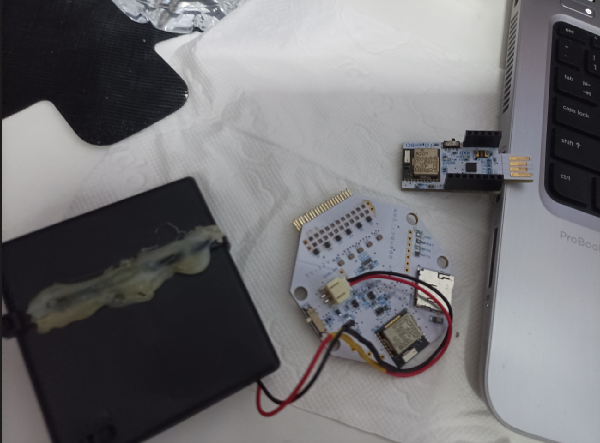
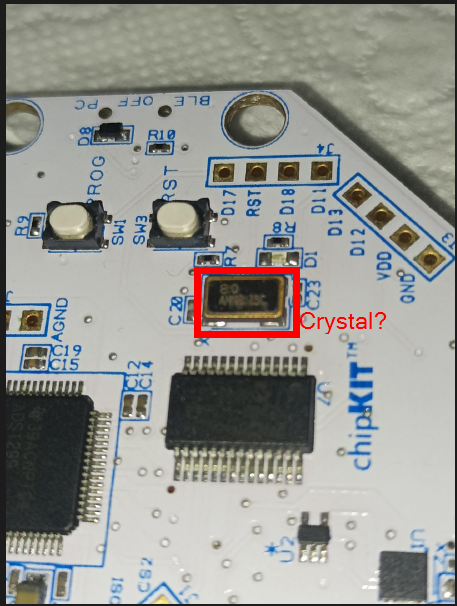
What should my next step be to diagnose why the firmware upload fails?
Update:
I try to change the power supply from 4 x AA bateries to Arduino Uno Boad +5V pin and Gnd. but still doesnt works.
I read here: https://openbci.com/forum/index.php?p=/discussion/2223/is-my-cyton-broken-non-responsive-after-attempted-firmware-upgrade#latest
that @wjcroft mentioned RadioPassThru32bit is just a dummy code, so i just upload a blank ino file that just have a
void setup(){} void loop(){}. i hope that was okay.here's a screenshot of my RadioDevice32bit and RadioHost32bit
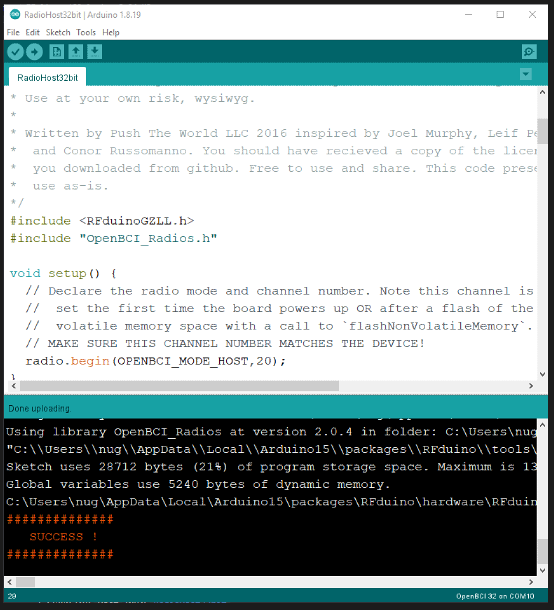
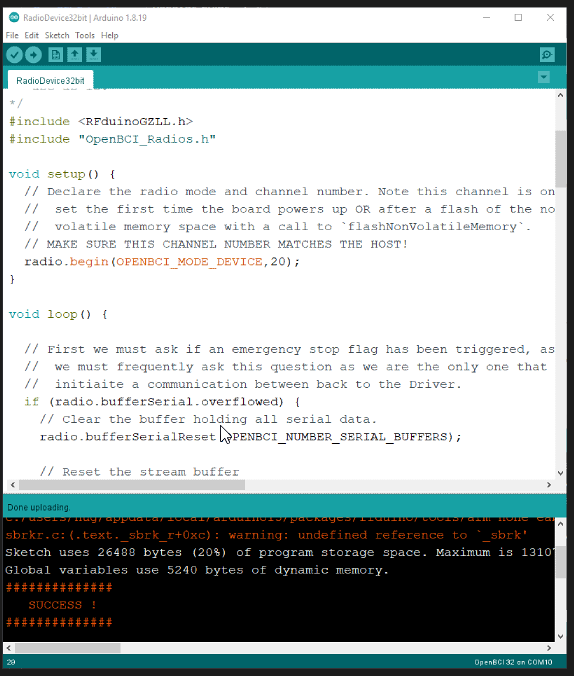
NO!
RadioPassThru32bit is NOT a 'do nothing' code, it is a special 'pass thru' version of the dongle firmware used in flashing the mainboard RFduino.
https://github.com/OpenBCI/OpenBCI_Radios/blob/master/examples/RadioPassThru32bit/RadioPassThru32bit.ino
You have to follow ALL the steps listed here:
https://docs.openbci.com/Cyton/CytonRadios/
https://docs.openbci.com/Cyton/CytonRadios/#program-device-radio-with-openbci-dongle
https://docs.openbci.com/Cyton/CytonProgram/
@wjcroft said:
ahh, then i should do it again.
i will come back later. tinkering again
thank you..
Finally it works.
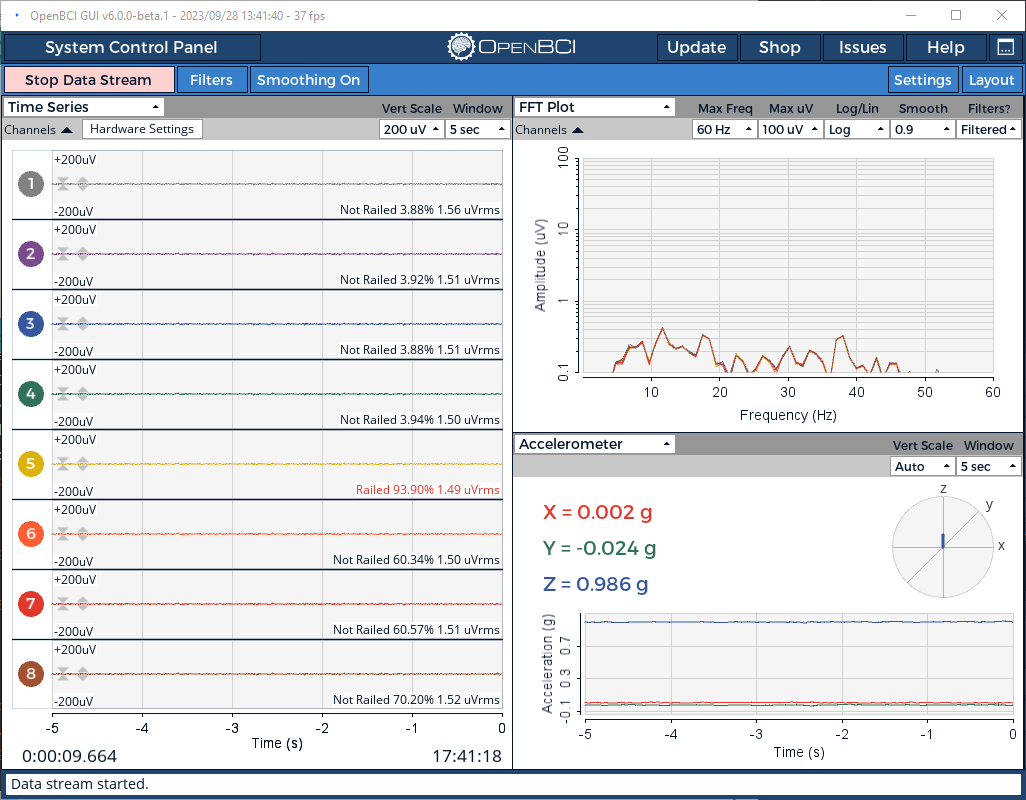
I will post the step by step tutorial in a moment
YEEEES!!! Congratulations!
Hi everyone,
Here is a clear summary of my current setup and the step-by-step troubleshooting process I have followed so far, based on the helpful guides by @danysab and @mbamonte. Thank you also to @wjcroft for the guide and all, GREATTTTT!!
Preparation & Environment
Installed Libraries:
OpenBCI_32bit_Library(by Joel Murphy, AJ Keller) v3.1.5OpenBCI_32bit_SD(by Joel Murphy) v2.0.0OpenBCI_Radios(by Joel Murphy, AJ Keller) v2.0.4OpenBCI_Wifi_Master(by AJ Keller) v1.0.1Additional Board Manager URLs:
https://github.com/majenkotech/pic32-tools-fixes/releases/download/1.0.0/package_chipkit_index.jsonhttps://gist.githubusercontent.com/per1234/f7822073e05276c4243740eaab4235d1/raw/9c34051294ddd54dbbdf3bec392df0afef8da938/package_rfduino166_index.jsonReference Guides Used:
Steps I Have Done
Switch dongle to RESET.
Upload
RadioPassThru32bit.inoto dongle.Connect all the wires through the breadboard as in the radio tutorial pictures.
Switch dongle to GPIO6; switch board to PC, hold down the wires onto Cyton.
Flash the
DEVICE. Upload theRadioDevice32bit.inowith Board RFduino. Modify the code, so that thevoid setup ()becomesFirst:
Then:
Remove all the wires, and switch dongle to RESET.
Flash the
HOST. Upload theRadioHost32bit.inowith Board RFduino. Modify the code, so that thevoid setup ()becomesFirst:
Then:
Switch dongle to GPIO6; switch board to PC.
Finally upload the Cyton with
DefaultBoard.inowith Board OpenBCI 32 and the Cyton in Bootloader mode, see: https://docs.openbci.com/Cyton/CytonProgram/thank youuuu