
OpenBCI Recording Issues: TXT File Format and Sample Index Anomaly
 SimonPei
South Korean
SimonPei
South Korean
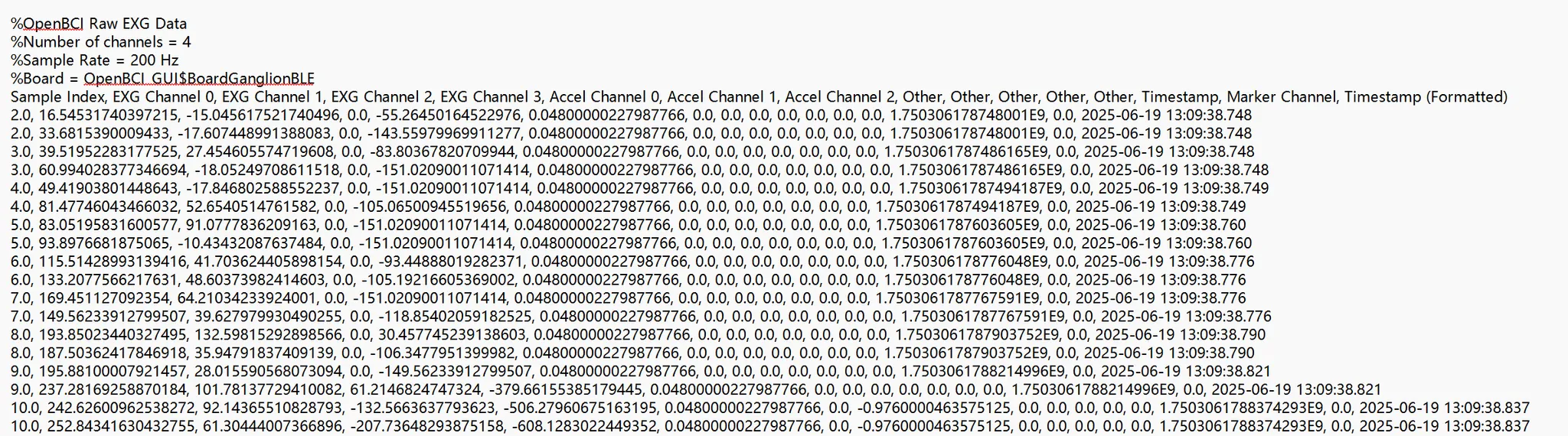
How should I handle the txt files? (I was expecting to receive csv files, but I couldn’t find a corresponding setting on the OpenBCI GUI.) Also, why does my Recording folder contain only txt files and not csv files? In the first column labeled "Sample Index" in the recorded text file, every number except 0 appears twice. If the sampling rate is 200 Hz, then 0 should also appear twice; however, 0 appears only once, meaning there are 201 sampling points per second rather than 200. Should I remove index 0?

Comments
The txt files ARE csv files, comma separated values. Header shows meanings of each column.
Ganglion V1 packet format described here:
https://docs.openbci.com/Ganglion/GanglionDataFormat/
Each radio packet contains TWO samples. When did you purchase this? The newer firmware revision may have an anomaly with the sample 0 index. Mentioning @Shirley and @philip_pitts (the engineer who designed the V3.x firmware.
As long as you are seeing the sample index increment by the value '1' consistently, you are not losing any samples.
William
Hi William,
Thank you for your detailed explanation. We purchased the Biosensing Starter Bundle (including the Ganglion) on June 09 of this year. I understand from your note that as long as the sample index increments by 1 consistently, I only need to focus on the index 1–100 data. Your confirmation really helps clarify that there are no lost samples.
Thanks again for your support and insights!
Best regards.
Simon, hi again.
No. For the time being until we hear from @Shirley or @philip_pitts (the firmware dev) -- consider ALL the samples in the recording as valid. I do not yet understand why sample 0 only appears once each time through the loop. This might be the way the new Ganglion V3 packet numbering works. With the previous firmware there were always two samples with the same packet index number
ONLY use the sample index as an indicator of potentially 'lost' packets. In that case the number will not appear and thus the index will have skipped numbers. (For example, 3 3 4 4 6 6, etc.) Also mentioning Richard @retiutut, the GUI dev.
Regards, William
Hi William, Thanks for your help and your teams support!