
External triggering, auditory stimuli

Hello,
I am just a beginner and hope somebody can help out. I am trying to input some external triggers into the openBCI for each auditory stimulus but I am struggling with this tutorial: https://docs.openbci.com/Cyton/CytonExternal/. The problem is that I do not have the female input pins GND, VDD D12 and D13 available as they are mechanically damaged and I would need to resolder them.
First I wanted to ask if it would be possible to use DVDD instead of VDD and if the GND next to DVDD (rather than VDD) would work as well. Also I wondered if I could use for the OpenBCI input pin also the female inputs MISO, SCK, RST, CLK, MOSI CS2 instead of pin18 (D18), or if I could even input the trigger into one of the EEG channels (N1P-N8P).
Thank you !
o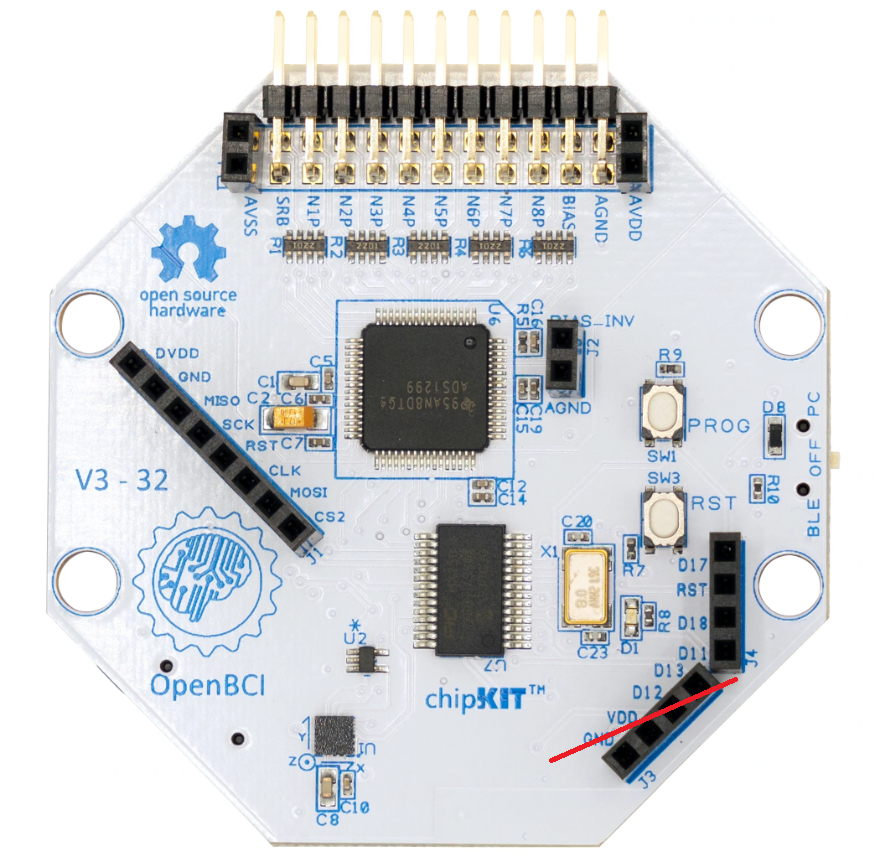
r
Comments
Hello together,
I am trying to input some external triggers from auditory stimuli. When following the tutorial here: https://docs.openbci.com/Cyton/CytonExternal/, under External Triggering the hard way, it is described that some code needs to be inserted. I just do not know in which file the code needs to be inserted (e.g. BoardController.dll?).
Thank you very much!
Hi Anton,
Yes the DVDD and GND on J1 is the same as VDD and GND on J3. As far as damage on J3 connector, I suggest you consult an electronics technician at almost any PC board repair facility. They should be able to unsolder the damaged connector and put in a new one. This is an easy repair and takes about 10 minutes.
It sounds like your J4 is also damaged, replace them both. The other pins on J1 cannot be used in place of the input pins (Dxx) on J3 and J4.
re: firmware changes needed for external trigger.
No, you are reading the older section of the page. No changes are needed now, see,
https://docs.openbci.com/Cyton/CytonExternal/#external-triggering-the-easy-way-firmware-3xx
https://docs.openbci.com/Cyton/CytonSDK/#board-mode
Regards, William
Hi William,
Great, thanks for your help, very useful! Will get the board fixed then.
Best,
Anton
Hi William,
I hope you are well. I tried to resolder the J3 and J4 myself and tried to input the trigger in the different pins from D11 - D18. However, I cannot see any input in the Other channels (there are 6 "Other" channels in the excel spreadsheet for the trigger inputs I assume). Also I tried a trial session where I only press the "PROG" button, but again, I cannot see any input.
I think it may have to do with the firmware I am using, I am not sure if I have the up to date firmware as I bought the openBCI a while ago. Is there any easy way to check the firmware version?
Thank you again,
Anton
Sorry an update, the PROG button works, I had not turned on the digital read mode. Now my question is if I still need to use the optoisolation circuit? I have created it exactly how it is stated on the External Triggering page, but apparently this was for firmware 1.xxx. So is the optoisolation not necessary for newer firmwares? I am using a raspberry pi for stimulation and could just plug my jumper cable directly from the pi into pins D12-D18 of the openBCI.
The optoisolation section of the External Triggering document, can apply to all firmware versions. It is just a method of electrically isolating the trigger source from Cyton PIC32 input pins. When you make a direct connection without isolation, any noise in the trigger source device, may couple into the Cyton.
You can try without the optoisolation, but examine your time series channel signal traces carefully for any signs of noise.
William