
LED on Cyton dongle, not staying lit

I would like to ask your advice about the wireless Open BCI USB dongle that comes with the Cyton board, which does not connect to my computers properly. I think that my dongle has the cause of the problem.
I would like to identify the cause of the connection and would like your advice.
The following is a description of the problem in two different perspectives.
--------------------------- Summary of the problem ---------------------------
(1) The connection to the PC's USB does not work.
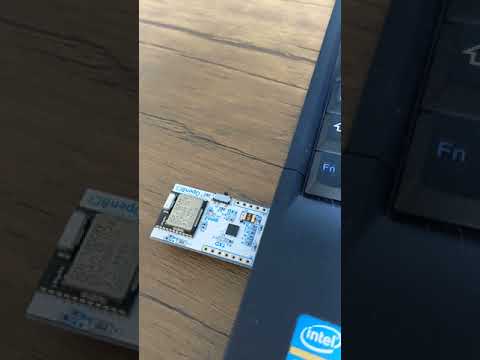
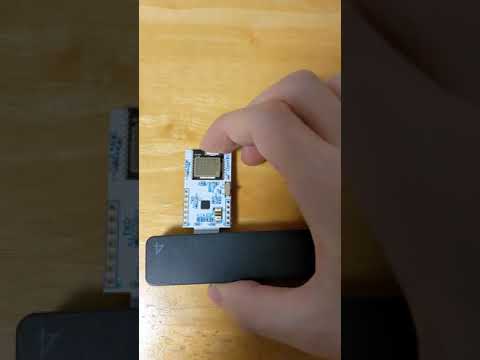
When I connect the wireless Open BCI USB Dongle to my computers(Linux,Windows), the blue LED glows for about a second and then goes out.
According to the documentation on the official site, the blue LED stays on when connected to the PC, but
The behavior of the dongle I purchased is different.
Conect My Linux Machine
Conect My Windows10 Machine
To see if there is a problem with the driver (FTDI VCP Driver), I tried serial communication between a Linux computer and a Raspberry Pi via USB using the FTDI VCP Driver.
As a result, I believe that there is no problem with the driver because it was able to transmit information without any problem.
(2) Connection error in OpenBCI GUI.
I ran Open BCI GUI on two computers, one Linux and one Windows, and tried to connect dongle and Cyton. However, I got a connection error.
Linux:
It seems that the USB dongle itself is recognized, but the connection to the Cyton board is not working.

Windows
Similarly, I got a connection error result.
OpenBCI GUI showed the following error message...
"Error reading from Serial port.Try a different port?"
--------------------------- supplementary information ---------------------------
Machine Spec:
[1]:Linux Machine
Ubuntu 18.04.6, 64bit
[2]:Windows Machine
Windows10, 64bitReference:
-- Reference:About FTDI Driver for Linux
https://docs.openbci.com/Troubleshooting/FTDI_Fix_Linux/
-- Reference:About FTDI Driver for Windows10(64bit)
https://ftdichip.com/wp-content/uploads/2020/08/AN_396-FTDI-Drivers-Installation-Guide-for-Windows-10.pdf
(page 7)Cyton board:
The Cyton board is powered on with the switch in the "PC" position, and the blue LED is glowing continuously. It seems this device is fine.
I have tried with other BCI dongles or with two computers, but the symptoms are the same and the connection to the Cyton board does not work.
Since I purchased the OpenBCI Starter Kit three months ago, I haven't had any successful connection, so I'd like to find the cause of connection error.
Comments
Aki, hi.
Since this is a new purchase, and it never worked, you should email customer support at contact at openbci.com and they can assist with any replacements. Generally it's wise to resolve purchase malfunctions as soon as possible after they arise; sorry you put this off for three months.
I am not sure I understand one of your last sentences: "...I have tried with other BCI dongles or with two computers, but the symptoms are the same and the connection to the Cyton board does not work..."
What do you mean by "other BCI dongles" ? OpenBCI dongles? Dongles from other companies will not work with OpenBCI. The Cyton dongle and Cyton mainboard only talk to each other, no other equipment.
Regards, William
Dear William
Thanks for your reply.
Sorry but, I would like to add a clarification to my first posted article, as it seems that there were some unclear points .
Actually, the first OpenBCI dongle I purchased was not working properly, so I contacted the customer support.
(I tried to follow the official documentation to set it up, but it didn't work.)
After a few emails back and forth, they sent me a new OpenBCI dongle. However, the connection didn't work with the second dongle as well.
I don't know if it's the dongle or my two computers (Linux and Windows) that are causing the problem.
I guess I'd better contact customer support again, right?
Regards, Aki
Aki,
Hmm, it's remotely 'possible' that your first dongle was defective. But if the replacement is failing in exactly the same way, and if OpenBCI verified the replacement dongle before sending to you, then it seems MORE likely that the issue is happening because of your equipment or operating system / drivers.
You should still email again with customer support and ask how to proceed. Do you have a friend with a relatively new computer that you could test the Cyton on? You already mentioned installing the FTDI VCP drivers (both Windows and Linux), so that tends to rule out the driver as the cause. There may be something unusual about your hardware / usb setup that is contributing to this issue. Mentioning @Shirley.
William
Dear William
Thanks for your reply.
I'll try it on my friend's computer. If it does not work, I will contact customer support again.
If there are any further developments, I will add them to this Discussion.
Thank you very much for your help.
Sincerely, Aki.
It may be possible that other "usb serial port" devices you have installed / used in the past, are having a driver conflict with the FTDI chip used in the Cyton dongle. In which case uninstalling the driver for the old device may remedy the situation. The behavior (LED lights briefly, then turns off), seems to correspond with the OS 'seeing' the device initially, then powering it off because of some type of misconfiguration internally.