
Ganglion / GUI freezes after Start, but Ganglion runs FINE with Brainflow [resolved]
 celticharp
Athens, Greece
celticharp
Athens, Greece
Hello!
So I decided to find my old Ganglion board that arrived years back, at the kickstarter funding.
I have bought the BLED112 dongle (I used to have the CSR 4 one) and tried the GUI.
So I clicked BLED112 choice at the start up, and then I clicked Ganglion-ceb2. Then start session.
But, when Start Data Stream or Start Impedance is clicked the GUI freezes. I don't see any log files to provide you with.

I also tried to run the GUI as administrator, remove the dongle and install it again, turn off/on the Ganglion.
It seems that everything runs smoothly if I run it from brainflow.
I have Windows 10 64bit, with update October 12, 2021—KB5006670 (OS Builds 19041.1288, 19042.1288, and 19043.1288).
Thanks!
P.S. I haven't ever performed any firware update (I hope this is not needed).
Comments
Amalia, hi.
Can you try running a test on another laptop, to rule out issues with the Windows machine drivers / libraries? Both Brainflow / Python and the OpenBCI_GUI are using the same Brainflow libraries to access the Ganglion / dongle. However the GUI also requires up to date graphics card libraries, such as OpenGL. When was your laptop manufactured? Make / model? Have you tried going to the manufacturer website to check for any graphics chip / card updates? Windows / Microsoft update process does not always pickup OpenGL updates.
Check for Consolexxxx.txt log files in your ~/Documents/OpenBCI_GUI/Console_Data/ folder. Mentioning Richard @retiutut.
Regards, William
Thank you for providing such useful information already. The last piece of the puzzle will be the Console Log file, as William has mentioned. Please provide the full file/text here and I will be able to determine the next steps to resolve this. @celticharp
Hello again!
Thank you for your answers.
I do not see anything alarming at the logs:
So it seems that the problem has nothing to do with the Ganglion. The GUI also freezes even if I select the synthetic board! just checked!
My laptop is an Asus F555L. Actually I thought that it was using Geforce 920M but for somes strange reason if I open device manager I can see BOTH Geforce 920M and Intel(R) HD Graphics 5500.
I can't remember what driver version I had before but I just installed Geforce 920M version 425.31.
Intel just updated to version 15.40.44.64.5107. It does the same.
I have some information attached from intel graphics center for you to see.
Not sure what else to do now..
Thank you!
PS. Sorry I cannot attach a file so here it is in raw format:
Intel(R) HD Graphics 5500
Report Date: Thursday, November 4, 2021
Report Time [hh:mm:ss]: 10:11:14 PM
Driver Version: 20.19.15.5107
Operating System: Windows* 10 Home (10.0.19041)
Default Language: Greek (Greece)
Physical Memory: 8094 MB
Vendor ID: 8086
Device ID: 1616
Device Revision: 09
Graphics Output Protocol (GOP) Version: 5.5.1028
Current Resolution: 1366 x 768
Processor: Intel(R) Core(TM) i5-5200U CPU @ 2.20GHz
Processor Speed: 2197 MHz
Processor Graphics in Use: Intel(R) HD Graphics 5500
Shader Version: 5.0
OpenGL* Version: 4.4
OpenCL* Version: 2.0
Microsoft DirectX* *
Runtime Version: 12.0
Hardware-Supported Version: 11.1
Devices connected to the Graphics Accelerator *
Active Displays: 1
Display Type: Digital
DDC2 Protocol: Supported
Gamma: 2.2
Connector Type: Embedded DisplayPort
Device Type: Built-in Display
Maximum Image Size
Horizontal Size: 13.39 inches
Vertical Size: 7.48 inches
Supported Modes
1366 x 768 (60p Hz)
1366 x 768 (40p Hz)
Sometimes the graphics control panel will allow you to choose between the low capability Intel graphics, and the more capable GeForce. If you have the ability to switch to the GeForce, choose that. Because OpenGL drivers may run better, and the GUI (Processing) uses OpenGL.
https://www.laptopmag.com/reviews/laptops/asus-f555l
Your OpenGL 4.4 is almost ten years old, if you can upgrade to a later version, would be prefered,
https://en.wikipedia.org/wiki/OpenGL#OpenGL_4.6
https://support.bluestacks.com/hc/en-us/articles/360038040731-How-to-update-OpenGL-on-your-PC-for-BlueStacks-4
That is the BrainFlow log. Can we please see the GUI Console log that starts with Console_[Date+Time]?
Oh I'm sorry you are right, but there is no other log file in that folder. Only Brainflow_*!
Actually I downloaded OpenGL Extensions Viewer because it was not clear to me the version of OpenGL that I had (maybe intel says nosense?)
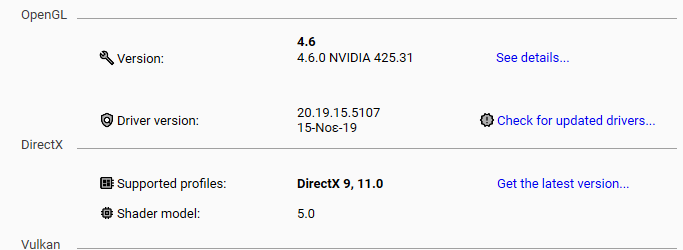
Here is the screenshot. It says I have 4.6!
wjcroft, I have chosen Nvidia to be the preffered one but nothing changed. (from this link)
I also tried to set OpenBCI explicitly to use nvidia. Nothing changed also.
You can try to setup the GUI to run from inside the Processing IDE, instructions here,
https://docs.openbci.com/Software/OpenBCISoftware/GUIDocs/#running-the-openbci-gui-from-the-processing-ide
Yes!!! It's working from Processing IDE. Thank you!
Glad to hear that. Richard @retiutut, any further comments?
It would really help to see the Console Log from the GUI when it was broken and after the fix. If the GUI is running and the BrainFlow log is there, then the other Console Log is there.
Sharing everything else but this is not entirely helpful to understanding an actual crash.
I can share with you the Console that was created from the Processing IDE. But still, no Console_* text file is created when I run the standalon GUI!
I don't have a problem to provide you a TeamViewer for you to see further details if you want.
I can share with you the Console File that was created from the Processing IDE. But still, no Console_* was created when I ran the standalon GUI!
You could connect remotely to my PC to check details if you want, so that it can be helpful to others. Or guide me to provide more info.