
this part on Ganglion is overheating, what is it?

Hello Everyone
Some years ago in a seminar I answered a question and they gave me a ganglion board , but unfortunatelly it was not working 
I told my friend to repait it and he said buy this part (which is marked on the photo) , the problem is from there (it gets too hot and the power light is on but so weak). Is there anyone can help me by the name and in case tell me where I can buy in Europe?
many thanks in advance.

Comments
Cloud, hi.
If you look carefully on your board, the part circled is U10, your red line obscures this label.
https://docs.openbci.com/Ganglion/GanglionSpecs/
https://github.com/OpenBCI/Ganglion_Hardware_Design_Files/blob/master/Ganglion_SCH.pdf
If you examine the schematic in the upper right corner, you can see that U10 is an NCP300 voltage detector chip,
https://www.onsemi.com/products/power-management/voltage-references-supervisors/voltage-supervisors/ncp300
The function of this, I believe, is to validate the proper battery voltage level is reached, then to 'enable the two voltage regulator chips above this in the diagram, via the V_ENABLE signal. This then turns on the regulated power supply voltages Vdd and Vaa.
My suggestion is that you check ALL THREE of these power supply chips. It's possible that one of the other chips is interacting with U10 somehow and causing the overheat / malfunction. The NCP300 should be available from any parts distributor in your area. Similarly for the NCP551's.
Regards, William
@wjcroft many thanks to your answer it was a big help as I don't know anything about those maps. I checked the website and I found several models pf NCP300 to buy which divided by the voltage from 0.9 volts to 4.7 volts which one is the right one if you know it?
Regards
Masoud
The Ganglion is designed to operate at standard 3.3V logic levels. So most likely the 3.0 V version is what you want. The other values on either side of that are:
AGAIN, I stress that you should check (with a digital voltage meter), all the chip components in the power supply section of the board. It may be that the voltage regulators (U9 and U11) are the source of the problem / overheat. U10 is only supposed to DETECT a valid voltage level. So seems odd that this would be the overheating component. More generally it is the regulators which fail.
Note that in addition to the voltage level, there are also variants that produce the RESET output of the chip as logic high or logic low. Hmm, please have your tech study the data sheets carefully to determine which you want. Just on first glance, it appears that V_ENABLE is logic high, but I may be wrong.
Dear William @wjcroft.
Your consern makes sense, I will buy both models to make sure I wont order again and wait
NCP551 is 3.3 volt like the NCP300 or the voltage is different?
Thank you again for your information. Once might you remember I asked some questions about Muse application and you helped me kindly.
Masoud, hi.
Data sheet for NCP551 is here,
https://www.onsemi.com/pdf/datasheet/ncp551-d.pdf
https://www.onsemi.com/products/power-management/ldo-regulators-linear-voltage-regulators/ncp551
The Vdd supply should be 3.3V. I'm not sure about Vaa supply. Examine the schematic carefully.
The NCP300 is likely set at 3.0V, there is not a 3.3V version of that part. See previous comment, nearby values are 4.5V (too high) and 2.8V (likely too low.)
William
@Cloud, hi.
OK, should have done this before: I just did actual measurements on a working Ganglion.
BOTH Vdd and Vaa are 3.0V, that means ALL THREE of the NCP components (NCP300, and 2 x NCP551), are all the 3V version. Measured battery voltage was 3.7V. The NCP300 part, pin 1, 'RESET' or 'V_ENABLE', is logic high = true. What I measured on pin 1 was the same as the battery voltage, 3.7V. That is because the actual voltage regulation down to 3V, only happens after the NCP551.
Regards, William
@wjcroft many thanks again,
Yesterday night I wanted to buy, I selected them but I said tomorrow I finish the purches. I change the NCP551 because I chose the 3.3 v.
I need this to try brain-trainer method as I have the bio-era dongle. Hope it is worthy.
Many thanks again William hope I can compensate for you
[merged to previous thread on same subject]
Hello Everybody
I had a bord that seems to have a problem with the main chip. I wanted make sure this is the right chip? https://www.microchip.com/en-us/product/mcp3912
regards
Hi Cloud,
Is your Ganglion a recent purchase? Have you tried contacting customer support (email contact at openbci.com) ?
Yes the MCP3912 is the ADC Analog to Digital Converter chip on the board.
Board level repair of surface mount / SMT chips is not very easy. If your product is still covered by the OpenBCI warranty, it is best to get help at that email address.
William
Thanks a lot for your answer. unfortunately I bought it in 2020 and never did use it. So it is out of warranty, and also i am located in Europe. A friend told me he can change it. Do i need to put the upgrade the firmware before changing, or is it after changing?
Are you sure the ADC is broken? Are you able to run the GUI and see a data stream from the Ganglion? Are all 4 channels working, or are some damaged?
https://docs.openbci.com/GettingStarted/Boards/GanglionGS/
You do not need to upgrade the firmware. That upgrade is optional. GUI knows how to speak with both old and new firmware.
the problem was overheating of this part. we changed it and nothing happened. in a post in 2021 you suggested that probabli it is from the main chip and also my friend said the same. so now I am trying to change it. Please, correct me if I am wrong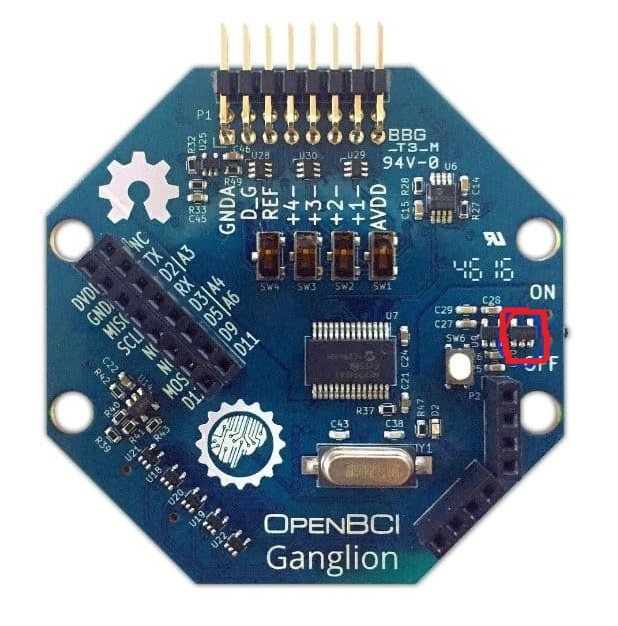
OK, now I am remembering the thread. I'm going to merge this current thread into that one. Suggest you REREAD everything I said in that thread.
https://openbci.com/forum/index.php?p=/discussion/2927/this-part-on-ganglion-is-overheating-what-is-it
Fixed some the schematics link that had changed above.
Please do NOT touch the ADC. It has nothing to do with your issue of failing regulators.
Mentioning our hardware engineer, @Tharun_OpenBCI.
Tharun, hi. This customer from 2020 has an issue with his Ganglion regulator(s) overheating. They already tried replacing one of the three parts. With no resolution. I previously suggested it could be any of the three causing the issue.
This board is out of warranty, so any suggestions to add to what was already said?
William
thanks a lot, @wjcroft So nice of you. I will wait for @Tharun_OpenBCI
I think I said this before, replace all three of the power supply regulator chips.
Hi @Cloud! As @wjcroft mentioned already, I would suggest that you first replace all three regulators. Do not replace the ADC (MCP3912) as this is a harder part to desolder/resolder and is also likely not the problem with your board. A likely reason that U10 on your board is overheating is due to a short between power and GND on the U10 chip. I would suggest you try this as well as replace all three regulators first before you attempt to replace the MCP3912.
Also, as this board is out of warranty, the only other suggestion I have would be to buy another Ganglion board.