Hi,
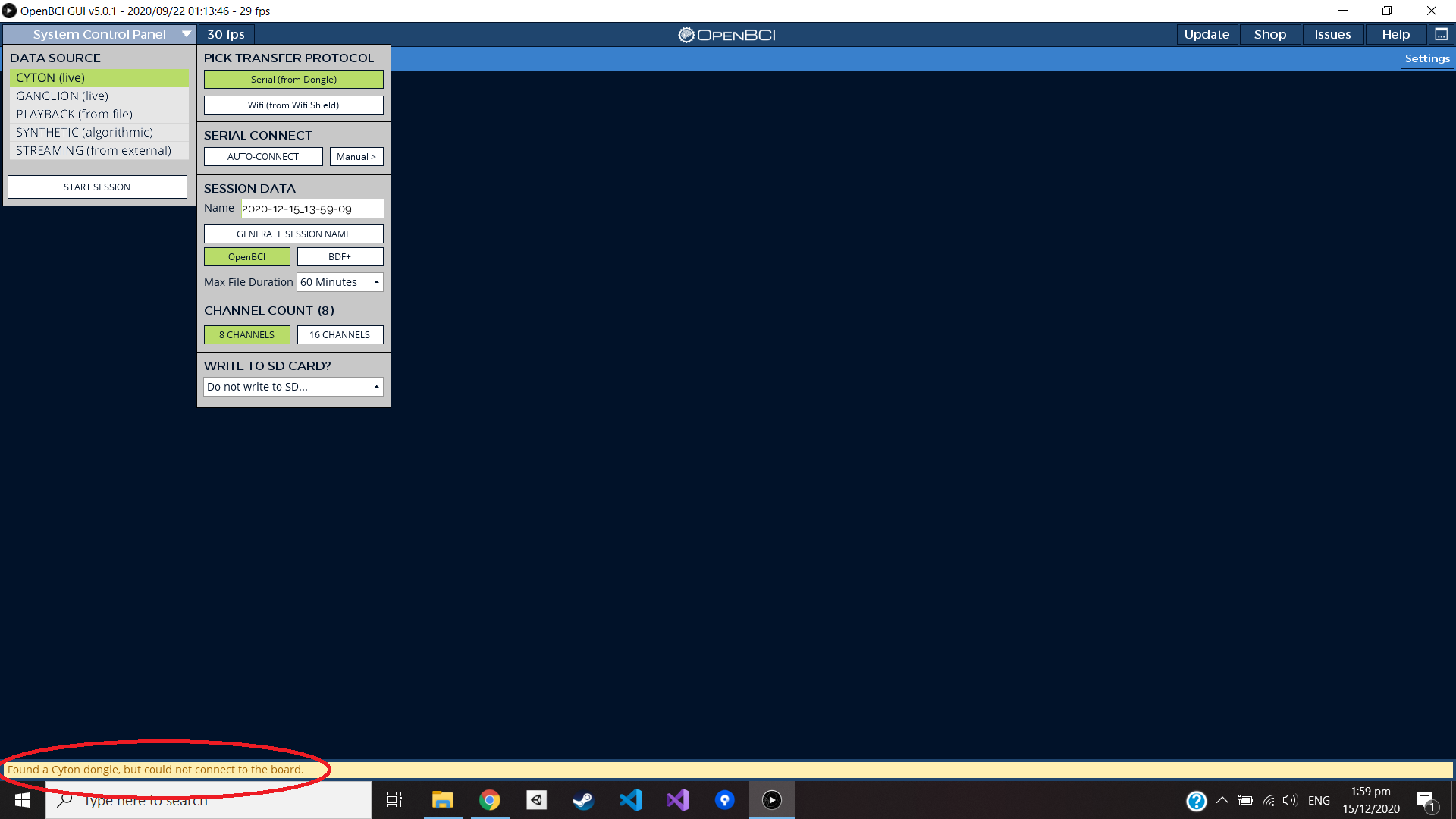
I have an issue that says all ports are in use. I have tried different solutions that are available in this forum but still no sucess. Kindly find the issue that is shown here! Could anyone give some help please ?
The fact that the GUI runs fine on other laptops, means that the problematic laptop is the issue, not OpenBCI. Is the misbehaving laptop up to date with all Windows 10 OS revisions? Or could there be something wrong with your usb hardware ports? I assume you are not using a usb port extender. What is the manufacturer / model of this laptop?
@ihgumilar In the top right of the GUI, there is a button that will open the "Console Log". Logs can be found in /[User]/Documents/OpenBCI_GUI/Console_Data/ on all operating systems.
Can you share a console log after going through this process again? or find the console log from the time you took the screenshot?
@retiutut said: @ihgumilar In the top right of the GUI, there is a button that will open the "Console Log". Logs can be found in /[User]/Documents/OpenBCI_GUI/Console_Data/ on all operating systems.
Can you share a console log after going through this process again? or find the console log from the time you took the screenshot?
Take Care,
RW
Hi @retiutut,
kindly find the log that I had yesterday.
Thank you very much in advanced.
Cheers,
====================================
Console Log Started at Local Time: 2020-12-15_18-48-25
Screen Resolution: 1920 X 1080
Welcome to the Processing-based OpenBCI GUI!
For more information, please visit: https://openbci.github.io/Documentation/docs/06Software/01-OpenBCISoftware/GUIDocs
OpenBCI_GUI::Setup: GUI v5 Sample Data exists in Documents folder.
TopNav: Internet Connection Successful
Local Version: v5.0.1, Latest Version: v5.0.1
GUI is up to date!
ControlP5 2.2.6 infos, comments, questions at http://www.sojamo.de/libraries/controlP5
The file "C:\Users\igum002\Documents\OpenBCI_GUI\Settings\UserPlaybackHistory.json" is missing or inaccessible, make sure the URL is valid or that the file has been added to your sketch and is readable.
OpenBCI_GUI::Control Panel: Playback history file not found or other error.
null
OpenBCI_GUI::Setup: Setup is complete!
sourceList: click!
Channel count set to 8
ControlPanel: Found Cyton Dongle on COM port: COM3
Channel count set to 16
ControlPanel: Attempting to Auto-Connect to Cyton
ControlPanel: Found Cyton Dongle on COM port: COM3
Cyton AutoConnect Button: get_channel
[DEFAULT]: Attempting to open Serial/COM port: COM3
Radios_Config: connect_to_portName: Attempting to open serial port: COM3
[ERROR]: Radios_Config: Serial Port in use. Try another port or unplug/plug dongle.
Failed to connect using COM3
[WARN]: Found a Cyton dongle, but could not connect to the board.
serialList: click!
[DEFAULT]: OpenBCI Port Name = COM3
ControlPanel: Found Cyton Dongle on COM port: COM3
Radios_Config: scan_channels
[DEFAULT]: Attempting to open Serial/COM port: COM3
Radios_Config: connect_to_portName: Attempting to open serial port: COM3
[ERROR]: Radios_Config: Serial Port in use. Try another port or unplug/plug dongle.
Failed to connect using COM3
ConsoleLog: Copying console log to clipboard!
The fact that the GUI runs fine on other laptops, means that the problematic laptop is the issue, not OpenBCI. Is the misbehaving laptop up to date with all Windows 10 OS revisions? Or could there be something wrong with your usb hardware ports? I assume you are not using a usb port extender. What is the manufacturer / model of this laptop?
William
Hi William,
These are pretty new laptops. These are the specifications of my hardware
HP Omen 15 RTX 2060 Gaming Laptop 15.6" FHD 144Hz Screen Intel 10th Gen i7-10750H,16GB 512GB NVMe SSD
I am not using extender. I have no idea what to do again. I already uninstall for USB driver and com ports.
I have recently pushed some code to improve the Auto-Connect button for all Cyton users. Would you like to test the latest beta version of the GUI? @ihgumilar
Inside the OpenBCI_GUI folder, there is a folder called libraries. Theses are the 3rd party libraries that the OpenBCI GUI uses to work it's magic. You need to copy all of these folders into:
On a Mac Users//Documents/Processing/libraries
On Windows C:\Users\Username\Documents\Processing\libraries
On Linux /home//sketchbook/libraries
Inside the OpenBCI_GUI folder, there is a folder called libraries. Theses are the 3rd party libraries that the OpenBCI GUI uses to work it's magic. You need to copy all of these folders into:
On a Mac Users//Documents/Processing/libraries
On Windows C:\Users\Username\Documents\Processing\libraries
On Linux /home//sketchbook/libraries
@reitutut
on my windows there are only these folders
C:\Users\Username\Documents\
No path like you suggested C:\Users\Username\Documents\Processing\libraries
Can I just make those two folders ? Processing\libraries
@retiutut said:
To switch to the development branch, open the GUI folder you downloaded in terminal or command prompt. Type
git checkout development
Then run the GUI in processing.
Unfortunately,
I have the same issue. Kindly see the log below
ControlPanel: Attempting to Auto-Connect to Cyton
ControlPanel: Found Cyton Dongle on COM port: COM3
[ERROR]: Radios_Config: Serial Port in use. Try another port or unplug/plug dongle.
Failed to connect using COM3
[WARN]: Found a Cyton dongle, but could not connect to the board. Auto-Scanning now...
[ERROR]: Radios_Config: Serial Port in use. Try another port or unplug/plug dongle.
Failed to connect using COM3
[ERROR]: Unable to connect to Cyton. Please check hardware and power source.
cytonDongleList: click!
[DEFAULT]: ControlPanel: Selected OpenBCI Port COM3
ControlPanel: Found Cyton Dongle on COM port: COM3
Radios_Config: scan_channels
[DEFAULT]: Attempting to open Serial/COM port: COM3
Radios_Config: connect_to_portName: Attempting to open serial port: COM3
[ERROR]: Radios_Config: Serial Port in use. Try another port or unplug/plug dongle.
Failed to connect using COM3
Radios_Config: get_channel
[DEFAULT]: Attempting to open Serial/COM port: COM3
Radios_Config: connect_to_portName: Attempting to open serial port: COM3
[ERROR]: Radios_Config: Serial Port in use. Try another port or unplug/plug dongle.
Failed to connect using COM3
Radios_Config: scan_channels
[DEFAULT]: Attempting to open Serial/COM port: COM3
Radios_Config: connect_to_portName: Attempting to open serial port: COM3
[ERROR]: Radios_Config: Serial Port in use. Try another port or unplug/plug dongle.
Failed to connect using COM3
ControlPanel: Found Cyton Dongle on COM port: COM3
ControlPanel: Found Cyton Dongle on COM port: COM3
Radios_Config: get_channel
[DEFAULT]: Attempting to open Serial/COM port: COM3
Radios_Config: connect_to_portName: Attempting to open serial port: COM3
[ERROR]: Radios_Config: Serial Port in use. Try another port or unplug/plug dongle.
Failed to connect using COM3
Can you send the full console log file using Beta 6? Please make sure only one application is open. In the screenshot, I can see two instances of the GUI open.
I notice in the last screenshot, that the detailed properties settings for port COM3, says "COM41". So the Windows OS is really confused about the port numbering.
@retiutut said:
Also, make sure the switch on the dongle is set to GPIO_6. It may have been switched accidentally.
I opened one application now and it was set GPIO_6. Kindly find the full log below
============
Console Log Started at Local Time: 2020-12-16_14-55-26
Screen Resolution: 1920 X 1080
Welcome to the Processing-based OpenBCI GUI!
For more information, please visit: https://openbci.github.io/Documentation/docs/06Software/01-OpenBCISoftware/GUIDocs
OpenBCI_GUI::Setup: GUI v5 Sample Data exists in Documents folder.
ControlP5 2.3.1 infos, comments, questions at http://www.sojamo.de/libraries/controlP5
TopNav: Internet Connection Successful
Local Version: v5.0.2-beta.6, Latest Version: v5.0.1
GUI is up to date!
The file "C:\Users\igum002\Documents\OpenBCI_GUI\Settings\UserPlaybackHistory.json" is missing or inaccessible, make sure the URL is valid or that the file has been added to your sketch and is readable.
OpenBCI_GUI::Control Panel: Playback history file not found or other error.
null
OpenBCI_GUI::Setup: Setup is complete!
sourceList: click!
Channel count set to 8
ControlPanel: Found Cyton Dongle on COM port: COM4

-------------------------------------------------
ControlPanel: Attempting to Auto-Connect to Cyton
-------------------------------------------------

ControlPanel: Found Cyton Dongle on COM port: COM4
[ERROR]: Radios_Config: Serial Port in use. Try another port or unplug/plug dongle.
Failed to connect using COM4
[WARN]: Found a Cyton dongle, but could not connect to the board. Auto-Scanning now...
[ERROR]: Radios_Config: Serial Port in use. Try another port or unplug/plug dongle.
Failed to connect using COM4
[ERROR]: Unable to connect to Cyton. Please check hardware and power source.

-------------------------------------------------
ControlPanel: Attempting to Auto-Connect to Cyton
-------------------------------------------------

ControlPanel: Found Cyton Dongle on COM port: COM4
[ERROR]: Radios_Config: Serial Port in use. Try another port or unplug/plug dongle.
Failed to connect using COM4
[WARN]: Found a Cyton dongle, but could not connect to the board. Auto-Scanning now...
[ERROR]: Radios_Config: Serial Port in use. Try another port or unplug/plug dongle.
Failed to connect using COM4
[ERROR]: Unable to connect to Cyton. Please check hardware and power source.

-------------------------------------------------
ControlPanel: Attempting to Auto-Connect to Cyton
-------------------------------------------------

ControlPanel: Found Cyton Dongle on COM port: COM4
[ERROR]: Radios_Config: Serial Port in use. Try another port or unplug/plug dongle.
Failed to connect using COM4
[WARN]: Found a Cyton dongle, but could not connect to the board. Auto-Scanning now...
[ERROR]: Radios_Config: Serial Port in use. Try another port or unplug/plug dongle.
Failed to connect using COM4
[ERROR]: Unable to connect to Cyton. Please check hardware and power source.
cytonDongleList: click!
[DEFAULT]: ControlPanel: Selected OpenBCI Port COM4
ControlPanel: Found Cyton Dongle on COM port: COM4
ControlPanel: Found Cyton Dongle on COM port: COM4
ControlPanel: Found Cyton Dongle on COM port: COM4
ControlPanel: Found Cyton Dongle on COM port: COM4
Radios_Config: scan_channels
[DEFAULT]: Attempting to open Serial/COM port: COM4
Radios_Config: connect_to_portName: Attempting to open serial port: COM4
[ERROR]: Radios_Config: Serial Port in use. Try another port or unplug/plug dongle.
Failed to connect using COM4
ConsoleLog: Copying console log to clipboard!
@ihgumilar Awesome! It's great to see how the GUI is behaving in 5.0.2 with the updated button. Thanks for providing this info!
Positives:
The GUI clearly identifies the COM port using the product name, we see the COM port name, which is COM4
The GUI control panel is running properly
GUI version check is successful
Issues Identified:
Like the logs say, the serial port is in use. I'm not entirely sure what could be using it, but indeed it is being used by another process. Make sure the OpenBCI GUI is the only application using serial ports (ex. close Arduino Serial Monitor).


Comments
Yet, the openBCI is able to connect and runs in other laptops or PC
Ihgumilar, hi.
The fact that the GUI runs fine on other laptops, means that the problematic laptop is the issue, not OpenBCI. Is the misbehaving laptop up to date with all Windows 10 OS revisions? Or could there be something wrong with your usb hardware ports? I assume you are not using a usb port extender. What is the manufacturer / model of this laptop?
William
@ihgumilar In the top right of the GUI, there is a button that will open the "Console Log". Logs can be found in /[User]/Documents/OpenBCI_GUI/Console_Data/ on all operating systems.
Can you share a console log after going through this process again? or find the console log from the time you took the screenshot?
Take Care,
RW
Hi @retiutut,
kindly find the log that I had yesterday.
Thank you very much in advanced.
Cheers,
====================================
Console Log Started at Local Time: 2020-12-15_18-48-25
Screen Resolution: 1920 X 1080
Welcome to the Processing-based OpenBCI GUI!
For more information, please visit: https://openbci.github.io/Documentation/docs/06Software/01-OpenBCISoftware/GUIDocs
OpenBCI_GUI::Setup: GUI v5 Sample Data exists in Documents folder.
TopNav: Internet Connection Successful
Local Version: v5.0.1, Latest Version: v5.0.1
GUI is up to date!
ControlP5 2.2.6 infos, comments, questions at http://www.sojamo.de/libraries/controlP5
The file "C:\Users\igum002\Documents\OpenBCI_GUI\Settings\UserPlaybackHistory.json" is missing or inaccessible, make sure the URL is valid or that the file has been added to your sketch and is readable.
OpenBCI_GUI::Control Panel: Playback history file not found or other error.
null
OpenBCI_GUI::Setup: Setup is complete!
sourceList: click!
Channel count set to 8
ControlPanel: Found Cyton Dongle on COM port: COM3
Channel count set to 16
ControlPanel: Attempting to Auto-Connect to Cyton
ControlPanel: Found Cyton Dongle on COM port: COM3
Cyton AutoConnect Button: get_channel
[DEFAULT]: Attempting to open Serial/COM port: COM3
Radios_Config: connect_to_portName: Attempting to open serial port: COM3
[ERROR]: Radios_Config: Serial Port in use. Try another port or unplug/plug dongle.
Failed to connect using COM3
[WARN]: Found a Cyton dongle, but could not connect to the board.
serialList: click!
[DEFAULT]: OpenBCI Port Name = COM3
ControlPanel: Found Cyton Dongle on COM port: COM3
Radios_Config: scan_channels
[DEFAULT]: Attempting to open Serial/COM port: COM3
Radios_Config: connect_to_portName: Attempting to open serial port: COM3
[ERROR]: Radios_Config: Serial Port in use. Try another port or unplug/plug dongle.
Failed to connect using COM3
ConsoleLog: Copying console log to clipboard!
Hi William,
These are pretty new laptops. These are the specifications of my hardware
HP Omen 15 RTX 2060 Gaming Laptop 15.6" FHD 144Hz Screen Intel 10th Gen i7-10750H,16GB 512GB NVMe SSD
I am not using extender. I have no idea what to do again. I already uninstall for USB driver and com ports.
Thanks
Ihshan
I tried many different com ports but no success
I have recently pushed some code to improve the Auto-Connect button for all Cyton users. Would you like to test the latest beta version of the GUI? @ihgumilar
@retiutut.
Thank you very much. Where can I download the beta version ?
Here is the Github repository:
https://github.com/OpenBCI/OpenBCI_GUI/tree/development
Make sure to use the development branch. The version at the top of the GUI should be 5.0.2-beta.6.
https://docs.openbci.com/docs/06Software/01-OpenBCISoftware/GUIDocs#running-the-openbci-gui-from-the-processing-ide
When trying auto-connect, it will now try to "autoscan" for channels also. It should, in theory, "just work" for all users.
@reitutut>; @retiutut said:
@reitutut
on my windows there are only these folders
C:\Users\Username\Documents\
No path like you suggested C:\Users\Username\Documents\Processing\libraries
Can I just make those two folders ? Processing\libraries
There is no exe file on the folder that I downloaded from the github https://github.com/OpenBCI/OpenBCI_GUI/tree/development. How can I run this ?
Here is the section in the docs tree:
https://docs.openbci.com/docs/06Software/01-OpenBCISoftware/GUIDocs#running-the-openbci-gui-from-the-processing-ide
To switch to the development branch, open the GUI folder you downloaded in terminal or command prompt. Type
git checkout development
Then run the GUI in processing.
Unfortunately,
I have the same issue. Kindly see the log below
ControlPanel: Attempting to Auto-Connect to Cyton
ControlPanel: Found Cyton Dongle on COM port: COM3
[ERROR]: Radios_Config: Serial Port in use. Try another port or unplug/plug dongle.
Failed to connect using COM3
[WARN]: Found a Cyton dongle, but could not connect to the board. Auto-Scanning now...
[ERROR]: Radios_Config: Serial Port in use. Try another port or unplug/plug dongle.
Failed to connect using COM3
[ERROR]: Unable to connect to Cyton. Please check hardware and power source.
cytonDongleList: click!
[DEFAULT]: ControlPanel: Selected OpenBCI Port COM3
ControlPanel: Found Cyton Dongle on COM port: COM3
Radios_Config: scan_channels
[DEFAULT]: Attempting to open Serial/COM port: COM3
Radios_Config: connect_to_portName: Attempting to open serial port: COM3
[ERROR]: Radios_Config: Serial Port in use. Try another port or unplug/plug dongle.
Failed to connect using COM3
Radios_Config: get_channel
[DEFAULT]: Attempting to open Serial/COM port: COM3
Radios_Config: connect_to_portName: Attempting to open serial port: COM3
[ERROR]: Radios_Config: Serial Port in use. Try another port or unplug/plug dongle.
Failed to connect using COM3
Radios_Config: scan_channels
[DEFAULT]: Attempting to open Serial/COM port: COM3
Radios_Config: connect_to_portName: Attempting to open serial port: COM3
[ERROR]: Radios_Config: Serial Port in use. Try another port or unplug/plug dongle.
Failed to connect using COM3
ControlPanel: Found Cyton Dongle on COM port: COM3
ControlPanel: Found Cyton Dongle on COM port: COM3
Radios_Config: get_channel
[DEFAULT]: Attempting to open Serial/COM port: COM3
Radios_Config: connect_to_portName: Attempting to open serial port: COM3
[ERROR]: Radios_Config: Serial Port in use. Try another port or unplug/plug dongle.
Failed to connect using COM3
Whenever I tried to change to different ports, It keeps giving me this warning. But actually, nothing in our hardware is using that port
Can you send the full console log file using Beta 6? Please make sure only one application is open. In the screenshot, I can see two instances of the GUI open.
Also, make sure the switch on the dongle is set to GPIO_6. It may have been switched accidentally.
I notice in the last screenshot, that the detailed properties settings for port COM3, says "COM41". So the Windows OS is really confused about the port numbering.
https://www.google.com/search?q=confused+windows+com+port+number
https://helpdesk.flexradio.com/hc/en-us/articles/200883925-Removing-Hidden-or-Ghosted-Com-ports
I opened one application now and it was set GPIO_6. Kindly find the full log below
============
@ihgumilar Awesome! It's great to see how the GUI is behaving in 5.0.2 with the updated button. Thanks for providing this info!
Positives:
Issues Identified:
This is weird behavior.
Finally, I solved the issue.
It requires an update for USB driver from HP
Thanks for your help @retiutut and @wjcroft
Thanks. I did ask on my first post of this thread:
Glad it was as simple as updating driver. Generally the automatic Microsoft ("Patch Tuesday") updates, will include driver revisions, if recommended.