
Are there other ways to remove latency from Cyton in macOS?
 matheusgmussi
Edmonton, Alberta
matheusgmussi
Edmonton, Alberta
Main Problem
I've been trying to use my OpenBCI on my Mac, but although I've tried many things, there is no way I can remove the latency from my signal.
First of all, I followed the Mommosoft blog instructions to have my dongle recognized by my Mac. And it works, most of the time (sometimes I still have a hard time making my Mac find my /dev/tty.usbserial- port tho). But my signal was showing weird shapes:
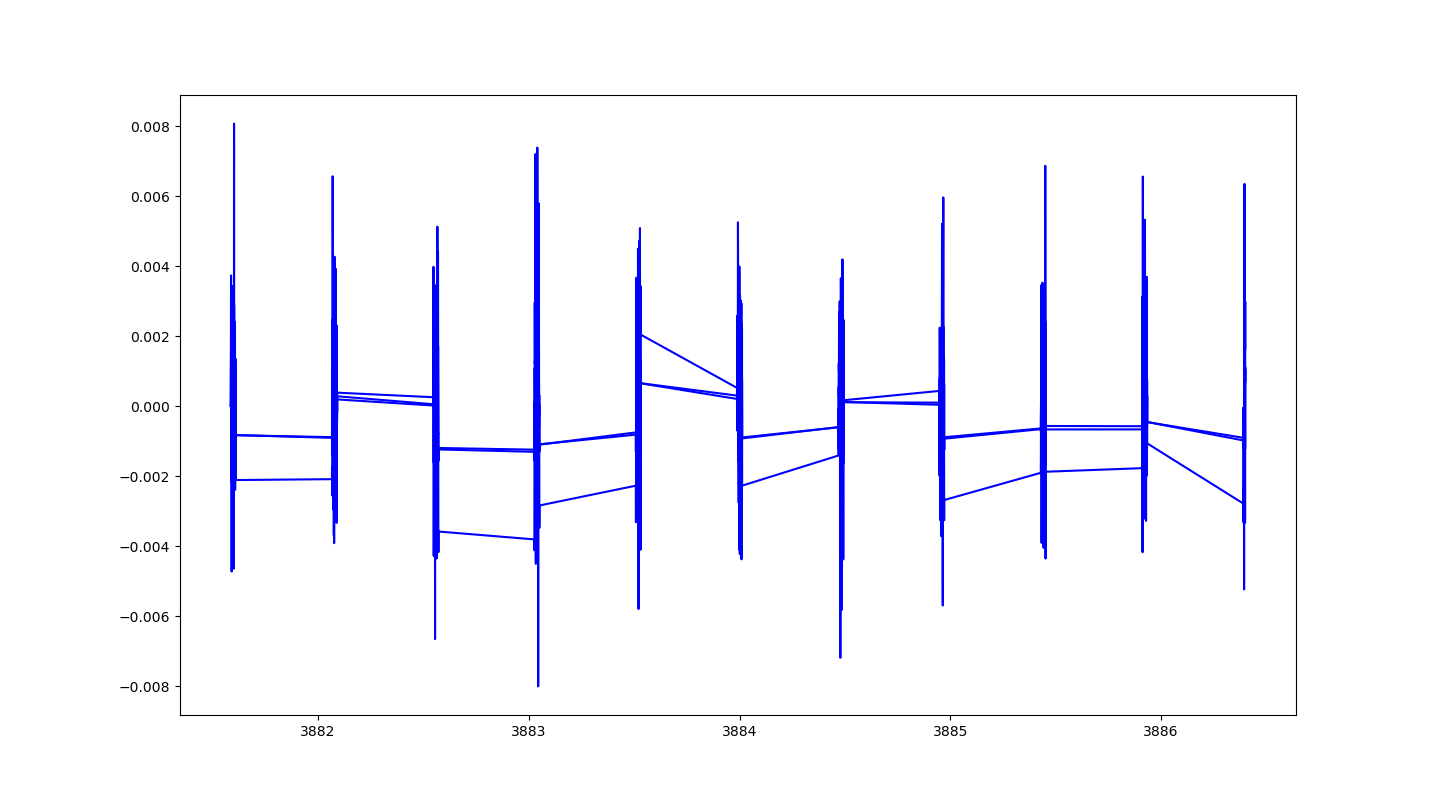
And I soon learned that was due to the latency:

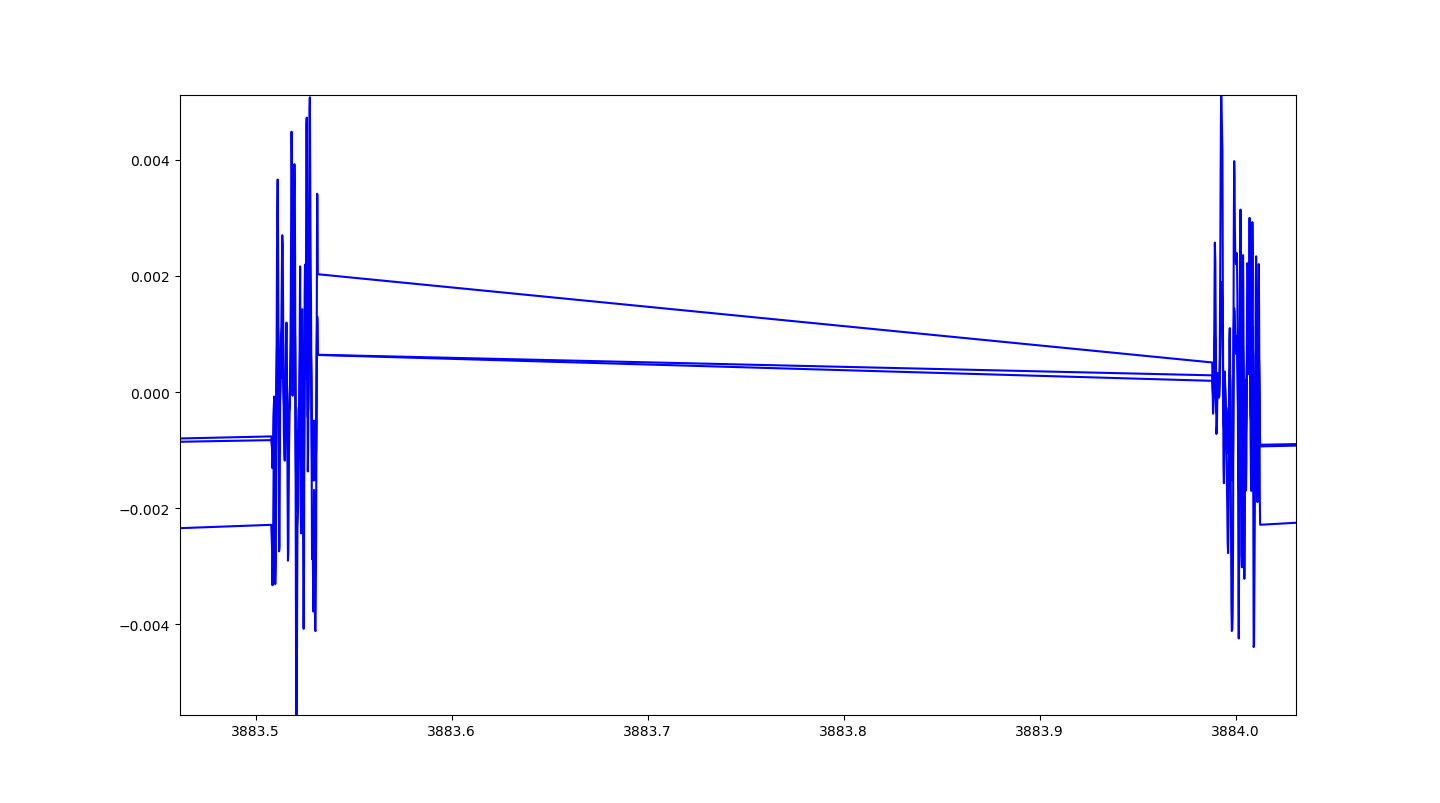
And this thread has some discussions about it. I tried many suggestions they gave: re-running the kext-dev-mode=1 command didn't do much; uninstalling the FTDI driver made my board recoggnition way more consistent, but it keeps the latency. So after not having much success, I found the instructions to remove FTDI buffer on the OpenBCI documentation. I followed it step-by-step, but still no luck. The board recognition is even wonkier now.
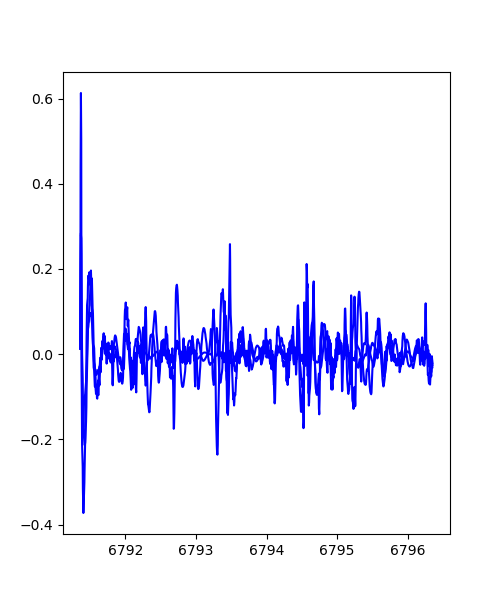
Are there any other solutions for this? I'm using an LSL to communicate with Python and I've tested my OpenBCI on Windows 7, with 1 ms latency and it works as it should (see pictures below).
Specs
MacBook Pro Retina, 15-inc, Late 2013
- macOS High Sierra v10.13.6
- Processor 2,3 GHz Intel Core i7
- Memory 16 GB 1600 MHz DDR3
- Graphics Intel Iris Pro 1536 MB
OpenBCI Cyton V3-32
- Firmware v3
LSL Library: liblsl 1.14.0 - amd 64
- FTDI v2.4.4
- Streaming from the OpenBCI-LSL repository
Side-notes
- When my Mac finds the port and I use the OpenBCI GUI instead, it seems like the signal runs as smooth as butter.
- I have a virtual machine running Win7 on the same Mac and it doesn't have any problem finding my port, and it gives me a great signal without huge latencies:
Please, let me know if any further info would be helpful.
Comments
Hi Matheus,
The LSL repository you mention, in fact all repos in 'openbci-archive', are deprecated and essentially obsolete.
https://github.com/openbci-archive/OpenBCI_LSL
Have you considered Brainflow instead?
https://brainflow.org/
Do you have a requirement in your application for real-time 1 ms latency? For example if you were doing neurofeedback or real-time BCI? If that is not the case, then the strangeness of the macOS driver situation does not have to get in the way. Using Brainflow, you can buffer up say a half-second or second worth of samples, then just plot them / process them, assuming the default sample rate of 250.xx Hz. The sample rate at the Cyton is constant, though may differ very slightly from 250.000 Hz. For example it might be 250.01 Hz. The real-time latency stuttering, is due to macOS FTDI driver issues. In the past there were workarounds for this, but that possibly has changed.
I'm not sure what to say about Apple's frequent changes to their driver interface specs. If you've been following these developments, you know that kexts's are being deprecated more and more in each macOS release. And will eventually be eliminated in favor of a new architecture, called 'System Extensions', rather than 'Kernel Extensions'. The new type of extension provides more security.
What macOS are you running? If it is Big Sur, then that might explain what you are encountering. Mentioning Richard @retiutut.
Regards, William
Ah, re-reading your post, I see you have 'macOS High Sierra v10.13.6'. This is pretty old at this point. Have you considered Mojave or Catalina? I would hold off on Big Sur. Then again, a 2013 era machine might have limited options for upgrade.
Hello @wjcroft,
Thanks for your answer. So I'll go in parts then:
Yes, I do. I'm developing a Hybrid BCI using SSVEP and P300 that needs feedback during online trials.
It's good you mentioned. I'm also working with my application on a Windows 7 computer paired with PsychoPy, and the interface gets literally twice as slow when I'm acquiring signals at the same time. I wonder if it is why. What should I use instead for, Windows?
This is the first time I hear about it. Can I apply this library for online applications too or is it meant only for slower processes? And I mean for both OSx and Windows.
Does this mean I should stop updating my macOS if I intend to keep using my OpenBCI or will the drivers be updated too?
I'm currently using the macOS High Sierra v10.13.6
Just saw your comment about the macOS. Actually, I'm pretty outdated indeed. Which one would you recommend in regards to OpenBCI compatibilty?
I don't know how to respond regarding getting rid of your latency issues. It seems like you have found all the past tips on how to tweek the drivers or macOS settings. My suggestion on moving to Mojave or Catalina, was that these may be more compatible with recent latency tips and FTDI drivers.
I'm not suggesting 'stop updating [your] macOS'. Just to get to a more recent version than High Sierra. I would suggest holding off on Big Sur (if that is an option), because the kext restrictions are starting now to go in more and more on each new macOS release. Obviously FTDI will need to respond to this, but their VCP page does not seem to give any indication of new 'System Extension' vs 'Kernel Extension' changes. HOWEVER they do show the latest version from August 2020: "Mac OS X 10.9 and above / 2020-08-13 / 2.4.4" It's possible this version is incompatible with your High Sierra, even though the line states "10.9 and above". My guess that FTDI does not have in house testing for every single macOS version between 10.9 and 10.15, with Big Sur being macOS 11.
https://www.ftdichip.com/Drivers/VCP.htm
I suggest you transition completely to Brainflow. Support is excellent on their Slack channel. Brainflow can work fine with real-time applications.
re: whether your SSVEP / P300 app is 'real-time'. You may or may not be able to workaround the latency you experience with High Sierra. As you see the GUI does fine just by using the Brainflow library and buffering a half second of data before streaming to the user interface displays.
Windows 7 is no longer supported by Microsoft. Please use Windows 8 or 10 with OpenBCI and BrainFlow.
@wjcroft Thanks once again. I'll look into updating. It's been a while since the last update, so I think is worth the shot. Also, I'm just downloading BrainFlow and getting to know more.
@retiutut well observed. Do you know what specifically can cause me problems in case I cannot update (considering it's a lab pc)?
It's easy to upgrade if you use these tips: https://www.zdnet.com/article/heres-how-you-can-still-get-a-free-windows-10-upgrade/
@matheusgmussi I have personally tested the FTDI Buffer Fix for Mac OS X Catalina 10.15.x. This is the last version supported by my Late 2013 iMac.
Disclaimer: OS X Catalina does not support 32-bit applications!
This is slightly concerning. Maybe updating your Mac and reinstalling the FTDI driver might reset the settings, and you could try the FTDI Buffer Fix again. If you want to go this route, I would try to update your MacBook Pro to Catalina 10.15.x instead of Big Sur, for now, though the GUI and BrainFlow have been through an initial test that was successful.
Otherwise, this is why there is a "Smoothing" button near the top of the OpenBCI GUI for Cyton (Live) data mode. It will store data into a small buffer so that the data draws smoother in the TimeSeries widget.
Hey, just wanted to come to give some feedback.
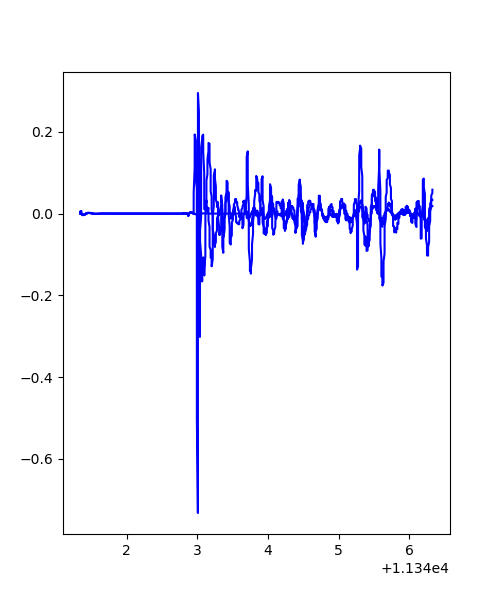
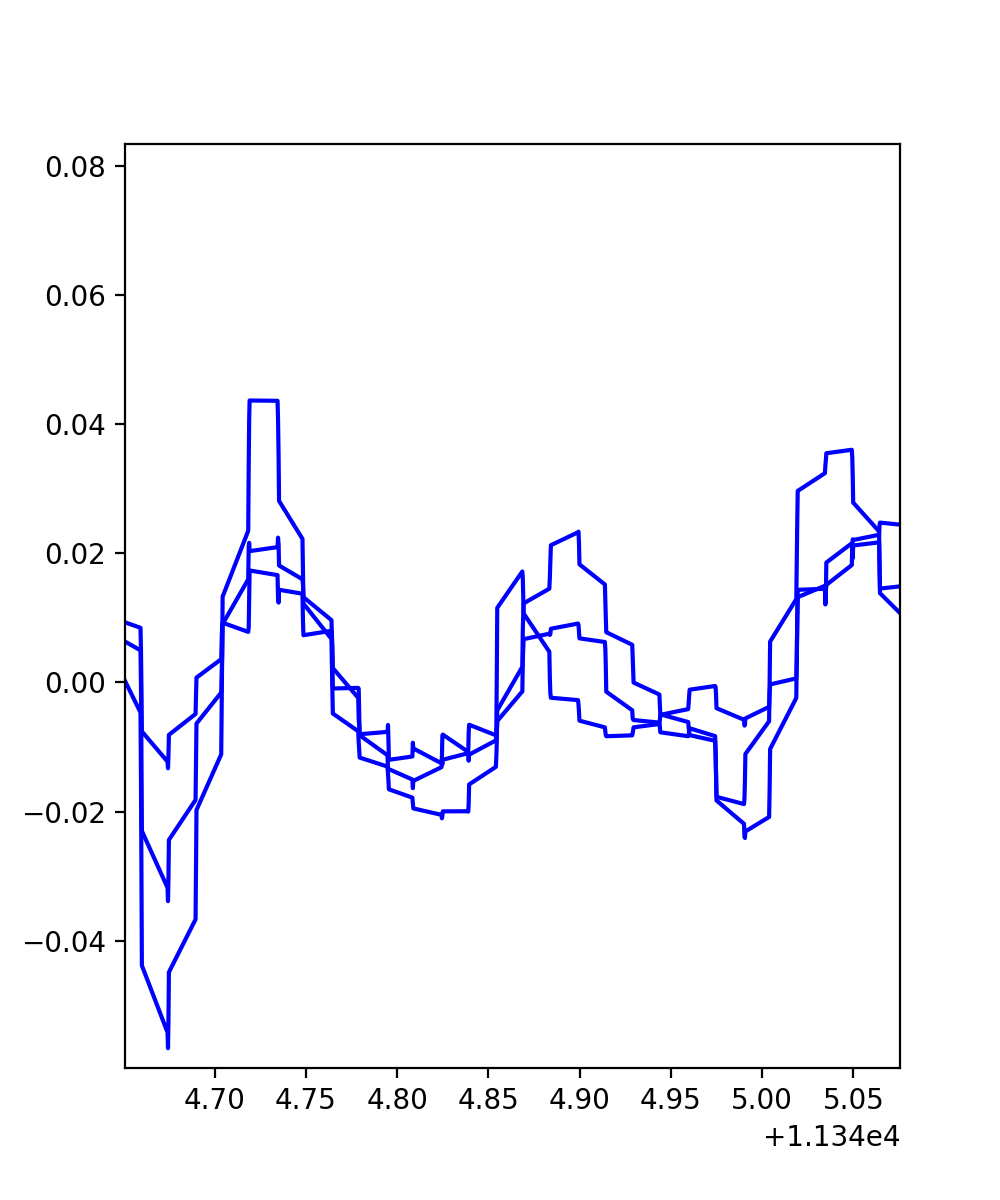

I tried installing Mojave last night (I didn't jump straight to Catalina just to save me the trouble of downgrading in case it didn't work) and I tested my code as it was (no FTDI reinstallation, I didn't re-do the FTDI Buffer Fix and I'm still using the OpenBCI-LSL). I already noticed the connection is much more stable with the dongle, the data is showing more properly -- but I still have some latency, which I think is normal, as you said, right? So, below, some pictures of what I'm getting. Please, confirm this is in fact latency:
I'll later today try BrainFlow and see what else can I improve.