
EMG Streaming from OpenBCI_GUI to Arduino
 rishannp
London, United Kingdom
rishannp
London, United Kingdom
Hi, I have recently been working on a prosthetic project ( 5 servos running each finger of the hand) and using the OpenBCI Ganglion to do the signal acquisition. I have learnt through multiple forum discussions how to use the networking widget and chose to stream Serial EMG data (sends as a float i believe to 3 d.p) -
Now here lies my issue, I am simply looking to stream the data, receive and control the servo but when it comes to transmission, I can clearly see the Arduino MEGA2560's RX LED blinking therefore its receiving data and it stops when i stop streaming etc so i know it is the BCI Gui that is streaming. However because I cannot actually open the serial monitor (due to it being actively used for transmission) I dont know what I am getting, when I write it to the servos I get no movement and when I stop and look through serial monitor there is no data as if its cleared. I can provide code below for the Arduino, its similar to the focus example however now I am just trying to take integers. Just some more information which may be important:
- On the networking widget, I use the same com port that the Arduino is plugged into, I think this is correct.
- Baud rate is set to 115200 on both Arduino and open bci gui.
- If i cannot do this my next option is try to interface OpenBCI with Matlab and then Matlab to arduino (atleast this way i can do some signal processing in matlab)
- I am using the Bluetooth dongle for the OpenBCI gui
My question is simply, what am I doing wrong here XD
Apologies for how the code shows below, for some reason only one part comes out properly on this forum
Thank you for any help and Please ask questions if anything is out of the norm, I am eager to get this working and need all the information/advice i can get!
const byte numChars = 32;
char receivedChars[numChars];   // an array to store the received data
boolean newData = false;
int dataNumber = 0;             // instantiate with 0

void setup() {
    Serial.begin(115200);
  pwm.begin();
  pwm.setPWMFreq(60);  // Analog servos run at ~60 Hz updates
  Serial.println("<Arduino is ready>");
}

void loop() {
    recvWithEndMarker();
    showNewNumber();
    NumbersToServo();
}

void recvWithEndMarker() { //Recieve data and look for an end marker to move onto next array
    static byte ndx = 0;
    char endMarker = '\n'; //OpenBCI networking info specifically states "ends with a new line character"
    char rc;

    if (Serial.available() > 0) {  //If the port is more than 0 then start
        rc = Serial.read();
        if (rc != endMarker) { //if rc isnt the marker then input characters into thearray
            receivedChars[ndx] = rc;
            ndx++;
            if (ndx >= numChars) {
                ndx = numChars - 1;
            }
        }
        else {
            receivedChars[ndx] = '\0'; // terminate the string
            ndx = 0;
            newData = true;
        }
    }
}

void showNewNumber() {
    if (newData == true) {
        dataNumber = 0;             // instantiate variable as zero
        dataNumber = atoi(receivedChars);   // atoi() function converts a character string to an integer value.
        digitalWrite(LED_BUILTIN, HIGH);
        Serial.print("This just in ... ");
        Serial.println(receivedChars);
        Serial.print("Data as Number ... ");    // text as shown
        Serial.write(dataNumber);
        Serial.println(dataNumber);     // printing the data
        newData = false;
    }
}
void NumbersToServo() {
  int value = dataNumber + 100;
 pwm.setPWM(11, 11, value);   //150 = closed, 500 = open
 pwm.setPWM(12, 12, dataNumber);   //150 = closed, 500 = open
 pwm.setPWM(13, 13, dataNumber);   //150 = closed, 500 = open
 pwm.setPWM(14, 14, dataNumber);   //150 = closed, 500 = open
 pwm.setPWM(15, 15, dataNumber);   //150 = closed, 500 = open
 delay(100);
}
Comments
Hi Rishannp,
I changed the category of this thread to 'OpenBCI_GUI', since it is a GUI question and not Ganglion hardware. Mentioning Richard @retiutut.
William
From the Networking Output Guide that you have already shared (source of truth):
Example:
You can test your Arduino code by seeing if you can parse this string correctly. Another Example:
1.000,0.020,0.030,0.040\nto simulate a muscle flex on channel 1. Since you are using 4 channels, the string will look exactly like this.Have a look at Fan Li's example from last year when the interns setup battlebots controlled via EMG:
https://github.com/Fan1117/neuro-controlled-robot/blob/master/Neurobots_Battle_Royale_3/Neurobots_Battle_Royale_3.ino
I had to look and find this example, and maybe it should be refined and added to the Docs.
Hi,
Thank you for the reply.
So I'm not sure if I understand the response but:
I am just using integers for my code as i don't need the decimals but when i enter values through the serial monitor i believe it parses the integers correctly but this is more an issue of how do I know what I am actually receiving as I have no real way of seeing the data being put into the Arduino. Surely theres a way for me to understand the data in Arduino so i know where to segment my data and send to Servo.
Thanks again!
The data coming in is a float with 3 decimal places. This may be why it isn't working in the code you shared.
In Fan Li's example, it uses ASCII to Float:
I would start with Fan Li's code, and modify it to suite your needs. It should work just fine.
If you want to try doing this without using Fan Li's code, you can use the Arduino Serial Monitor to send strings like
1.000,0.020,0.030,0.040\nto test your code. You probably don't need to type\nsince this is added when you press enter to send the command. This is how the new format was developed and implemented last year.If the Arduino acts as expected when sending test strings, just connect it to the GUI and it will work.
Just want to start with thank you for being so patient and helpful!
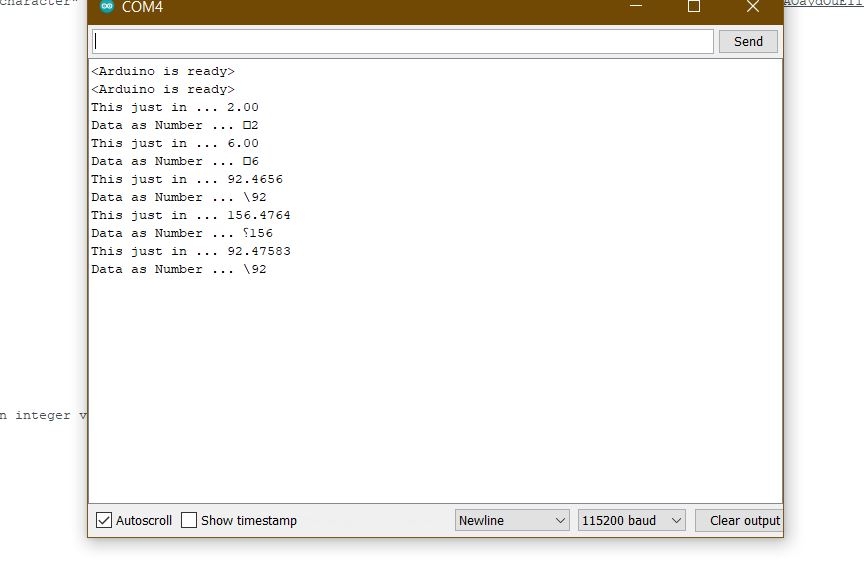
So I actually have tested my code in the serial monitor and attached an example with this response! And this is exactly what i want the data to do, cut off the decimals and only display the integer so when i use serial monitor it works perfectly fine! Its just a matter of when i connect with the networking widget, I have no way of seeing the data or even knowing if its the right info. The RX could just be 0's for all i know haha! I hope this explains my predicament a bit better but I most assuredly will look at Fan Li's code and edit!
Let me know if you have any thoughts on why the output isn't working (As the servos should move with my code but they do not)