
sudden drop in all channels while recording with Cyton daisy

Hello,

I just started using OpenBCI and EEG so any help will be appreciated. Some of my recordings, I am experiencing a sudden drop in signals in all channels, without necessarily doing anything to change it. It doesn't happen in all my recordings. Any idea how I can troubleshoot this and what might be the issue?
Comments
The signal quality before the drop in signal does not look good. I have seen this happen when changing the board settings while the stream is active. The next version of the GUI will have a new User Interface to Save, Load, and Send Hardware Settings to Cyton, but only while Streaming is off.
Temporary Fix: Close session. Turn Cyton Off and then back On. Restart session.
@yidil, hi.
Is this a new Cyton that you just received? Has this issue always been present, or has it worked as expected in the past?
Richard's observation that your first two seconds look suspect, should be followed up. The scale is at 200 microvolts, so EEG is normally not this high in amplitude. What was the Cyton connected to?
At time mark '-3', the large dip / bounce in the signal, is similar to what happens when the ADS1299 first starts up, but without the following EEG data stream. Which reinforces what Richard is saying about the ADS1299 (Cyton analog to digital converter chip), changing state / glitching. What battery are you using, and current voltage? Is it possible some power connections are glitching, because of flaky connections?
William
Thank you William (@wjcroft) and @retiutut for your answers. I did not change the board settings (I am assuming this is things like changing the channel, sampling rate etc) while streaming was on. Restarting the session seems to fix but this won't work when I need to use this to get recordings.
This is a new Cyton but I just started recording so don't think this is a new issue. Cyton is connected via usb to a Mac computer. I think the glitch makes sense, do you think then forgoing the usb connection and just connecting the board to the computer with a cable will fix it?
Again thank you for the help and sorry for all the cross-posts.
Best,
Idil
Hi Idil,
What was asking, is if this is a recent purchase, and so the Cyton has NEVER performed as expected, but always has had this failure mode. Can you answer the questions about battery type and voltage? Do the battery connections look solid? Can you try with another battery?
No, you need to use the Cyton dongle, there is no 'cable' connection method. The glitch looks likely to be either in the power supply / battery, or in the ADS1299 analog to digital converter chip from TI. I assume you are using the latest v5 GUI?
Regards, William
Also, why does your EEG graph look so out of range, many channels way over 200 microvolts.
@wjcroft then it always had this failure mode. I observed this with both the batteries I tested it with, one is 4 Duracell plus AA batteries (1.5V) and the other is a 1S Lipo Battery (3.7V, 2.22 WH, 600 mAh). So both those should have been fine. Yes I am using the latest GUI and I have no idea why the signal is that high
What happens when you just use 8 channels instead of 16 (Daisy)? Have you performed all of the tutorials / getting started steps? Signals and amplitude should look as described.
https://docs.openbci.com/docs/01GettingStarted/01-Boards/CytonGS
https://docs.openbci.com/docs/01GettingStarted/02-Biosensing-Setups/EEGSetup
https://docs.openbci.com/docs/01GettingStarted/02-Biosensing-Setups/ECGSetup
https://docs.openbci.com/docs/01GettingStarted/02-Biosensing-Setups/EMGSetup
Idil, thanks. I'm asking about the tutorial EEG / ECG etc. tests, just to get a final picture of how the signal quality looks. At this point with the repeated failed recordings you have made, it certainly looks like you have a bad Cyton. Can you estimate an average of how many minutes it takes before it flat-lines? The test with 8 channels only will also help to eliminate some defect with the Daisy.
The next step for you will be to email contact at openbci.com and describe your problem with the new Cyton. You can give a link to this thread. They will then determine how to get you a working system. Mentioning @openbci.
Regards, William
I did the tests, and I do see the signal changes when I touch the board pins. Detecting the alpha change with EEG seems challenging as I am the only one testing right now and the noise of the system. When the EEG is not worn in the head, sometimes after I while I get rid of the noise and all the signals look flat, but most of the times, this type of signal noise stays (I am attaching two photos from two different sessions, one is nearly after 40s I started recording). Do you think there can be a simple explanation like electrode pins aren't very clean, or this indicates an issue with Cyton?
Best,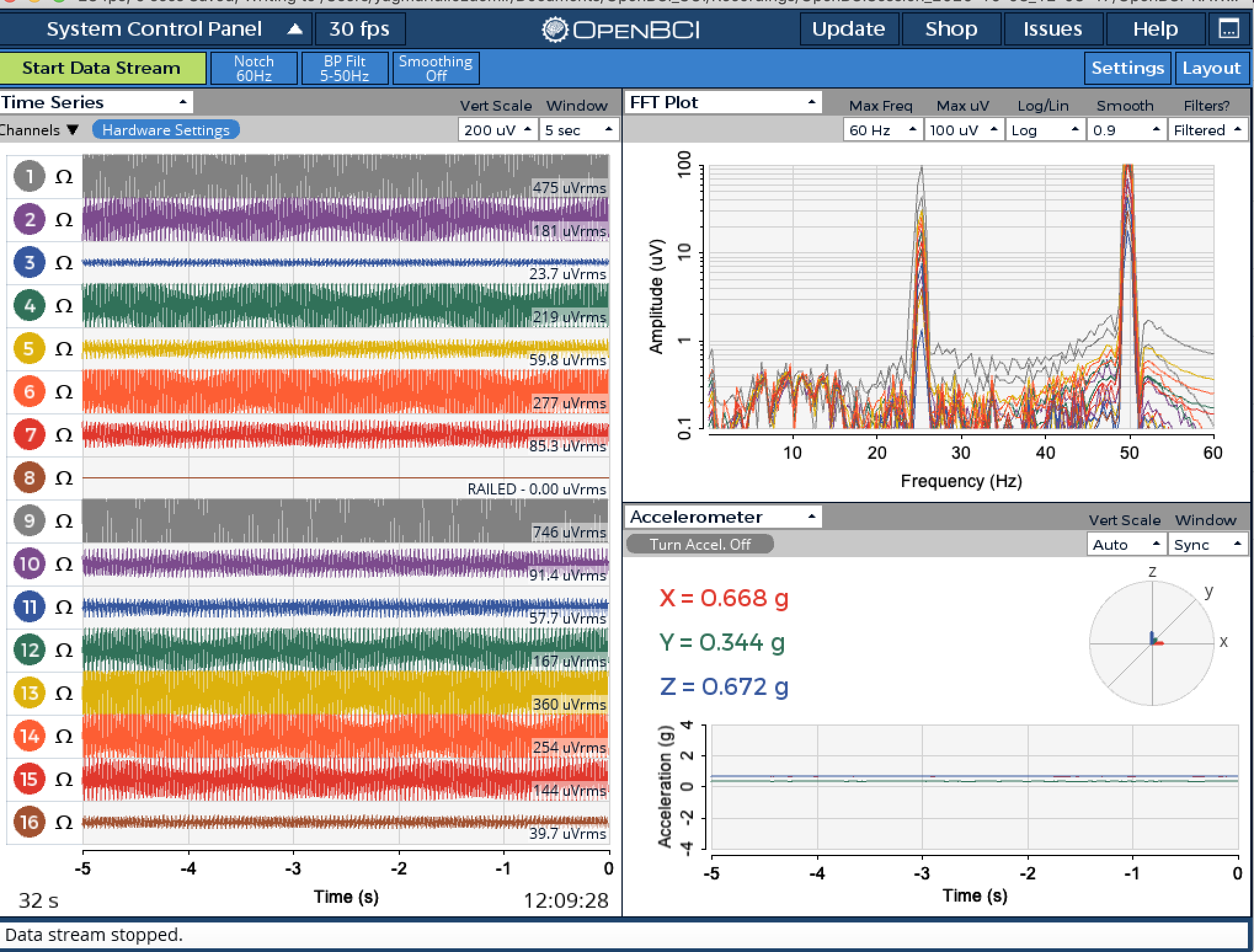

Idil
Hi, previously I asked that you test without the Daisy, so we could eliminate Daisy malfunction as a cause of the glitch you are seeing (recordings flat line after some period). Can you please perform that test?
I also suggested trying each of the tests in these sections, and compare your signal to what you see in the tutorials. These tests only use one or two channels each. You can turn off unused channels, see the Cyton getting started guide. The drop down menu above the Channels column, allows you to only display the few channels you are using.
Your screenshots all show a tremendous amount of mains noise, 50 Hz in your case. Yet you appear to be using the 60 Hz notch instead of the 50 Hz. Press the Notch button.
Finally let's try to pin down the flat line glitch. Does that consistently happen after so many seconds? Or is it rare / very rare, etc.?
Also explain what electrodes you are using, and electrolyte if any (paste, gel, etc.)
The eeg with that notch button looks like this-- sorry about that
(I will do the test with only cyton just now)I am posting some screenshots on the eye blinking alpha experiments. This is the only experiment I can do since I only have the EEG equipment. I am having a hard time seeing the activity on channel 7, and the following alpha peak which I posted a photo of below doesn't look as clear as the tutorial page.
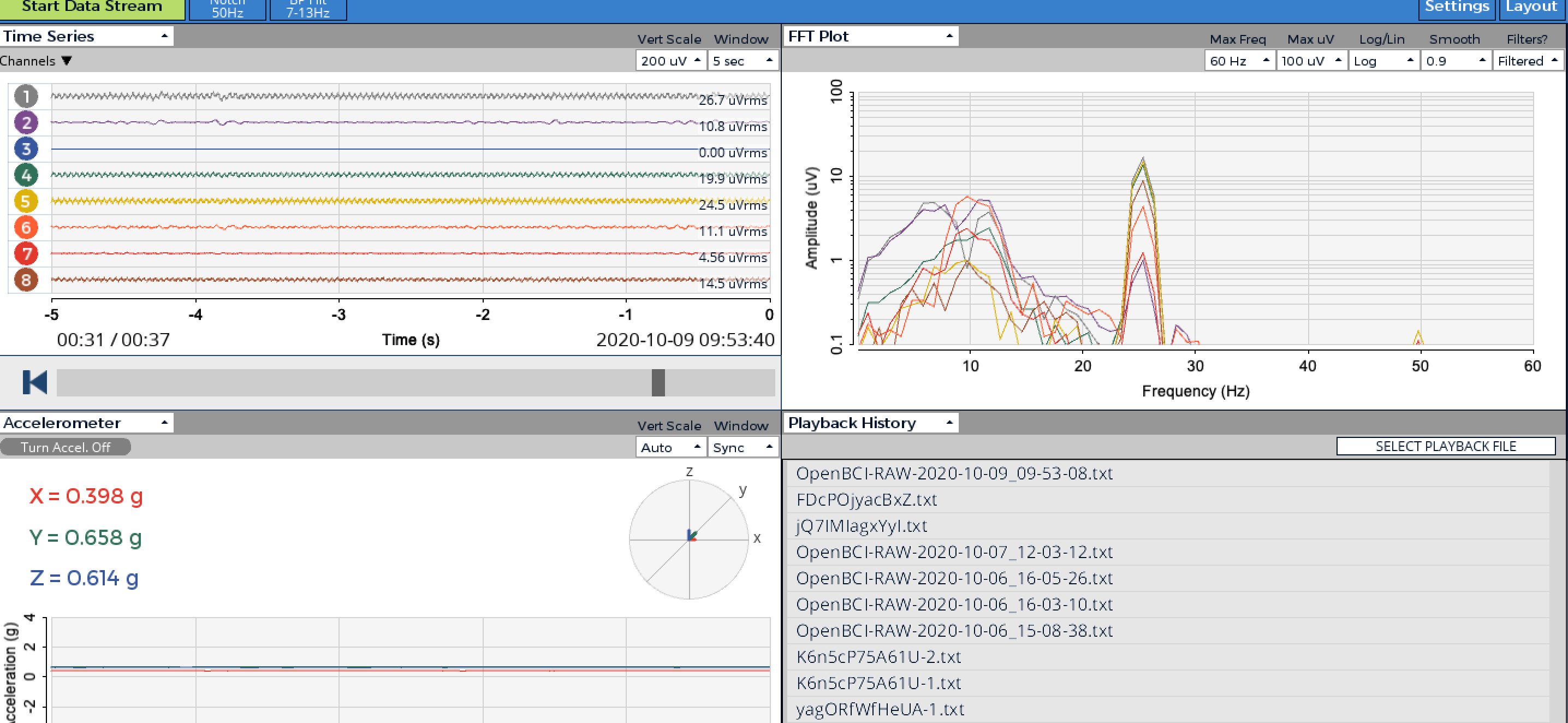

Also I notice these very big spikes happening, which again make the detection of alpha waves challenging.
Thank you for all the help!
Without the daisy board, I still get noise in the channels when eeg is not worn, like this: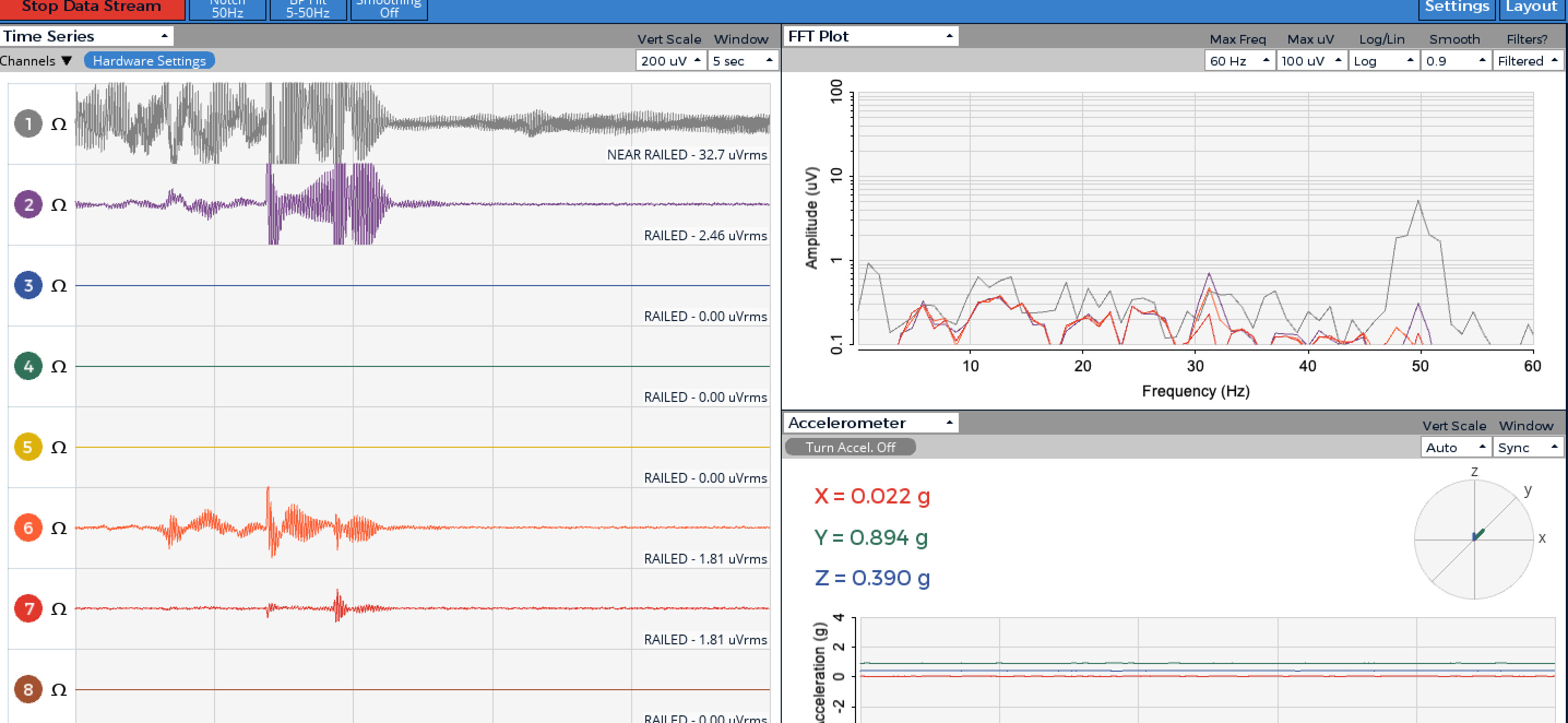

With the daisy board, I am still seeing the huge spikes as I described before: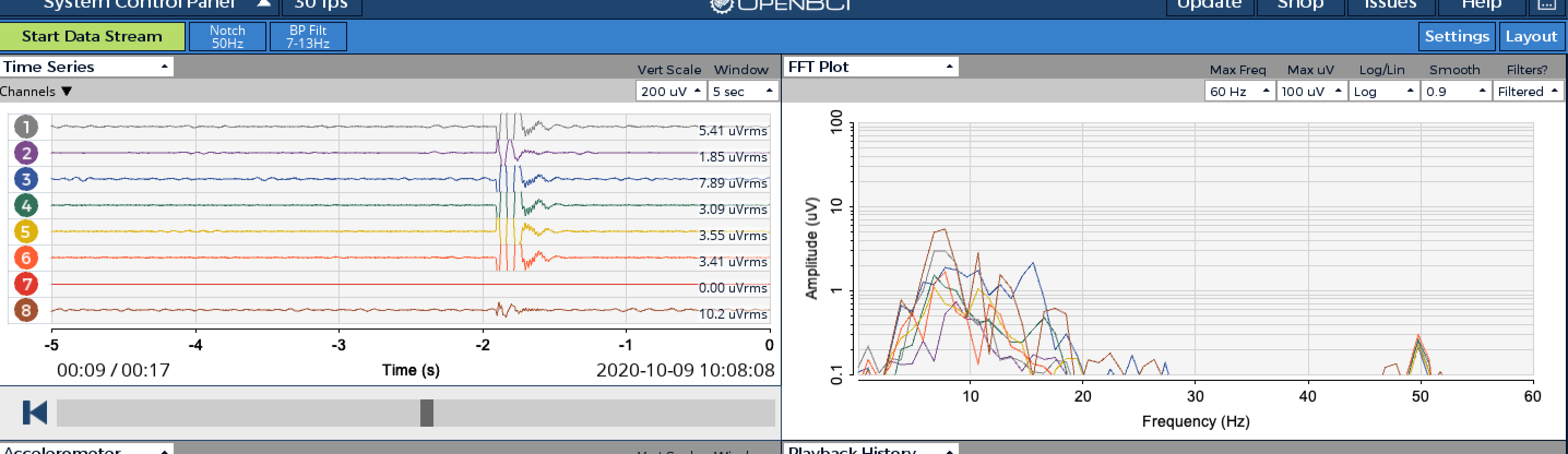
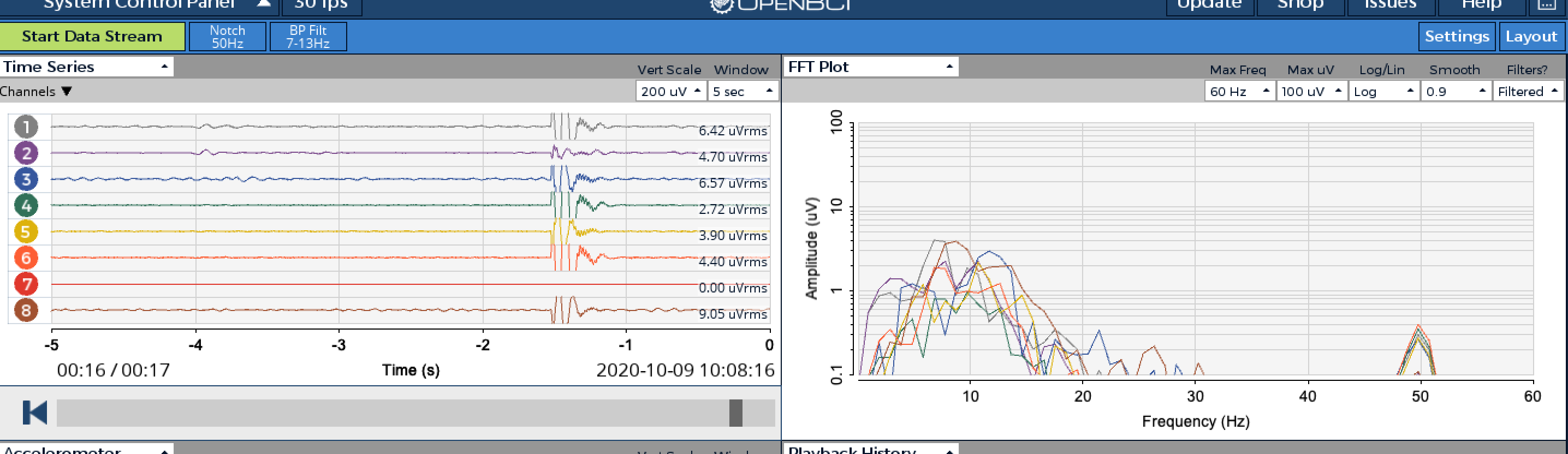
For the eye blinking experiment using only the Cyton, after about 2 s of eye blink(it happened on 10:08:14) I see an increase in the specified alpha range, but it is not channel7. Immediately after the blinking there was a very high amplitude activity in all channels which I do not think is about eye blinking.
I am usind dry electron pins.
Thank you for all the help,
Really appreciate it.
Best,
Idil
@yidil Please be aware that all channels and reference should be connected to a user (or turned off) to reduce risk of EMF.
Also, the Cyton and Daisy configuration uses a Y splitter cable to connect to SRB on both boards. When using Cyton by itself, the Y splitter cable is not necessary.
If the reference electrodes (earclips) are not connected properly, you will see noise on all channels. This is a common mistake when switching between Cyton and Cyton+Daisy.
Do you understand that the alpha generation tutorial is NOT about 'blinking'. Eye blinks typically cause moderate spikes in (mostly) frontally located channels. This is termed an 'artifact' and is not actual EEG.
The distinction you are looking for, is the steady state difference in 10 Hz amplitude. When in the eyes closed state, there should be an increase in alpha amplitude in the 8 to 12 Hz range. The actual moments of movements of the eyes or eye lids, will show some artifact activity, which is NOT what you are looking at.
My impression is that you still have strong 50 Hz mains contamination. Do you understand that many sources of EMF electromagnetic field interference, are common in home and lab environments? Such equipment as extension cords, power supplies, lighting, floor / wall / ceiling conduits, phone chargers, etc. -- all of these produce fields that extend out radially some feet from the source. Try positioning the Cyton in areas away from such equipment to see if your 50 Hz / 25 Hz noise reduces.
Are you using the Ultracortex? What ear clips? It looks like your reference (SRB2) connection could be poor, resulting in similar noise on all channels. Do you have cup electrodes and paste? Try testing with different electrode types and reference. You can measure the impedance of the channel by pressing the 'ohm' symbol. Press again to turn off.
At this point it's not clear that your Cyton is 'malfunctioning'. Rather that your use of electrodes / reference is in question.
William