
Random spikes with GUI + BLED112, but not BioEra [resolved]

We have detected randam spike (approximately once or twice /min) .
1-50Hz BP filter

No Filter
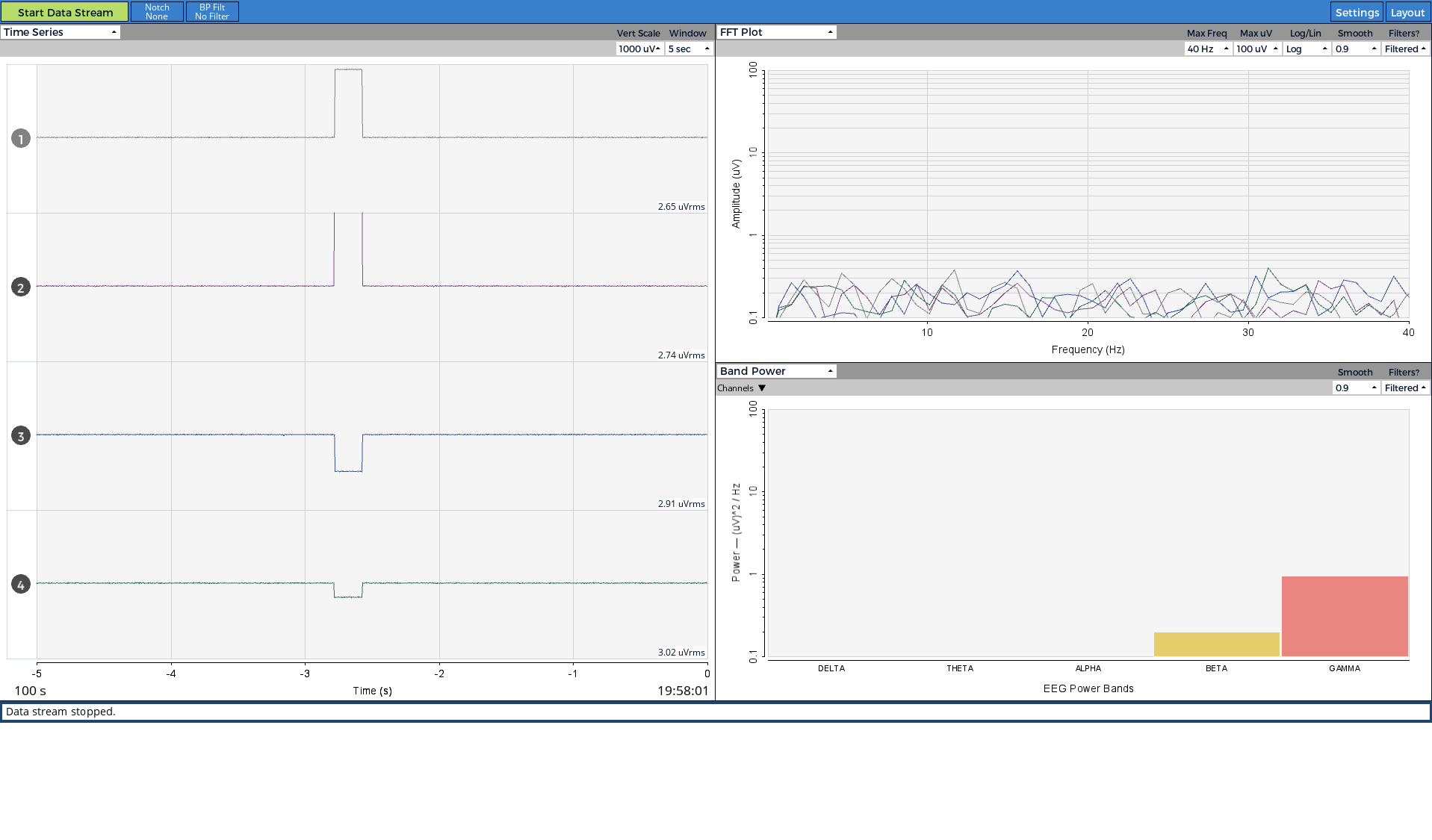
The following are the conditions.
・Detectable with latest OpenBCI GUI (v4.2.0) - OpenBCIHub (v2.1.0)
・Detectable under both 1-50Hz BP filter on and 'No Filter' conditions
・Detectable with or without connecting the electrodes to the scalp
・Detectable when i connect all inputs (and reference) to the GND
・Does Not matter channel ON or OFF(we did not change any setting during measurements)
・Not detactable with Older GUI(v4.1.0 - Hub v2.0.6) - CSR4.0 dongle combination
・but Detactable with Older GUI(v4.1.0 - Hub v2.0.6) - BLED112 combination
・Not detactable with third party software(Bioera - BLED112 combination)
・Not seems to be derived from measurement environment, because I can confirm them in different room or buildings.
・Not seems to be derived from damaged board, because we can confirm them on different 4-boards
・We didn't update the firmware after I received the Ganglions.
Please let me know if you have any ideas.
Thank you,
Otemo
Comments
Otemo, thanks for your thorough testing. Your results seem to indicate some issues with communications between the Hub and the BLED112. The fact that BioEra can talk to the BLED112 just fine, does point at something in the Hub.
As you might know, OpenBCI is about to release a new GUI that does not use the Hub, but instead uses 'BrainFlow' library API. This may resolve the issue, because the Hub architecture is quite complex.
Have these Ganglions EVER worked correctly for you, using the BLED112 ? You say you have 4 Ganglions, and they all behave identically? Mentioning Richard @retiutut.
Regards, William
The artefacts present in the pictures are weird, rare, and concerning. I have two Ganglions and I've never seen anything like this. Awaiting a response to William's questions.
Otemo, also confirm that your testing used a different BLED112 with each Ganglion. Otherwise we could intuit that the error is in the BLED112 dongle itself, not the Hub.
Hi William and Richard,
We always appreciate your quick response and help!
Last spring we changed the usb dongle from CSR to BLED112. From the time, we were seeing this artifact, but we thought it was probably due to environmental noise.
Following your advice, we will test again. We will report the results sometime soon.
Please test both with different BLED112's, Ganglion's, and with different laptops if you can. To eliminate possibility of glitched hardware / OS / software / firmware.
Sure! We will examine each possible factor.
Thanks for your advice.
Otemo
Hi there:
Today we tested using three Windows machines (lenovo: x270, hp: 450G3, panasonic: cf-sv), combining two Ganglion boards and two BLED112 dongles.
The results of the test gave me enough facts to suspect that the cause was on my laptop(lenovo: x270).
The results of verifying all combinations are as follows.
When using a Lenovo X270 (my laptop), artifacts were detected in all combinations.
Other PCs (hp, panasonic) did not generate any problematic artifacts during the measurement.
I have confirmed that my colleague's lenovo machine detects noise similar to the artifact I reported.
We will continue to verify the cause of the artifact.
Thank you,
Otemo
Thanks Otemo. What OS are the Lenovo's running? If Windows 10, look on the Start / Settings / System / About page. Near the bottom are the Windows OS specs: Windows 10 version, date, and build #.
Also mention OS (7 or 10 only, don't need the subversion) running on the HP, Panasonic.
Thank you William.
Here are our information about Win Machine
[ Lenovo x270 ] - Artifacts detectable
Windows10 Pro
version: 1903
date: 2019/08/29
OS build#: 18362.592
[ HP Probook 450 G3 ] - Not detectable
Windows10 Pro
version: 1803
date: 2018/05/08
OS build#: 17134.829
[ Panasonic CF-SV] - Not detectable
Windows10 Pro
version: 1809
date: 2019/03/12
OS build#: 17763.737
I tested it under the combination condition of Lenovo x270-Brainbay-BLED112 (Hub-v2.1.0).
As expected, artifacts were detectable.
Yes, since BrainBay relies on the Hub process, you would expect the same glitch. The fact that BioEra (with it's own BLED112 driver) works fine -- definitely implicates the Hub BLED112 code. That Hub code is running in a complex Javascript / Electron environment. The upcoming new version of the GUI is using the BrainFlow API library, written C++. The lowest layer C++ in turn is connected to a C layer that plugs into the Java used by the Processing Language (GUI is a Processing app). The result should be much less overhead and more reliability.
I don't know the timeline on the new GUI release, but it is likely arriving by some time in March if not earlier.
As far as why the Lenovo machines are doing this and not others -- it could be that the usb driver framework in Lenovo has somewhat different kernel driver, buffering, latency, etc. configuration. Somehow aggravating the BLED112 communications.
It might also make a difference what type of usb port the BLED112 is plugged into: usb2 vs usb3 vs usb-c, etc. Whether the BLED112 is plugged directly into the machine mainboard, or has an indirect connection via a usb hub. Etc. You might try experimenting with the usb configuration, if you want to do further detective work.
But this is the first we have heard of this issue. I'm hoping the upcoming GUI release will resolve this. Very likely it will, since we have the example of BioEra running just fine with a driver included in the Java based BioEra app.
Thank you William.
Your detailed description will clarify what we should inspect.
ok, we will continue to investigate the cause and report it here, and wait for the delivery of the new GUI!
Hi William,
As you pointed out, the latest GUI, OpenBCI_GUI-5.0.0-beta.0, seems to have fixed this problem.
We are currently testing it.
Thank you.
Otemo
Great, I've modified the thread title to reflect this resolution.