
mobile app receiving from Cyton's Bluetooth module
 rdececilio
Trondheim, Norway
rdececilio
Trondheim, Norway
Hi everybody!
I am part of a team working on the development of a treatment against insomnia using neurotechnology and for proof of concept we would like to use some openBCI equipment. We would need to use a Cyton board as we need to record from 7 channels, and the question is if the RFDuino module can transmit all channels' data at a sample rate of 250Hz through Bluetooth to a mobile app we have developed for iOS and Android. We have seen some conflicting information regarding if this is possible or not.
That is the main question, if the module can transmit all the channel's data at that power. If it is not possible, what could we do to work around this issue? We have thought of three potential solutions:
1 – Install a more powerful Bluetooth module into the board.
2 – Connect the RFDuino dongle to the phone via OTG cable.
3 – Transfer the data to an Arduino/Raspberry Pi board that will handle streaming the data to the phones.
Would any of these solutions work and be practical? Would there be a better alternative instead of these suggestions?
Thank you very much!
Comments
Roberto, hi.
You should be fine with the dongle plugged into an OTG cable. This will present the Cyton data stream as a usb serial port. You will get the full 250 Hz sample rate at 115200 baud. You may need to play with the process priority or threading to keep up with that data rate continuously. Possibly using some type of circular buffering.
You could also use a Raspberry if you want, it has usb serial. Arduino though, not recommended.
One final route would be to use a Wifi Shield with the Cyton, but this product does not work well for all customers. It is more experimental. It does work fine for Ganglion, just has some packet drop issues with Cyton, for only some customers.
Regards, William
Hi William,
Thank you for your quick and precise response.
What models of Raspberry would work? Would it be just the newer models that you would recommend or would older models also work? Also, why do you not recommend Arduino?
Regards, Roberto
Roberto, hi. My first suggestion is to use the OTG cable with the Android tablet. This is the most direct route of the data stream for your app. Unclear if iOS has the same kind of usb serial port access as Android.
Since all Raspberries are low priced, I would go with the latest RPi4, to have the most processing power should you need it.
Arduino, although it connects via a usb port to the laptop, this appears as a usb serial port to the laptop. Arduino's generally do not have a "usb host port" where the dongle could plug in. Some Arduino's do allow a shield that provides a host port, but Arduino's are greatly underpowered in comparison to RPi4 or an Android device.
Regards, William
Another reason I recommend the OTG with Android tablet, is that these have substantial lithium battery cells. I'm not sure the power drain of the dongle, but it may impact a small mobile phone, more than it would a larger device.
Hi William,
Thank you very much for your fast replies. If we have more questions regarding this I will let you know. But for now this should be enough for us.
Thanks,
Roberto
Hi again William,
We have decided to use the Pi since OTG is not an option for iOS. Question is: How could you connect between a Cyton board (or a Ganglion board, since we may just use both) and a Pi?
Best regards,
Roberto
Roberto, hi.
re: OTG capability for iOS. This page says it is available in iOS 13,
http://www.iphonehacks.com/2019/06/ios-13-features-apple-borrowed-from-android.html
re: Ganglion dongle
Cyton uses a dongle based on RFduino, and it communicates with the matching RFduino on the Cyton mainboard, using a custom radio protocol called GZLL from Nordic. So it is not conventional Bluetooth. GZLL has the advantage of greatly increased throughput.
Ganglion uses the BLED112 dongle, which does speak Bluetooth. And additionally has an onboard processor and buffering that can offload some of this from the laptop.
Both dongles appear to the usb host as a usb serial port.
Regards, William
re: iOS usb serial port
You might ask these guys how they are doing it:
http://redpark.com/lightning-serial-cable-l2-db9v/
Note that this output plug presents RS232 serial connector. NOT what you want. But inside the cable or cable box, they must have a usb to serial converter chip. Both Cyton and Ganglion dongles have a similar type of chip inside.
Hi William,
I don't think it's relevant for us to use OTG cables or adapters. We would rather keep all the complexities and hackings into the actual product (that we can hide from the end user).
What is the reason it is not recommended to connect to the ganglion directly with native BLE?
What if we connected ganglion to a raspberry with a dongle, then made our own protocol to transfer data from raspberry to phone with BLE. Would that solve any issues? Raspberry has bluetooth 4.2 vs 4.0 and that might make things better? Also we could send data in bigger chunks and fewer times per second if we made our own protocol on the raspberry.
Thanks and best regards,
Roberto
I'm not sure of your question. Here you ask about native BLE, and you next suggest using the BLED112 dongle.
Bluetooth Low Energy actually has throughput limitations. If you look at the Ganglion radio protocol definition, you can see that it is quite complex, compressed, unable to send Aux information channels, limited to 200Hz etc. BLE is defined as Bluetooth standard version 4.x and above.
In the case of Cyton, the RFduino's do not actually speak official BLE, they speak a special proprietary low energy Bluetooth called GZLL, Gazelle; from Nordic Semiconductor. This was done to achieve the 8 channel + 3 Aux channels at 250 Hz.
The BLED112 was chosen for Ganglion, because it contains internal buffering and processing, and a serial port interface. Prior to the BLED112, native BLE connections were attempted from Mac, Windows, and various laptops. These were unreliable because of variations in hardware implementation of BLE.
Understand your aversion to the OTGs. Your best path would likely be to have the Cyton and Ganglion dongles plugged into the Raspberry. Then establish Wifi link(s) from Raspberry to the phones. This will give you the best throughput. As mentioned the BLE protocol has poor throughput, unless extraordinary measures are taken.
One other possibility would be to use a Bluetooth 3.x protocol, called SPP, Serial Port Protocol. This does have higher throughput and is not convoluted in complexity. However my impression is that a Wifi connection with TCP would be the easiest to implement.
William
Hi William, Lars here, I am working with @rdececilio
Thanks for clarification regarding BLE!
Sounds like going the BLE path is possible, but on the limits of what is possible with the standard. Let's hope bluetooth 5 and protocols in the future will fix this.
This actually sounds like a good idea. In my head it would need to be one of the following:
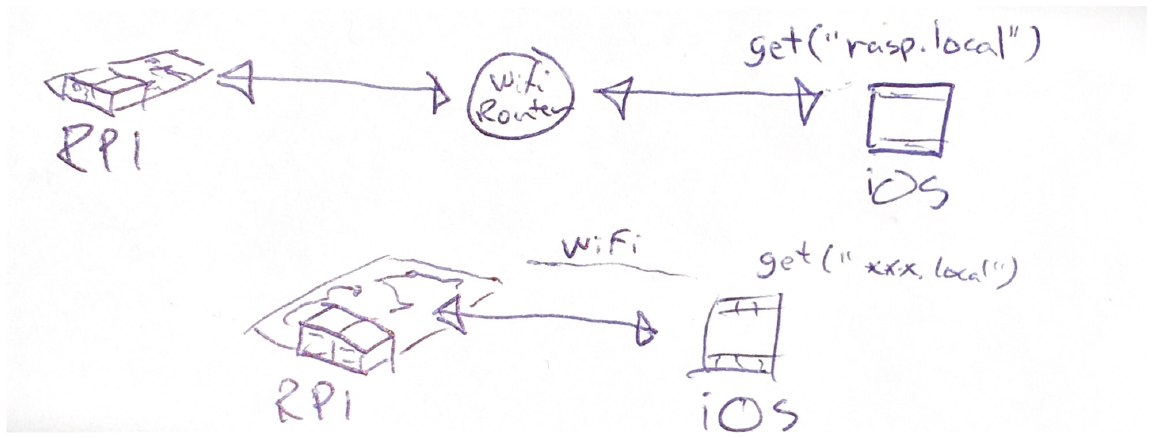
1. Raspberry connected to router. iPhone connected to router.
I know this can work technically. At least for routers supporting Bonjour, and without restrictions (like hotel wifi etc).
2. iPhone connected directly to raspberry with wifi-direct
Wifi-direct seems to be hard in iOS: https://stackoverflow.com/questions/28448274/wi-fi-direct-and-ios-support
3. iPhone connected directly to raspberry. Raspberry is acting as an access point
This would work. Like in this video. Might even be automated with the use of NEHotspotHelper. Only caveats is that we will lose internet connectivity while using the software.
Do you have any thoughts or experiences on these 3 alternatives?
I did actually look into this, but in order to use it in iOS you need to be registered in the MFi program.
Thanks for all help, @wjcroft!
Lars
Lars, thanks for your comments.
The actual data stream bits per second rate of the Ganglion data (200 Hz packets), is relatively low. So using a lightly loaded router in the area should be fine. You would not need Wifi Direct or Raspberry acting as an independent access point.
Your server on the Raspberry will be taking data from the Ganglion+BLED112, using the BrainFlow library. Then it will convert that data stream into a simple TCP stream. Using a design of your choosing. Data rate of this simple TCP stream will be relatively low.
Similar idea would apply with a Cyton dongle.
Another aspect that would further reduce data rate is to consider the 24 bit samples from Ganglion or Cyton. The low order bits of these (usually about 5 or 6) are really in the 'noise' as far as microvolts. These bits represent signals less than a microvolt. So with some scaling you could even reduce the 24 bit samples to 16 bit samples. Doubt this would be worth the effort, but another angle to reduce data rate.
Regards, William
Actually, I don't believe BrainFlow provides the raw samples from the ADCs. Check the docs. It may just provide floats or longs. In any event, the microvolts generally fit into 16 bit range (+ or - 32,000 units).