
large noise pulses on Windows, but NOT on Mac
 ht_steve1976
Japan
ht_steve1976
Japan
There are periodic big noises (see Figure) on OPENBCI_GUI in Windows PC. The noise appears every 3 or 4 seconds. I tested OPENBCI_GUI in Windows 7, 10. 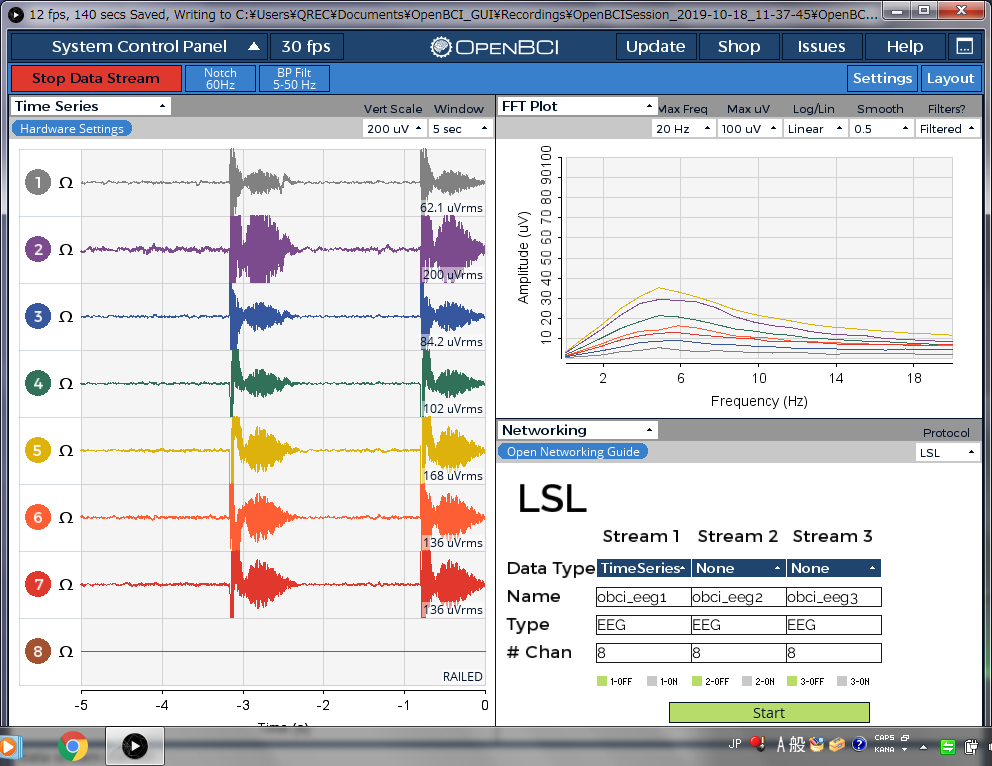
On OPENBCI_GUI in Mac OS, there is no problem.
Is there anyone who got the same problem or know the solution?
Comments
Steve, hi.
Just to clarify, are you using the Cyton dongle (Bluetooth), or is this via the Wifi Shield? Mentioning Richard @retiutut.
This pulse shape corresponds to what is seen with packet loss. The latest GUI version has a 'cleanup' algorithm that better interpolates when packets are lost. Generally with packet loss you want to improve the radio connection to avoid the packet loss. This can be done easier with the Cyton dongle by changing the radio channel, to one with less interference. Or positioning your equipment in an environment with less radio noise.
If you are using Wifi Shield, there are some other suggestions we could mention.
Regards, William
Interpolation will be available in GUI 4.1.7. This looks like WiFi shield.
But interesting Richard, that it is working fine on Mac. So could be timing related with the radio packets.
Steve give further details if Wifi is used: Wifi Station or Direct, TCP or UDP or UDPx3. We recommend UDPx3. Also power shield and Cyton with separate 4AA power supplies.
@wjcroft Thank you very much for your comments.
I'm using Cyton, not Wifi Shield.
Does it mean that I should change the USB socket to other sockets?
@retiutut
I checked OPENBCI_GUI version on my Windows computer. That is v4.1.6. According to OPENBCI_GUI on the computer, the latest one is v4.1.6. Are you working for OPENBCI?
https://docs.openbci.com/docs/01GettingStarted/01-Boards/CytonGS#5-optional-settings
Press the right arrow in Optional Settings, then read how to change the radio channel. Since Bluetooth shares the 2.4 GHz spectrum with Wifi, it could be possible you're getting interference from either. There are various radio spectrum analyzers that can show you graphically the local transmitters and frequencies.
An easy adaptation is to just use a usb extension cable, to position the dongle as close to the Cyton as possible.
There are free apps for this, as well as small devices, dongles that plug into laptops, etc.
https://www.google.com/search?q=wifi+bluetooth+spectrum+analyzer
https://play.google.com/store/search?q=wifi analyzer&hl=en_US
@ht_steve1976
Lol, sorry for the confusion. I am the lead developer for the OpenBCI GUI, and 4.1.7 is not out yet! Updated interpolation will be available in the next GUI.
Thanks for clarifying that you are not using the WiFi shield. Try what William has said, and also make sure you charge the battery for Cyton or try new AA batteries. I've seen packet loss occur when the Cyton battery is low.
@wjcroft
Thank you very much for your advice. Sorry for this late reply.
I tried all the radio channels, but I couldn't solve the problem. But I found that a radio channel changes the frequency of how often the noise appears. And sometimes the frequency changes day by day.
So next I'll try a radio spectrum analyzer and to use those devices in a radio shielded room.
If you came up with other possibilities, please let me know.
Thank you very much for your kind messages.
@retiutut
Thank you very much for your kind help. Sorry for this late reply.
I will try ver 4.1.7 right after it will be available.
Steve, here are some images showing correspondence between Bluetooth channel numbers and Wifi channels.
https://www.google.com/search?q=bluetooth+vs+wifi+channels&rlz=1C5CHFA_enUS577US577&source=lnms&tbm=isch&sa=X
While the router stays on a fixed wifi channel, Bluetooth channel use is designed to 'hop around' any interference. Except for Cyton, which uses a fixed channel number. This was done to maximize radio throughput.
And one other adaptation you can try: use a usb 'extension cable', to place the dongle very close to the Cyton. This will increase the signal strength between the two RFduinos.
Regards,
@wjcroft
Thank you very much for your kind advice.
But I don't have an android smartphone and I could not find a radio spectrum analyzer in the App store.
Do you know some radio spectrum analyzer in the App Store or other ways?
Most of the wifi analyzers are Android based. Would one of your friends have an Android phone?
https://play.google.com/store/search?q=wifi analyzer&hl=en_US
There are free apps for this, as well as small devices, dongles that plug into laptops, etc.
https://www.google.com/search?q=wifi+bluetooth+spectrum+analyzer
https://www.google.com/search?q=wifi+spectrum+analyzer+usb
I suggest trying the usb extension cable idea. That will put the dongle very close to the Cyton.
I am in process of climbing aboard the extension cable idea but the rest of this discussion is beyond my technical grasp and experience.
Noise pulses like shown on the original post can be the result of a noisy Bluetooth radio channel. By reducing distance between the Cyton and dongle, radio signal strength is increased. Extension cable can be one way to increase radio signal to noise ratio. Another way is to reduce interference from other Bluetooth / Wifi devices in the same area.
I'm so sorry for my late comment.
I was hurry, so I decided to borrow another computer, MacBook Air. Therefore, I couldn't find the cause.
But I would like to note something I noticed.
I thought the cause may be the specification of that computer.
Immediately after the large noise, the eye blink signal appear on OpenBCI_GUI immediately. However, a few seconds after the noise, the eye blink signal appear later.
I'm sorry, I took a picture of the specification of that computer, but I lost. So if I found, I would like to note here.
Thank you very much for your comments.