
Trouble attaching to Cyton board thru COM port

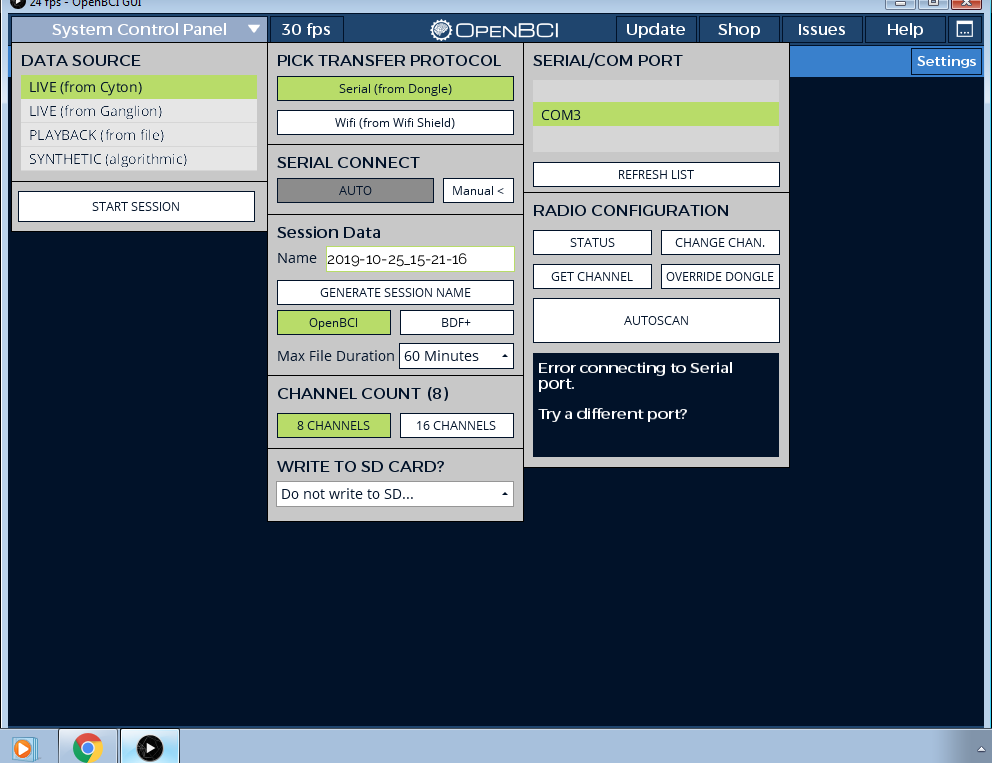
Hey all, am having some issues connecting my dongle to the GUI here. I have attached the dongle and the cyton powered up per the start guide and per the pic it won;t connect to the program, in fact I can;t get the GUI to acknowledge my hardware at all. Any suggestions? (sorry for the quick reply, forum seems to be booting me out if I go too lengthy...)
Comments
IWatts, hi.
Have you tried Autoscan? Sometimes the RFduino on the Cyton mainboard is on a different radio channel than the RFduino present on the dongle. Autoscan can get them synced up.
Does the COM3 (dongle serial port) entry in the Windows Device Manager, appear / disappear when the dongle is plugged / unplugged? This can verify you have the proper COM port number.
Regards, William
Yes, I have tried the Autoscan here, same error message comes up, won;t connect thru.
And yes, the COM3 disappears from the serial/com port list here when I unplug and replug it in. Didn;t think of this since I am not that familiar with the hardware or software, got this Cyton board years ago back in 2015 with the intention of utilizing it in a hobby capacity but life happened and its only now that I have been able to come back to it. Do you have any other suggestions or ideas?
Also, and I just thought of this, how dependent is the dongle on a bluetooth connection from the computer itself, does it need a viable wifi connection from it itself? Reason I ask is I am trying to use an old laptop with a physical LAN connection that has a busted wireless card on it, since I figured once the software was downloaded on the hard drive I wouldn't necessarily need any wireless or even internet access until or unless I wanted to upload the data to a server or share it with someone. Could this cause the issue?
If your Cyton was purchased in 2015, and the firmware never upgraded, this means you have the V1 Cyton and RFduino firmware. This firmware no longer works with the current GUI.
I suggest you do the upgrade procedure shown here,
https://docs.openbci.com/docs/02Cyton/CytonProgram
https://github.com/OpenBCI/OpenBCI_Cyton_Library/blob/master/UPGRADE_GUIDE.md
Do you have a version of the GUI from 2015? That would work with your existing system. You can also find old versions here. Although I see V1 GUI is no longer listed. Not sure which GUI still works with V1 Cyton firmware.
https://github.com/OpenBCI/OpenBCI_GUI/releases?after=v2.1.2
Regards, William
Thank you, am trying to update now, will let you know or post when I have done so and if it worked
Let us know if you got your firmware updated.