
Noise in unused channels [resolved]

Hello Everyone,
I am a beginner in openbci. Recently, I purchased a ganglion board. During testing, I found that there are some random spikes in Openbci GUI time series though I made the channel OFF using the left-side button. I tried changing the room and building but the same problem happens. Now I am using 4*1.5V AA (new alkaline battery). I also ordered Li-Po battery and it will take some time to receive.
Can you guys give me idea which science is here that produces this noise?
Comments
There is nothing wrong with the board or the GUI, turning a channel Off and On changes board settings. It's not a good idea to turn channels on and off while in the middle of a recording while expecting there to be 0 artifacts.
This is not really noise either, it's an artifact caused by changing board settings. Please change board settings before starting data stream if you don't want to see these artifacts.
@retiutut
Thanks for your reply. I made three channels OFF and one channel ON without electrode before the start of recording.
Iqram, hi.
Can you clarify, the specifics of your Ganglion test?
(1) were the channels 1-4 connected to scalp (and reference / ground) during this test? Channels should not be free floating, that picks up noise.
(2) Did you change any settings during this image shown? Settings changes can cause temporary glitches.
What is your goal in your measurements? Have you done the steps in the Ganglion tutorial? What type of sensors are you using?
https://docs.openbci.com/docs/01GettingStarted/01-Boards/GanglionGS
Regards, William
Hi Walliam,
Thanks for your reply. During above test, there was no electrode connected and I expected to see zero microV. Now I understood, the noise comes from empty terminals.
My goal is measuring EEG (Fp1, Fp2), EOG (Right and left eyes) to understand sleep stages. Do you think that Ganglion is enough for both EEG and EOG simultaneously?
Thanks in advance.
Yes, Ganglion should be able to do that. EOG is same as EMG really, and is in millivolt range. Vs. microvolt for EEG.
Can you please clarify (asked this once already), you were not changing channel on/off buttons during this image, correct?
It's possible with the Ganglion on/off channel buttons set to off, that some large environmental noise still leaks through.
On Cyton the on/off buttons really do switch off the ADS1299 ADC converter channel. On Ganglion, Ganglion hardware has no such hardware channel switch, but firmware can emulates this. Mentioning @retiutut.
https://docs.openbci.com/docs/03Ganglion/GanglionSDK
But if this is leaking thru, could be a glitch in the firmware or GUI.
I wasn't changing channel ON/OFF as shown in the image.
I'm 90% sure you did in fact turn channels on and off during the recording or there was a device nearby...
How do I know this? I just tested it and I see the same artifacts.

Only other possibility is a problem with the board. Channels should not be showing any data when turned off.
@iqram Please provide a screenshot of the Ganglion without turning channels on and off:
Hello

I exactly did what you mentioned. No wire, no switching.
Last 1 week, I am getting this kind of spikes in the signal after receiving the Ganglion board. Even when I use electrode, I get this kind of spikes emerging in signal. I also changed my workspace, even in the field with my notebook and ganglion.
In my GUI, channels shows 0 to random data even I make channels remain OFF.

Here is screenshot when I made three switches OFF before recording.
Richard and Iqram, thanks for your comments.
Take a look at lines around number 823,
https://github.com/OpenBCI/OpenBCI_Ganglion_Library/blob/master/OpenBCI_Ganglion_Library.cpp
The MCP3912 is the ADC chip. It does indeed have ability to turn channels on or off. This means that with channels disabled in the GUI, they should be disabled in the MCP as well. Yet that is not happening. Most likely cause I can assume, is a bad MCP chip. It's remotely possible this could be a firmware glitch.
Since this is a new purchase sounds best for @openbci @Shirley to get a new Ganglion out Iqram.
Iqram, can you email contact at openbci.com and point to this forum thread, ask how to proceed.
Regards, William
@iqram I agree with William that there looks to be a problem with this board! Those spikes are not good. Please contact OpenBCI support.
@iqram, please email [email protected] to get in touch about a replacement Ganglion. Thank you
Looking closer at the artifacts in your screenshot, I see now that they are not the same as mine. Here are my notes on what makes this screenshot/issue unique:
Thanks for all your support.
I am wondering that I bought two Ganglion boards recently and both are producing the same kinds of artifacts that I mentioned above. Is it possible that there are another issues rather than the damaged board, such as, firmware glitch?
Can you please suggest any other way to solve this issue?
Can you please suggest any other way to solve this issue?
@iqram I doubt it. Refer to my screenshot above. I said "Yikes" when I saw this screenshot. I also have two Ganglion boards and this is not normal behavior. Did you try to update the firmware after you received the Ganglions? They are ready to go when shipped.
From William:
Maybe there was an issue when the firmware was loaded? Possible. Does this look more like a bad hardware component? I think so, because I have never seen artifacts like these with my Ganglions.
@retiutut
I didn't update the firmware after I received the Ganglions.
@iqram Good to hear! That somewhat rules out a firmware glitch, but still could have happened when programmed. Reach out to support and hopefully a replacement resolves the issue.
@retiutut
I see. My academic advisor is waiting for some EEG, EOG result and I am claiming a replacement. Luck is so rude to me!
Anyways thanks everyone for support and comments.
@iqram Sorry to hear that, but I can assure you that this is not normal Ganglion behavior. It is a little weird that both of the Ganglions you have would be producing the same kind of error, please mention this to support. Hopefully, there is other material you can work on in the mean time to satisfy your advisor. Thanks for providing all the necessary information to try and resolve this!
I know you said you tried different room / outside. HOWEVER, it's remotely possible that there is a strong cell phone antenna or other transmitter in your local area. Such antennas are frequently mounted on rooftops, even power poles. So they don't always look like tall tower structures.
I have not seen any of your screen shots, where you were actually doing an EEG recording according to the tutorial. With all electrodes connected: channel, reference, ground. Unconnected channel pins can pickup outside noise. How this would get through even in the case of the channel turned off, I don't know. But the MCP ADC may have some quirk in the presence of extreme EMF noise pulses.
Please try connecting some EEG channels as mentioned, and see if the noise pulses are still there. We're leaning in the direction that this is broken hardware. But two Ganglion's in a row broken? That is very curious indeed.
@wjcroft
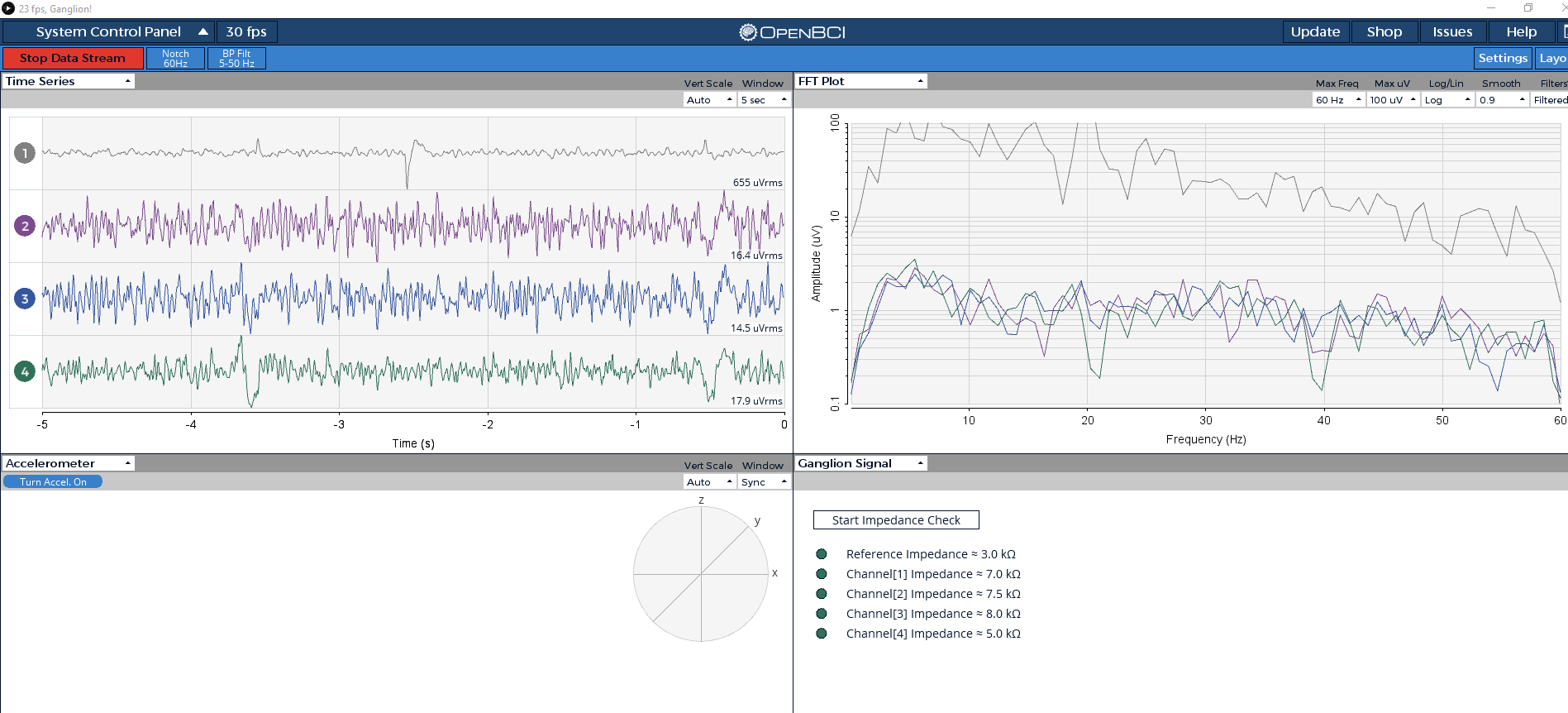

I did the test as you mentioned.
Case1: All channel wire (F1,F2, Fp1,Fp2), Ref (Ear) and D_G (Ear)
All switch button ON
Case2: All channel wire (F1,F2, Fp1,Fp2), Ref (Ear) and D_G (Ear)

Three switch buttons OFF, one ON.
Note: Channel impedance also checked.
Thanks. I see the spikes even with the scalp recording. So does look like a Ganglion hardware malfunction. Hope you can get working boards from support.
@Shirley
I emailed the openbci support team claiming a replacement. Thanks.
I emailed the support team two days ago about the replacement issue. But still no reply from openbci support team. Any idea of delayed response?
Yes, some of the team from the office are at a conference.
I see. Hope to get reply soon.
Hi, I got my replaced Ganglions and it works fine. Thanks.