
How to record on SD at 1000 SPS and include timestamps without using OpenBCI GUI

Hello everyone, I'm avoiding data streaming to the GUI because I've found it's the only way to vanish some artifacts affecting my signals. I'm using Cyton+Daisy and I just need to record into the SD (<5min), including timestamps (or in marker mode could work) at 1000Hz sampling. I am following the instructions and configuring via Radio the Cyton board ("~4" for 1000sps; "<" to include timestamps; "/4" in case I use marker mode; "A" to record 5min ; "b" to begin recording; "s" to stop and "j" to close txt file.
Am I doing anything wrong?
Comments
To be clear, using this sequence of commands leads me to a 250SPS (apparently, based on previous post in this Forum) signal with no timestamp (that's why apparently). If I used marker mode, I can se marks whenever I introduce them, so It works in that sense.
Brainiac, hi.
If you use the "Google Advanced Search" box at upper right, you can find some previous threads on high speed SD card questions and answers. My recollection is that the current Cyton firmware is somewhat crippled as far as allowing what you are asking for. As you have discovered, it forces the SPS back to 250, regardless of any higher rates set. This speed setting feature is somehow tied up with the use of the Wifi Shield.
I believe the other threads show that if you initiate the high speed sampling with the Wifi Shield, it will hold, because the streaming can continue at that higher rate. There is some bug that requires SD card recording rate to match the rate of streaming. Hence with only the bluetooth link, the rate is forced back to 250 Hz.
I'm NOT recommending you purchase a Wifi Shield, see the disclaimer on that page in the shop. However you might look around with the search button and see what others have discovered with this. It might even be possible for you to turn off this misfeature in the firmware. I seem to recall possibly one of the threads mentioned this.
Sorry that you hit this snag in our firmware. Mentioning Richard @retiutut.
You did state in your initial thread text here, that "I'm avoiding data streaming to the GUI because I've found it's the only way to vanish some artifacts affecting my signals." Can you elaborate on that or show examples. Perhaps your placement of cables or electromagnetic interference is causing the artifacts. Are you using the latest GUI and firmware? When did you purchase your system?
Regards, William
@brainiac How are you sending those commands to the board? Asking so myself and others can try to replicate this.
Thanks a lot @wjcroft ! I DO HAVE the WIFI SHIELD. The artifacts I mention looks like a periodic (maybe every 1 or 2 seconds) "impulse response", synchronized in every channel. The picture shows the case when I'm using BLE (took out the wifi SHield). But it gets even worse when plugging in the wifi shield (using it in wifi station mode).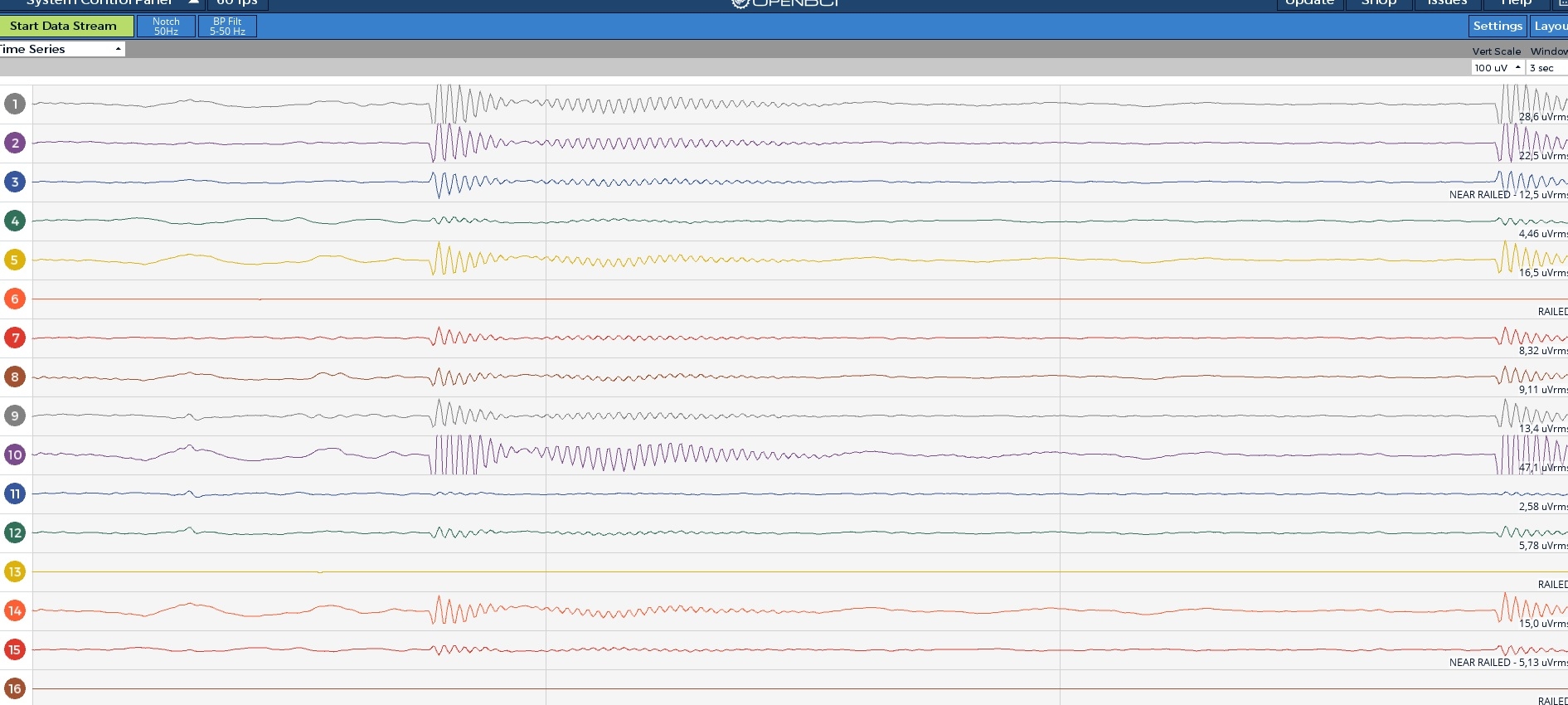
@retiutut I'm using arduino IDE to communicate through serial port.
And sorry @wjcroft, I've updated Cyton's firmware to the latest and we bought the gear last year. I also downloaded last GUI version two weeks ago.
Have you tried using the UDPx3 mode instead of TCP? The ESP microcontroller has to do a lot of work for TCP, and that extra power consumption apparently causes distortions. UDPx3 in Wifi Direct might be the simplest case.
If you are seeing these 1 to 2 second blips using Cyton and dongle, then I would suggest that the blips could likely be coming from electromagnetic interference in your immediate vicinity. Try relocating your Cyton to home or another lab and see if it changes. Get away from power lines, extension cords, switching power supplies (on wall or floor), conduits running through walls or floors, routers, cell phones, etc.
Mention your electrode setup, cabling, impedance measurements, skin preparation, etc. Higher than normal skin impedance can make the electrode cables more likely to pickup this kind of electromagnetic interference.
Many cell tower transmitters are now installed on tops of buildings, or smaller poles in neighborhoods. (This name for the latter is "small cells".) So large power output cell transmitters now no longer have to look like giant tower or pole structures.
A modest priced EMF meter can detect various types of EMF, even at low levels.
https://www.google.com/search?q=cornet+ed88tplus
Has your Cyton ever operated WITHOUT these blips? What was different?
Thanks @wjcroft. Well I actually tried at different locations and these artifacts are invariant. Also gets worse using WIFI shield. I am using dry electrodes (the ones with spikes) and tried tightening them as much as possible (actually until pain). I'll register impedance next time and get back to you on that one.
The only way those artifacts disappear is NOT USING radios. I mean, just recording blind and then picking up the signal from SD card.
This sounds like high skin impedance is leading to the electrodes and electrode wires acting like antennas for EMF in the area. If you count the peaks in the graph you posted above, it looks suspiciously like mains frequency (50 or 60 Hz). Yet as a burst, not constant.
When you "tried at different locations", do you mean different buildings, or different rooms / tables in rooms, etc.
Where is your Ground / Bias lead? Reference (SRB2?) Are you using the OpenBCI ear clips? Is this an Ultracortex?
Have you ever used gel or paste electrodes (generally cup type electrodes?) These give much lower skin impedance than the spiky dry electrodes. Hence should produce less noise artifacts.
Whenever noise appears on all channels simultaneously, suspect your reference lead. Because it is in common with all channels. In other words in your case, the high impedance on the reference connection, could let these mains related noise signals in more easily.
Hi Again @wjcroft and @retiutut,
Sorry for my delay. We needed to keep going with work and left this issue for the last and could not reply sooner (COVID had a lot to do too).
So, I was reading some posts regarding my issue and I discovered you had already discussed the same problems. Thanks a lot for the help! I'll try to sort this out with an extra pack of batteries for Cyton when using wifi shield and, if nothing changes, I'll try to hard-code my needs hoping not to break anything.
best