
Cyton slide switch repair? [solved]

Hi,
I guess I used my board too much, the slide switch is failing, I get it to the ON position or BLE and the blue light stutters and sometimes doesn't turn on at all
When I push on the switch a little sometimes it will stay on for a while but then turns off and the signal is lost
Any suggestions, any hack that I can use to keep it on and I can use the battery to disconnect the board?
Regards,
John
Comments
I have a Ganglion that the power switch broke off. I used of piece of wire to put the Ganglion mode in the "On" position, and I use a switch connected to the battery to turn the device on and off.
https://www.adafruit.com/product/3064
John, hi.
Sometimes an electronics / repair shop, will have a solution or spray called a "contact cleaner". Don't spray directly, that would splash the whole board. Just put a bit on a Q-Tip or other pointed applicator. And apply to the places where you see openings in the switch component casing. Work the switch back and forth a few times to move the liquid. It should soak in and remove any oxidation. Here's one I've used successfully in the past, called De-OxIt,
https://www.amazon.com/CAIG-Laboratories-D100L-2DB-Electric-Cleaner/dp/B0002BBVN2
They make other forms of the liquids as well, if you click on the CAIG Laboratories link.
If the switch is really dead and contact cleaner does not bring it back, you always can create a small wire connection on the board using a small amount of solder, to bridge the switch so that it is always closed. See the schematic and PC layout images.
Regards, William
The cyton switch is not as simple, it has 8 legs and I am not sure which legs to solder together?
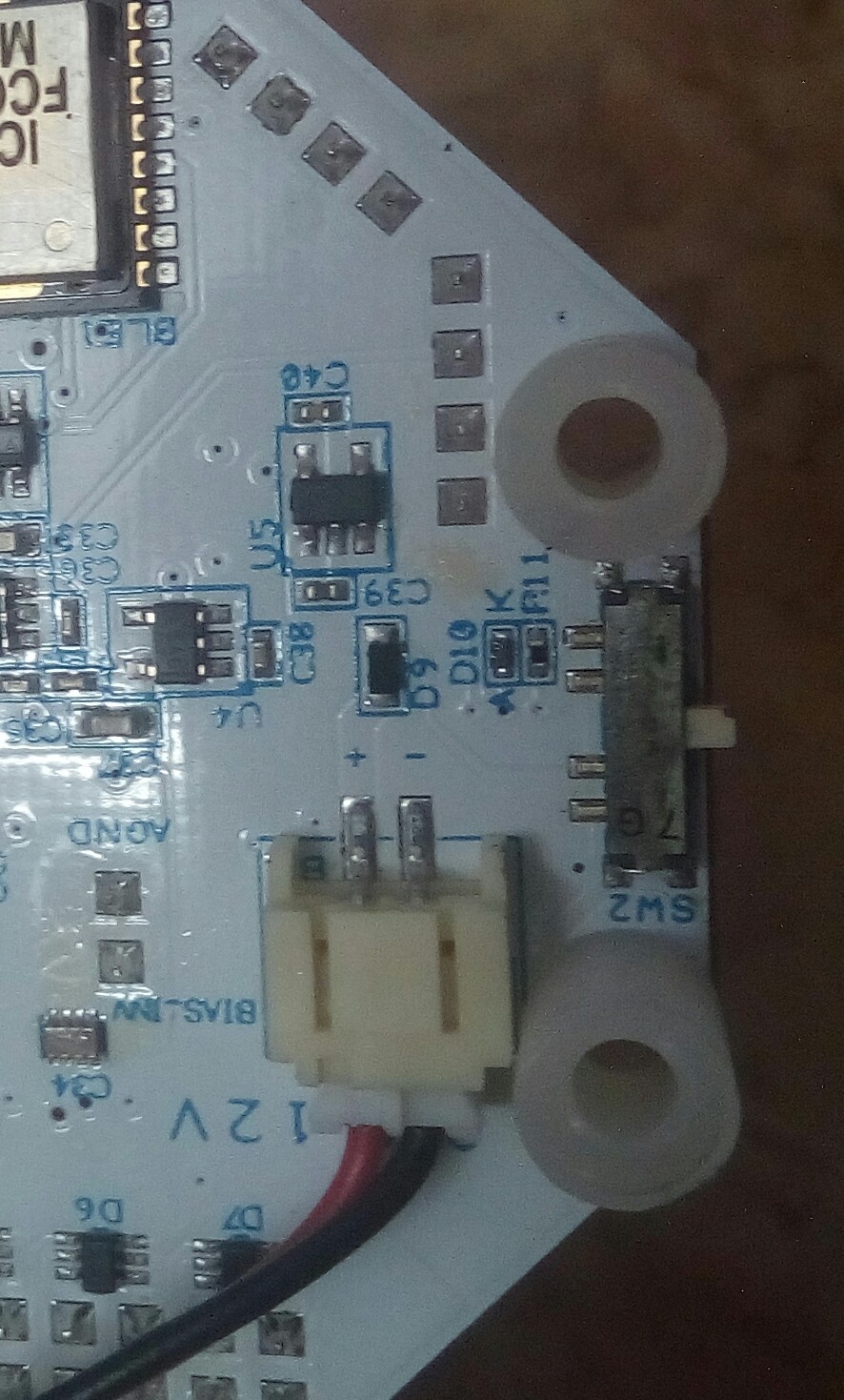
I updated my previous comment, Can you please take a look and let me know which legs to solder together?
John, hi.
You should confirm this yourself with the schematic and PC layout, available on our docs page,
https://raw.githubusercontent.com/OpenBCI/Docs/master/assets/images/OBCI_V3_32bit-Schematic.jpg
https://raw.githubusercontent.com/OpenBCI/Docs/master/assets/images/OBCI_32bit_layerBottom_noMirror.jpg
But my interpretation is this. Looking at the bottom of the Cyton with the component labels, correct side up, you can see SW2, power switch on the left side of the board. Ignore the 4 pins at the very top and bottom of the switch. I see that there seems to be a bridge (you installed?) on the very top pins. You can leave it there, it does no damage because those two pins are already connected via the PC trace, as can be seen on the bottom layer image.
Now looking at the switch contacts running down the right hand side of the switch, those are labeled respectively top to bottom, 1, 2, 3, 4. As shown on the schematic.
If you bridge the 1 and 2 contacts, that will be the same as throwing the switch in the PC position. Another possibility would be to find a switch like the below link, online, and solder the two wires to 1 and 2.
https://www.adafruit.com/product/1092
Finally I would say, call a local electronics repair store, and see if they will apply some De-OxIt or other contact cleaner to the switch first, before you give up that it is permanently broken. My impression if the switch is intermittent, is that the contacts are just dirty / oxidized, and would function ok if contact cleaner such as De-OxIt was applied. Note that there are various types of contact cleaner on the market, De-OxIt is the finest available as you can see on the Amazon reviews. Some lesser contact cleaners just consist of alcohol or solvents and do not have this de-oxidizing quality.
Regards, William
Thanks a lot William, I will give it a try and let you know