
Ganglion 4-channel connection issues and high electrode impedance :(

Hi everyone!
I'm new to OpenBCI and this kind of equipment in general, so I'm still learning how everything works and was hoping someone could help me figure out a few issues that I'm having....
My setup:
- Ganglion 4-channel
- MacBook Pro M2 running macOS Sonoma
- OpenBCI GUI v6.0.0 Beta 1
- USB Dongle 112
Connection issues
I'm having a lot of trouble with the USB dongle. The connection only seems to work if I keep the dongle very close to the Ganglion. If I have my MacBook on the desk and the Ganglion on my head (about 50 cm away), I start losing the signal.
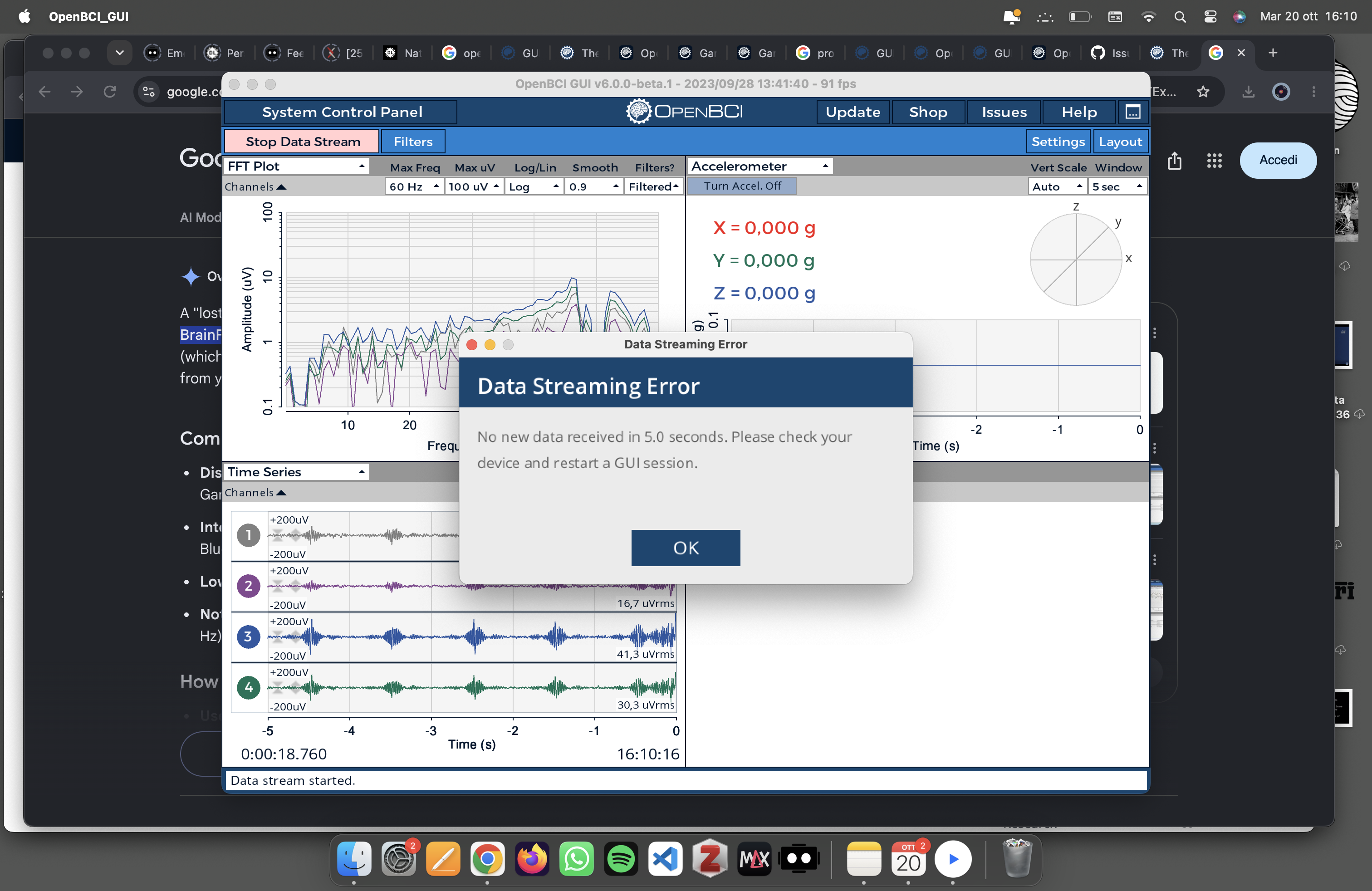
In general, the connection is very unstable, and the recording stops every few minutes.
This doesn't happen when I use my Mac's built-in Bluetooth, but then I get a lot of packet loss.
Has anyone experienced something similar? Could the USB adapter I'm using be causing the problem? My Mac doesn't have a USB-A port, so I need an adapter to connect the dongle.Electrode impedance
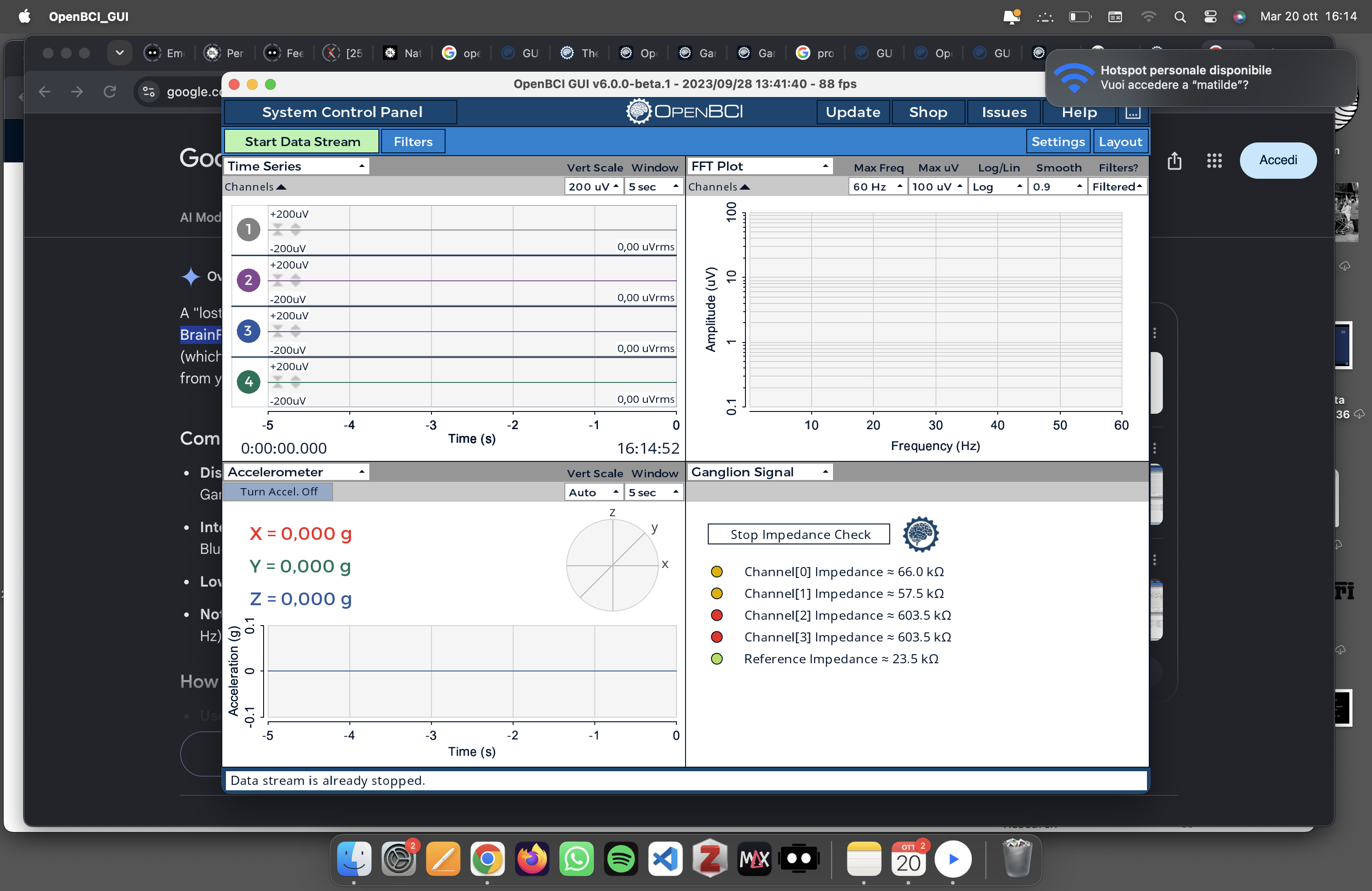
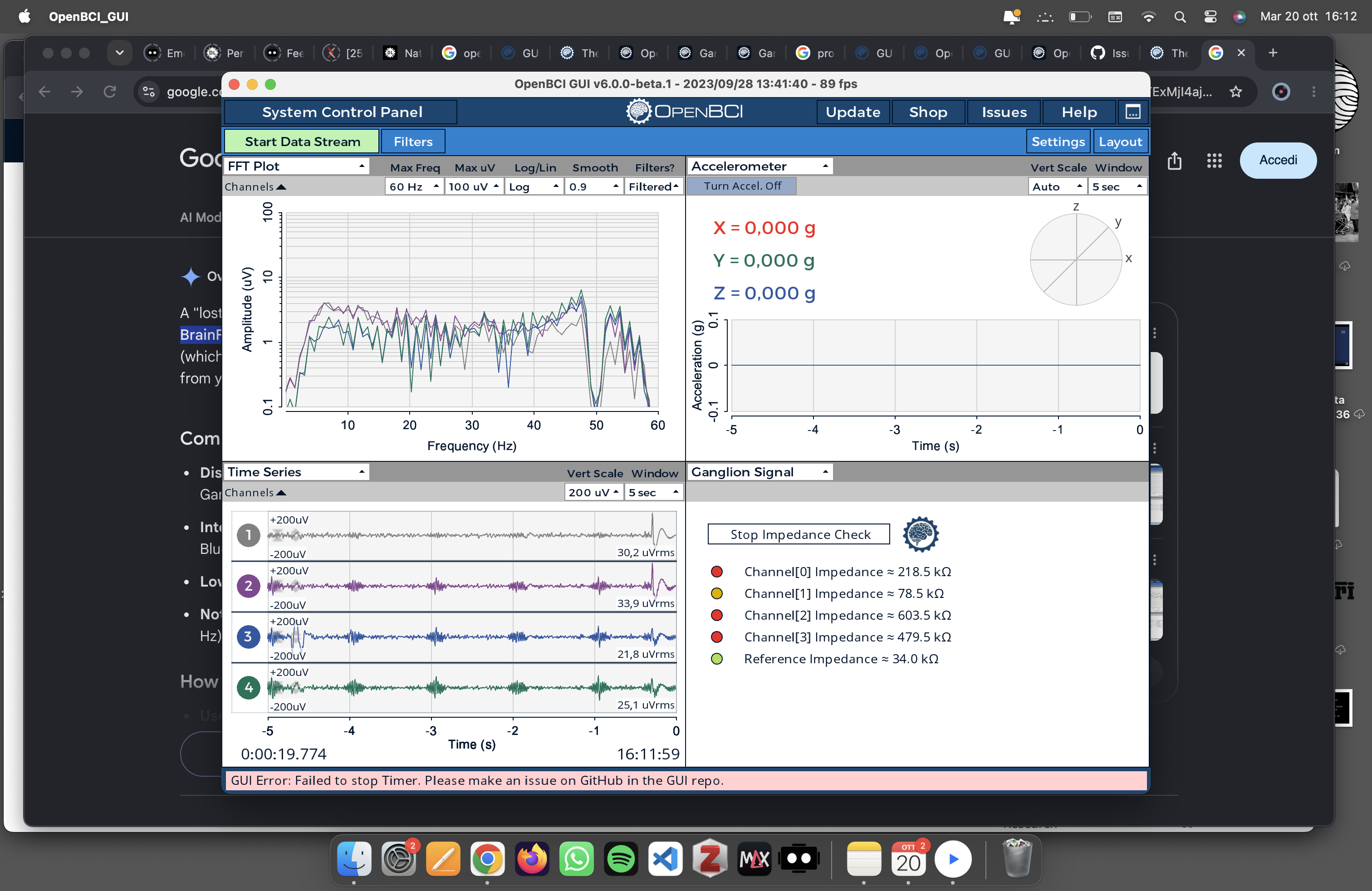
I'm also having trouble with two of the four electrodes (the two on the sides). Their impedance readings never seem to drop below 603, which makes me wonder if they're actually making good contact.
I've tried pressing them firmly against my scalp, even through my hair, but nothing seems to help.
Is there anything else I should try?
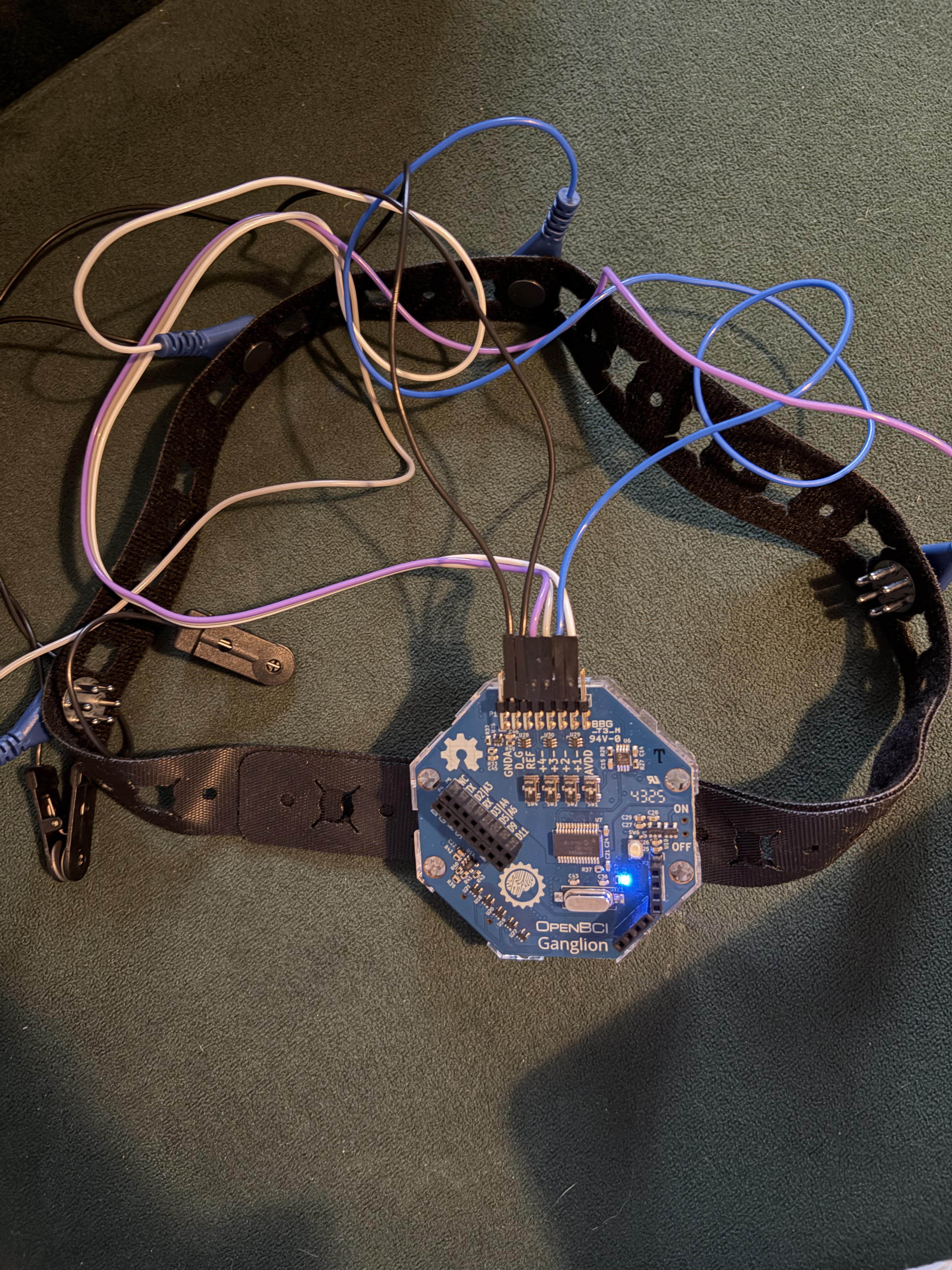
I'm attaching some pictures of the errors, part of the console log, and a photo of the Ganglion powered on.
Any help or suggestions would be greatly appreciated. I'm still trying to figure everything out, so any advice would be really helpful!
Thanks in advance to anyone who can help me!
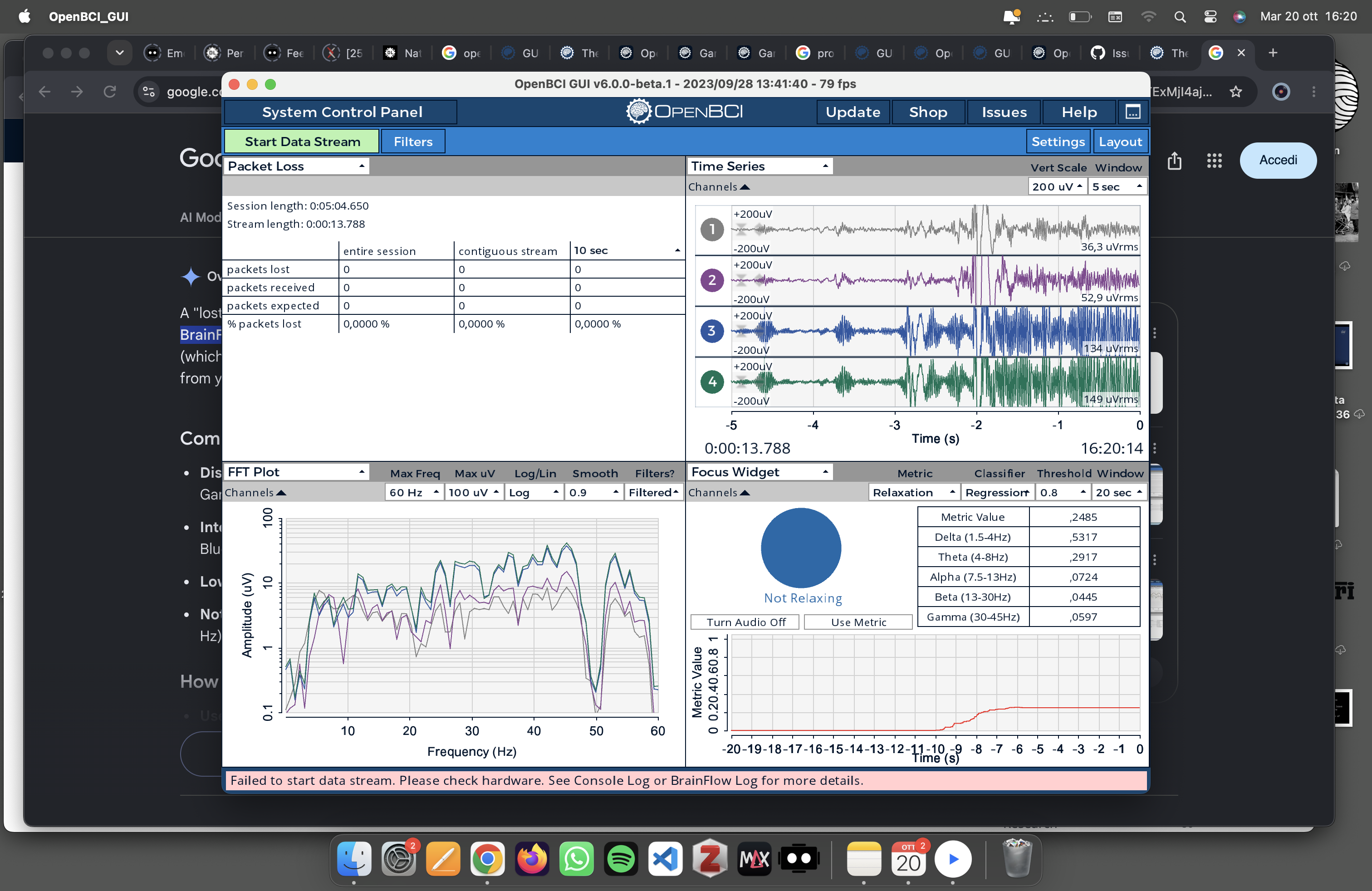
Brainflow start streaming
ERROR: Exception when starting stream
brainflow.BrainFlowError: Error in start_stream:GENERAL_ERROR
at brainflow.BoardShim.start_stream(BoardShim.java:1437)
at OpenBCI_GUI$BoardBrainFlow.startStreaming(OpenBCI_GUI.java:2764)
at OpenBCI_GUI.startRunning(OpenBCI_GUI.java:934)
at OpenBCI_GUI$TopNav.stopButtonWasPressed(OpenBCI_GUI.java:20645)
at OpenBCI_GUI$TopNav$2.controlEvent(OpenBCI_GUI.java:20484)
at controlP5.Controller.callListener(Unknown Source)
at controlP5.Controller.setMousePressed(Unknown Source)
at controlP5.ControllerGroup.setMousePressed(Unknown Source)
at controlP5.ControlWindow.mouseReleasedEvent(Unknown Source)
at controlP5.ControlWindow.mouseEvent(Unknown Source)
at jdk.internal.reflect.GeneratedMethodAccessor1.invoke(Unknown Source)
at java.base/jdk.internal.reflect.DelegatingMethodAccessorImpl.invoke(DelegatingMethodAccessorImpl.java:43)
at java.base/java.lang.reflect.Method.invoke(Method.java:568)
at processing.core.PApplet$RegisteredMethods.handle(PApplet.java:1309)
at processing.core.PApplet.handleMethods(PApplet.java:1456)
at processing.core.PApplet.handleMouseEvent(PApplet.java:2368)
at processing.core.PApplet.dequeueEvents(PApplet.java:2261)
at processing.core.PApplet.handleDraw(PApplet.java:2104)
at processing.opengl.PSurfaceJOGL$DrawListener.display(PSurfaceJOGL.java:840)
at jogamp.opengl.GLDrawableHelper.displayImpl(GLDrawableHelper.java:692)
at jogamp.opengl.GLDrawableHelper.display(GLDrawableHelper.java:674)
at jogamp.opengl.GLAutoDrawableBase$2.run(GLAutoDrawableBase.java:443)
at jogamp.opengl.GLDrawableHelper.invokeGLImpl(GLDrawableHelper.java:1293)
at jogamp.opengl.GLDrawableHelper.invokeGL(GLDrawableHelper.java:1147)
at com.jogamp.newt.opengl.GLWindow.display(GLWindow.java:782)
at com.jogamp.opengl.util.AWTAnimatorImpl.display(AWTAnimatorImpl.java:81)
at com.jogamp.opengl.util.AnimatorBase.display(AnimatorBase.java:453)
at com.jogamp.opengl.util.FPSAnimator$MainTask.run(FPSAnimator.java:178)
at java.base/java.util.TimerThread.mainLoop(Timer.java:566)
at java.base/java.util.TimerThread.run(Timer.java:516)
[ERROR]: Failed to start data stream. Please check hardware. See Console Log or BrainFlow Log for more details.
ConsoleLog: Opening console log as text file!
Comments
Hi Matilde,
A common suggestion with the dongles is to use a usb extension cord to get the dongle AWAY from metal surfaces that might attenuate the radio / bluetooth signals. For example a 3 or 4 foot cable, that lets you drape the dongle over the top of your monitor. This will reduce packet loss.
You may have already tried this: Since you have a newer machine, it may be possible to avoid the dongle and use the 'Native' method, see 2nd image:
https://docs.openbci.com/GettingStarted/Boards/GanglionGS/#connect-the-gui-to-your-ganglion-board
In the 'Pick Transfer Protocol' selection box, choose 'Native'.
Is it possible that your table or a nearby shelf, cabinet, etc. is metallic and thus could affect signal strength? Try moving to another area in your office / home. Ambient EMF electromagnetic noise / fields can also lead to packet loss. Such EMF fields are produced by a huge number of factors: lamps, power supplies, conduits, extension cords, wireless gear, excessive other Bluetooth devices, etc.
Your headband does not look like the OpenBCI version based on velcro One-Wrap. An advantage of that band is that it can be tightened without being elastic. If your band is elastic material, that may limit how tight you can achieve. Another trick you can try is slightly moistening the scalp area under the combx.
Regards, William
Your Time Series traces in the 1st and 3rd screenshot images, show MARKED 1 hz EMF interference pattern. You must eliminate this EMF source or move away from it.
Hi William!
Thank you so much for your detailed and helpful reply!
I tried using the Native connection method and slightly moistening the scalp under the electrodes. CH1 and CH2 improved significantly, but CH3 and CH4 remained unchanged at 603.
When I try pressing the electrodes more firmly against my scalp, their readings occasionally fluctuate between around 480 and 700, but this doesn't happen very often. Most of the time, they remain stuck at 603.
Also, I bought a USB extension cable, and it seems to have helped reduce the 1 Hz interference slightly. At times, the interference is barely noticeable on CH1 and CH2, but it is still very prominent on CH3 and CH4 (as you can see in the attached image).
When I use the Native Bluetooth connection instead, the 1 Hz interference remains constant.
I've also tried recording in several different locations around my house, but nothing seems to change. The 1 Hz interference remains constant and doesn't seem to decrease at all. I wonder what could be causing it in my house!
About the headband: it is the original Velcro version! I purchased the Biosensing Starter Bundle directly from the official OpenBCI website.
Do you think it might be worth replacing the two lateral 35 mm Comb Snap Ag-AgCl electrodes with two Flat Snap Ag-AgCl electrodes, like the ones I'm using at the front?
If so, are there any other recommended electrode positions besides TP7 and TP8? I have quite a lot of hair, which makes it difficult to get good contact with the scalp.
My main interest is studying concentration and relaxation using EEG. I'd really appreciate any advice on the best electrode configuration for this purpose, especially considering the issues I'm having with CH3 and CH4.
Thank you very much again for helping me
Best regards!
matilde