
question on EMG with LSL

Greetings, I'm trying to collect and stream EMG data using LSL (replicating ths music experiment). I was able to install the Python latest version and all the required packges except fo the PyQt4. Upon typing the command python openbci_lsl.py --stream there is a series of erros messages like :
C:\Program Files\Python311\OpenBCI_LSL-master\lib\open_bci_v3.py:488: SyntaxWarning: "is" with a literal. Did you mean "=="?
if channel is 1:
C:\Program Files\Python311\OpenBCI_LSL-master\lib\open_bci_v3.py:490: SyntaxWarning: "is" with a literal. Did you mean "=="?
if channel is 2: .....
Eventually the program gets stuck after -------INSTANTIATING BOARD-------.
At this point nothing happens.
The dongle and the cyton board are coneected and EMG signal is shown at the GUI.
Can someone help? Regards Amilton
Comments
Hi Amilton,
You mention this program,
https://github.com/openbci-archive/OpenBCI_LSL
But as you can see by the 'archive' in the name, it is deprecated and no longer supported. Bugs exist. If the below link is the 'music experiment' you reference:
https://docs.openbci.com/Examples/EMGProjects/EMGmusic/
Then that tutorial DOES NOT use openbci_lsl.py. Instead as you can see, it uses the GUI Networking Widget, setup to stream out LSL. That is what we recommend.
https://docs.openbci.com/Software/OpenBCISoftware/GUIWidgets/#lsl
William
William I just follow the tutorial for the project, but anyways, you're saying that all we have to do is click teh button at the interface to stream. Well it doesn't work.
Was it THIS tutorial??
https://docs.openbci.com/Examples/EMGProjects/EMGmusic/
or this one?
https://docs.openbci.com/Examples/EMGProjects/EMGpiano/
BOTH of these are using the Networking Widget, and describe how to set it up.
The first one, I have a second gropu of studentes trying the second. I've just tried once again, using the GUI Widget, althoug nothing apparently happens . What should I do to see the command window just bellow the GUI widget? It doesn't pops up.
I appreciate your patience
https://docs.openbci.com/Troubleshooting/GUI_Troubleshooting/
I've just run out of battery.
Perhaps I should have the Network widget fully open in the GUI.
I'll try tomorrow, it is now 7 pm at my place.
Regards, Amilton
Dear William. Thank you for your help sofar.
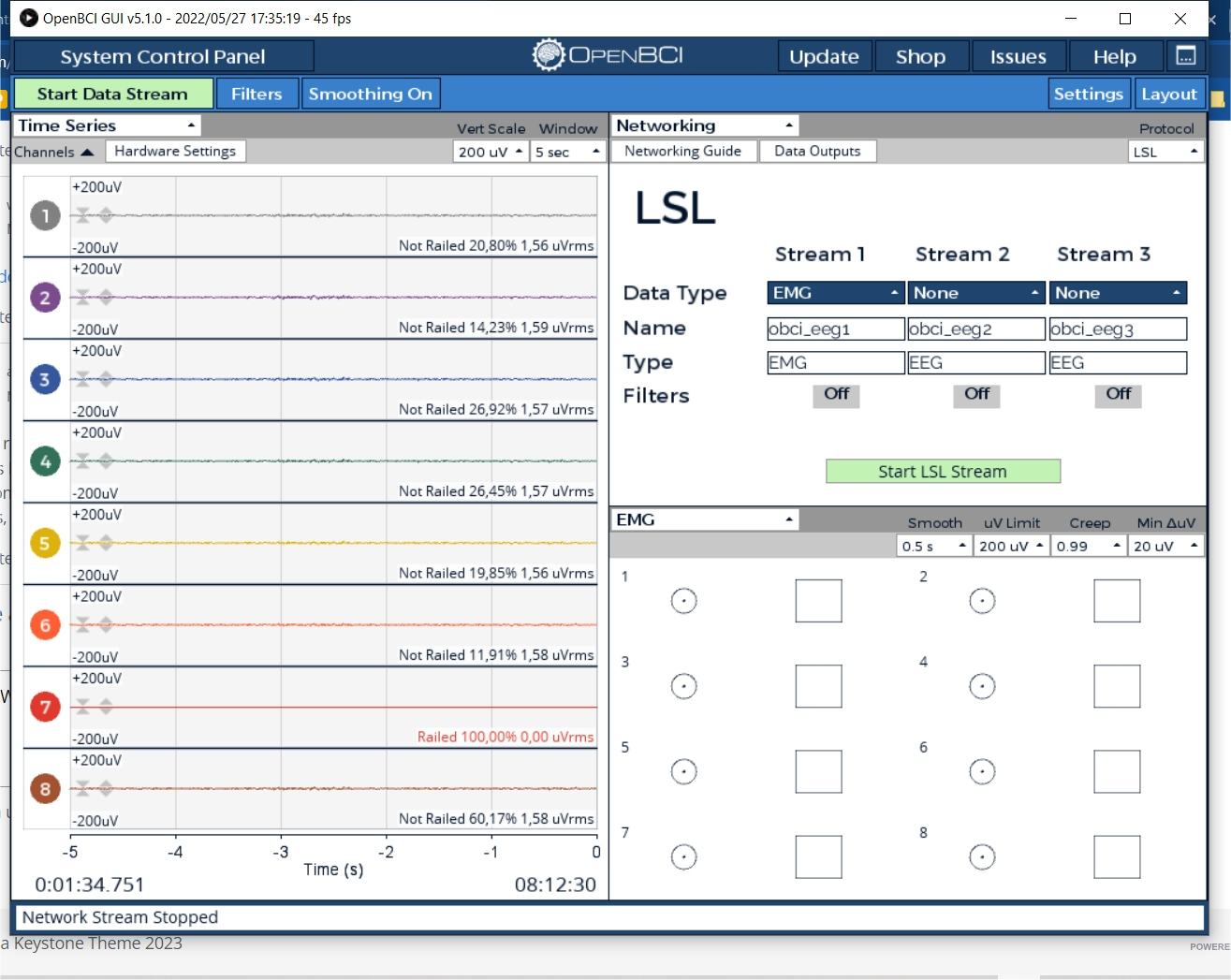
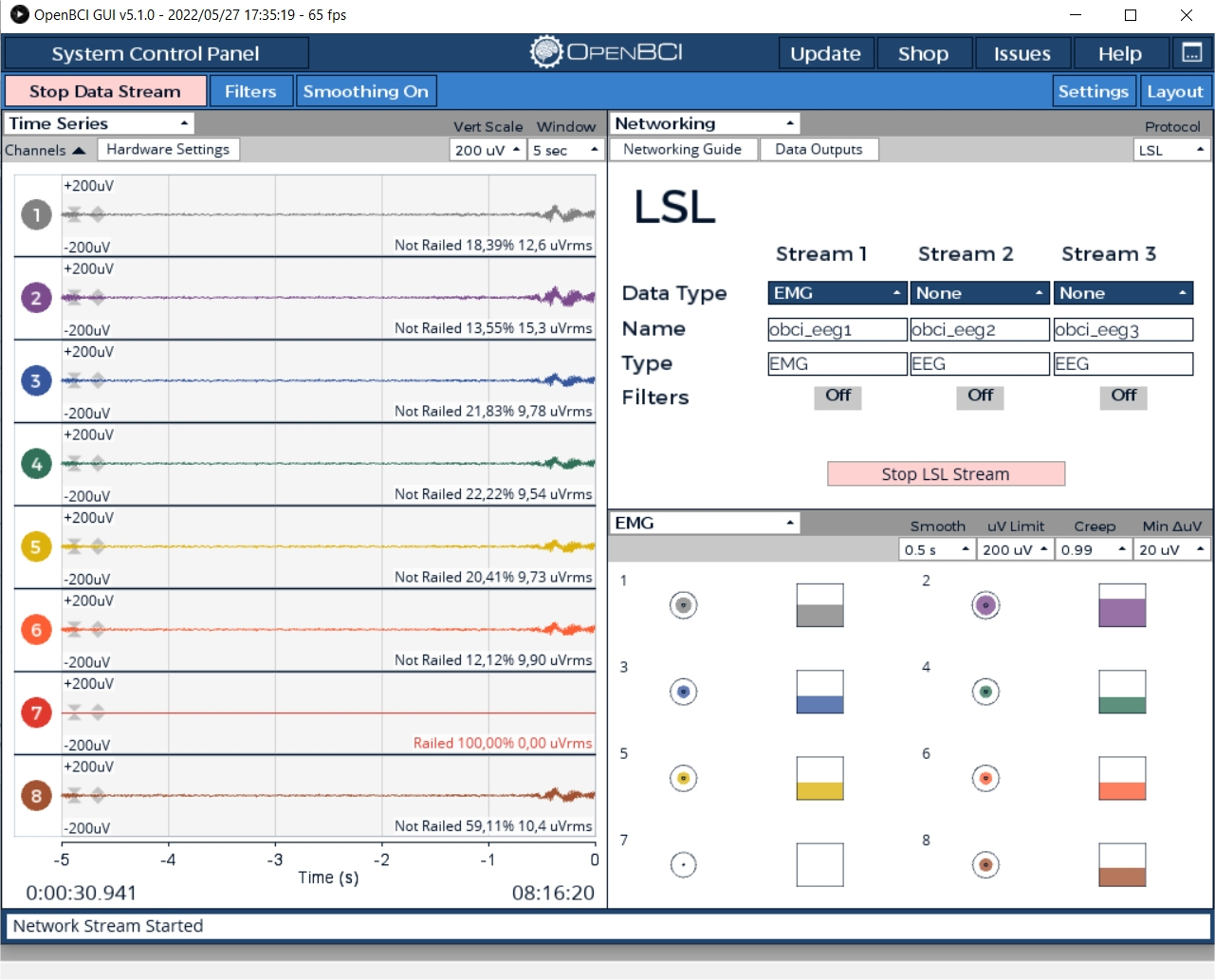
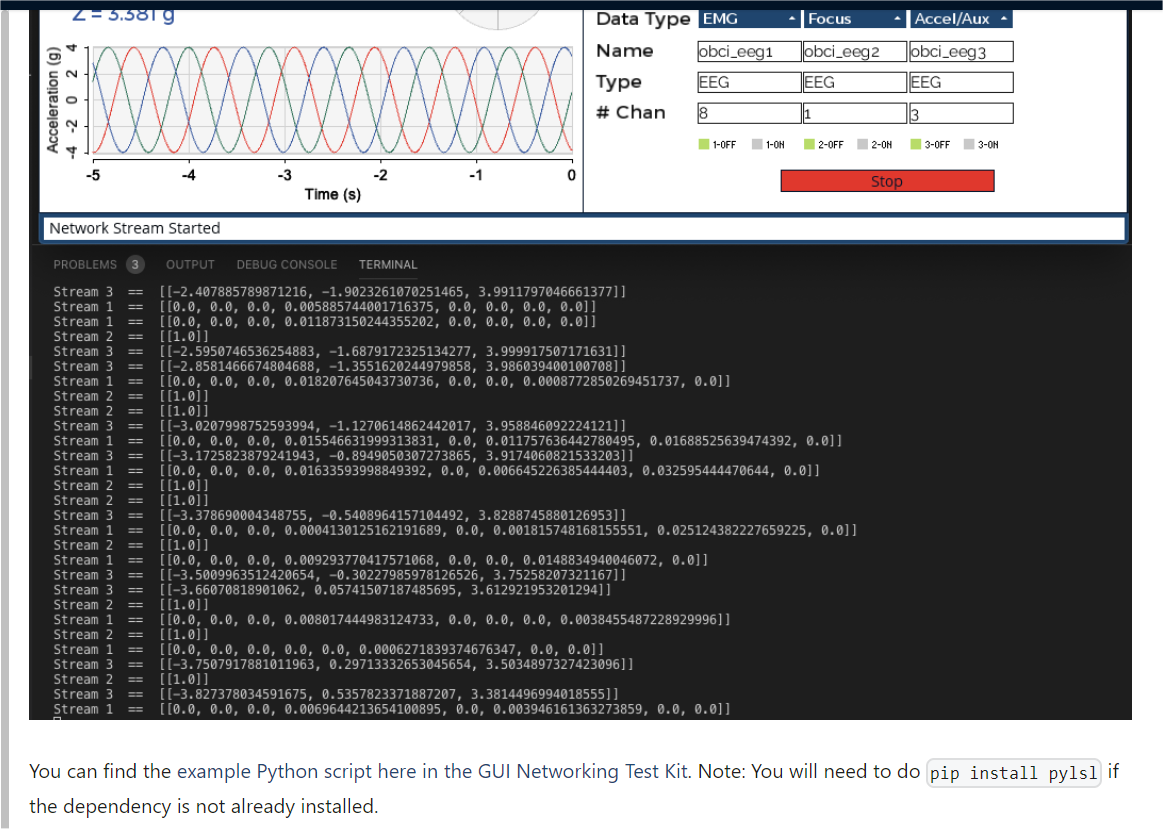
I recharged the battery and runned the GUI once again. These pictures show the interface
Before starting
and after
I'd like to see the the data lines as shown in the tutorial
What shoud I do?
The final lines of the log are as follows
OpenBCI_GUI: openNewLogFile: opened ODF output file: C:\Users\Master\Documents\OpenBCI_GUI\Recordings\OpenBCISession_2023-05-08_08-01-18\OpenBCI-RAW-2023-05-08_08-15-49.txt
OpenBCI_GUI: BrainFlow Streamer Location: file://C:\Users\Master\Documents\OpenBCI_GUI\Recordings\OpenBCISession_2023-05-08_08-01-18\BrainFlow-RAW_2023-05-08_08-01-18_2.csv:w
Brainflow start streaming
[DEFAULT]: Data stream started.
Stream update numChan to 8
nPointsPerUpdate 10
dataToSend len: 80
Networking: StringList size=5 [ "EMG", "obci_eeg1", "EMG", "8", "false" ]
[DEFAULT]: Network Stream Started
[DEFAULT]: openBCI_GUI: stopButton was pressed. Stopping data transfer, wait a few seconds.
Brainflow stop streaming
[DEFAULT]: Data stream stopped.
[DEFAULT]: Network Stream Stopped
ConsoleLog: Opening console log as text file!
Sorry for bugging with so many questions.
Here is the latest log
ControlPanel: Attempting to Auto-Connect to Cyton
ControlPanel: Found Cyton Dongle on COM port: COM6
Success: Host and Device on Channel number: 20. Using COM port: COM6
[DEFAULT]: Attempting to Start Session...
initButtonPressed: Calling initSystem() after next draw()
OpenBCI_GUI: Start session. Calling initSystem().
=================================================
|| INITIALIZING SYSTEM ||
OpenBCI_GUI: Configuring Cyton Channel Count...
Sending config string to board: c
OpenBCI_GUI: Channel count set to 8
InitSettings: Saving Default Settings to file!
SessionSettings: 3 active widgets saved!
[SUCCESS]: Session started!
New widget [8] selected for container...
Your cursor is in Time Series
New widget [5] selected for container...
Your cursor is in FFT Plot
Networking: Protocol mode set to LSL. Stopping network
New widget [8] selected for container...
Your cursor is in Accelerometer
New widget [0] selected for container...
Your cursor is in Accelerometer
[DEFAULT]: openBCI_GUI: startButton was pressed. Starting data transfer, wait a few seconds.
OpenBCI_GUI: openNewLogFile: opened ODF output file: C:\Users\Master\Documents\OpenBCI_GUI\Recordings\OpenBCISession_2023-05-08_08-39-11\OpenBCI-RAW-2023-05-08_08-40-33.txt
OpenBCI_GUI: BrainFlow Streamer Location: streaming_board://225.1.1.1:6677
Brainflow start streaming
[DEFAULT]: Data stream started.
Stream update numChan to 8
nPointsPerUpdate 10
dataToSend len: 80
Networking: StringList size=5 [ "EMG", "obci_eeg1", "EEG", "8", "false" ]
[DEFAULT]: Network Stream Started
[DEFAULT]: Network Stream Stopped
[DEFAULT]: openBCI_GUI: stopButton was pressed. Stopping data transfer, wait a few seconds.
Brainflow stop streaming
[DEFAULT]: Data stream stopped.
ConsoleLog: Opening console log as text file!
Regards
What does your console log show for the Python program, as mentioned in the tutorial? It prints some progress indicator strings:
https://github.com/OpenBCI/OpenBCI_Tutorials/blob/master/EMG_Controlled_Music/LSL_Stream_Music.py
Also, the tutorial just has you setup ONE LSL stream, EMG, on channel 1. You don't need the other EEG streams you have turned on.
Hi William,
I understand that the console log of the Python program will show the dialog only when I'm running the LSL_Stream_Music.py script. My question arose because the picture in the GUI Widget Guide (Network / LSL section) led me to think that the console log was part of the GUI picture, which is not the case (or is? Hope not). The figures look like a single one.
We'll be trying to run the experiment this coming wednesday. I'll let you about the results.
Regards
Amilton
I already mentioned how to turn on the GUI console log.
https://docs.openbci.com/Troubleshooting/GUI_Troubleshooting/
I am suggesting to look at the Python program log, to see if the LSL stream is connecting as expected.
Hi William ,
By suggesting to look at the Python program log you mean look at the command window, this is what I get:
C:\Program Files\Python311>python.exe LSL_Stream_Music.py
Looking for an EMG stream...
2023-05-11 10:55:55.874 ( 0.354s) [ D501E902] netinterfaces.cpp:36 INFO| netif '{93493458-B410-4F90-808A-209211F1BFE6}' (status: 2, multicast: 1
2023-05-11 10:55:55.875 ( 0.355s) [ D501E902] netinterfaces.cpp:36 INFO| netif '{651673D9-80F3-45BB-991E-421D609B72D4}' (status: 2, multicast: 1
2023-05-11 10:55:55.875 ( 0.355s) [ D501E902] netinterfaces.cpp:36 INFO| netif '{9BCC3CD2-D909-4F03-A942-706FB86C5F44}' (status: 1, multicast: 1
2023-05-11 10:55:55.875 ( 0.355s) [ D501E902] netinterfaces.cpp:58 INFO| IPv6 ifindex 17
2023-05-11 10:55:55.875 ( 0.355s) [ D501E902] netinterfaces.cpp:36 INFO| netif '{1221F732-DBAF-4C94-BB67-723AAEE59508}' (status: 2, multicast: 1
2023-05-11 10:55:55.875 ( 0.355s) [ D501E902] netinterfaces.cpp:36 INFO| netif '{8AB82879-F55B-457A-ABCB-A14B3DF0CF2D}' (status: 2, multicast: 1
2023-05-11 10:55:55.875 ( 0.355s) [ D501E902] netinterfaces.cpp:36 INFO| netif '{3CA68AE2-75B4-42DD-8942-0DD5EA458646}' (status: 2, multicast: 1
2023-05-11 10:55:55.878 ( 0.358s) [ D501E902] netinterfaces.cpp:36 INFO| netif '{EE06E783-1A13-11EB-A4D3-806E6F6E6963}' (status: 1, multicast: 1
2023-05-11 10:55:55.881 ( 0.361s) [ D501E902] netinterfaces.cpp:58 INFO| IPv6 ifindex 1
2023-05-11 10:55:55.889 ( 0.369s) [ D501E902] api_config.cpp:270 INFO| Loaded default config
and nothing else happens. it hangs in the last line. The GUI still reads (@ the botton) Network Stream Started
Perhaps I may be looking at the wrong place, if this is the case , please give me instructions about what to do.
thank you for your patience.
Amilton
As you can see from the Python source code, it prints: "Looking for an EMG stream..." ; which shows on your output.
But then NEVER prints: "EMG stream found!"
https://github.com/OpenBCI/OpenBCI_Tutorials/blob/master/EMG_Controlled_Music/LSL_Stream_Music.py
So the calls to LSL functions:
Hang inside those functions and never return.
Richard @retiutut do you have any tips or suggestions?
@amilton, please mention which version of Windows you are running, and on what hardware platform.
Hi
I'm using
Windows 10 Home Single Language version 22H2 compiel 19045.2965 (regurlarly updated)
Intel(R) Core(TM) i7-5500U CPU @ 2.40GHz 2.40 GHz with 16GB installed
I run the GUI in adm mode, but not the phyton.
Regards
Amilton
It looks like the networking widjet is'nt working.
Note: I do star data acquisition with the networking and emg widgets on
No, I would not jump to that conclusion. I would say there is something wrong with the Python LSL program you are using, or the LSL library calls it is using. As Richard @retiutut would verify, the GUI Networking Widget has been thoroughly tested. There may be LSL test programs that are better suited to verifying the LSL stream is being sourced from the Networking Widget.
The output messages you posted above, many
netinterfaces.cpplines, are coming from the LSL library functions that Python is calling.I hope Richard will comment further. Have you tried this other LSL test program?
https://github.com/OpenBCI/OpenBCI_GUI/blob/master/Networking-Test-Kit/LSL/lslStreamTest.py
HI guys, I've tried the following scripts so far: lslStreamTest.py, LSL_EMG_Piano.py, LSL_Stream_Music.py and LSL_Stream_Facial_Multiple_LEDs.py. All of them except the last one gave the same result:
C:\Program Files\Python311>python.exe LSL_Stream_Music.py
Looking for an EMG stream...
2023-05-12 09:17:24.967 ( 0.287s) [ 493E2E04] netinterfaces.cpp:36 INFO| netif '{93493458-B410-4F90-808A-209211F1BFE6}' (status: 2, multicast: 1
2023-05-12 09:17:24.967 ( 0.287s) [ 493E2E04] netinterfaces.cpp:36 INFO| netif '{651673D9-80F3-45BB-991E-421D609B72D4}' (status: 2, multicast: 1
2023-05-12 09:17:24.968 ( 0.287s) [ 493E2E04] netinterfaces.cpp:36 INFO| netif '{9BCC3CD2-D909-4F03-A942-706FB86C5F44}' (status: 1, multicast: 1
2023-05-12 09:17:24.968 ( 0.288s) [ 493E2E04] netinterfaces.cpp:58 INFO| IPv6 ifindex 17
2023-05-12 09:17:24.968 ( 0.288s) [ 493E2E04] netinterfaces.cpp:36 INFO| netif '{1221F732-DBAF-4C94-BB67-723AAEE59508}' (status: 2, multicast: 1
2023-05-12 09:17:24.968 ( 0.288s) [ 493E2E04] netinterfaces.cpp:36 INFO| netif '{8AB82879-F55B-457A-ABCB-A14B3DF0CF2D}' (status: 2, multicast: 1
2023-05-12 09:17:24.968 ( 0.288s) [ 493E2E04] netinterfaces.cpp:36 INFO| netif '{3CA68AE2-75B4-42DD-8942-0DD5EA458646}' (status: 2, multicast: 1
2023-05-12 09:17:24.968 ( 0.288s) [ 493E2E04] netinterfaces.cpp:36 INFO| netif '{EE06E783-1A13-11EB-A4D3-806E6F6E6963}' (status: 1, multicast: 1
2023-05-12 09:17:24.968 ( 0.288s) [ 493E2E04] netinterfaces.cpp:58 INFO| IPv6 ifindex 1
2023-05-12 09:17:24.969 ( 0.288s) [ 493E2E04] api_config.cpp:270 INFO| Loaded default config
i.e. the scripts doesn't find the stream.
The last script (LSL_Stream_Facial_Multiple_LEDs.py) resulted in
C:\Program Files\Python311>python.exe LSL_Stream_Facial_Multiple_LEDs.py
Traceback (most recent call last):
File "C:\Program Files\Python311\LSL_Stream_Facial_Multiple_LEDs.py", line 8, in
ser = serial.Serial('COM6', 9600)
^^^^^^^^^^^^^
AttributeError: module 'serial' has no attribute 'Serial'
note that I've changed the original COM4 to COM6, since this is the port my setup uses
I'll change PCs and let you know the results.
TKS
Amilton
Update
Started sretaming EMG data and tested the script lslStreamTest2.py as suggested. This is the output
c:\Program Files\Python311>python lslStreamTest2.py
looking for an EEG stream...
2023-05-12 16:18:50.387 ( 0.021s) [ 88198076] netinterfaces.cpp:36 INFO| netif '{93493458-B410-4F90-808A-209211F1BFE6}' (status: 2, multicast: 1
2023-05-12 16:18:50.388 ( 0.022s) [ 88198076] netinterfaces.cpp:36 INFO| netif '{651673D9-80F3-45BB-991E-421D609B72D4}' (status: 2, multicast: 1
2023-05-12 16:18:50.388 ( 0.022s) [ 88198076] netinterfaces.cpp:36 INFO| netif '{9BCC3CD2-D909-4F03-A942-706FB86C5F44}' (status: 1, multicast: 1
2023-05-12 16:18:50.388 ( 0.022s) [ 88198076] netinterfaces.cpp:58 INFO| IPv6 ifindex 17
2023-05-12 16:18:50.388 ( 0.022s) [ 88198076] netinterfaces.cpp:36 INFO| netif '{1221F732-DBAF-4C94-BB67-723AAEE59508}' (status: 2, multicast: 1
2023-05-12 16:18:50.390 ( 0.024s) [ 88198076] netinterfaces.cpp:36 INFO| netif '{8AB82879-F55B-457A-ABCB-A14B3DF0CF2D}' (status: 2, multicast: 1
2023-05-12 16:18:50.394 ( 0.028s) [ 88198076] netinterfaces.cpp:36 INFO| netif '{3CA68AE2-75B4-42DD-8942-0DD5EA458646}' (status: 2, multicast: 1
2023-05-12 16:18:50.394 ( 0.028s) [ 88198076] netinterfaces.cpp:36 INFO| netif '{EE06E783-1A13-11EB-A4D3-806E6F6E6963}' (status: 1, multicast: 1
2023-05-12 16:18:50.397 ( 0.031s) [ 88198076] netinterfaces.cpp:58 INFO| IPv6 ifindex 1
2023-05-12 16:18:50.398 ( 0.032s) [ 88198076] api_config.cpp:270 INFO| Loaded default config
2023-05-12 16:18:50.424 ( 0.058s) [ 88198076] common.cpp:65 INFO| git:6dc417089a1f73f26589b4f1e64def357b183e9c/branch:refs/tags/v1.16.1/build:Release/compiler:MSVC-19.0.24245.0/link:SHARED
Testing Sampling Rates...
Number of Chunks and Samples == 238 , 238
Valid Samples and Duration == 238 / 5
Avg Sampling Rate == 47.6
Is this OK?
The script LSL_Stream_Music2.py
c:\Program Files\Python311>python LSL_Stream_Music2.py
Looking for an EMG stream...
2023-05-12 16:22:50.638 ( 0.620s) [ 702284EC] netinterfaces.cpp:36 INFO| netif '{93493458-B410-4F90-808A-209211F1BFE6}' (status: 2, multicast: 1
2023-05-12 16:22:50.638 ( 0.620s) [ 702284EC] netinterfaces.cpp:36 INFO| netif '{651673D9-80F3-45BB-991E-421D609B72D4}' (status: 2, multicast: 1
2023-05-12 16:22:50.638 ( 0.621s) [ 702284EC] netinterfaces.cpp:36 INFO| netif '{9BCC3CD2-D909-4F03-A942-706FB86C5F44}' (status: 1, multicast: 1
2023-05-12 16:22:50.638 ( 0.621s) [ 702284EC] netinterfaces.cpp:58 INFO| IPv6 ifindex 17
2023-05-12 16:22:50.638 ( 0.621s) [ 702284EC] netinterfaces.cpp:36 INFO| netif '{1221F732-DBAF-4C94-BB67-723AAEE59508}' (status: 2, multicast: 1
2023-05-12 16:22:50.639 ( 0.621s) [ 702284EC] netinterfaces.cpp:36 INFO| netif '{8AB82879-F55B-457A-ABCB-A14B3DF0CF2D}' (status: 2, multicast: 1
2023-05-12 16:22:50.639 ( 0.621s) [ 702284EC] netinterfaces.cpp:36 INFO| netif '{3CA68AE2-75B4-42DD-8942-0DD5EA458646}' (status: 2, multicast: 1
2023-05-12 16:22:50.639 ( 0.621s) [ 702284EC] netinterfaces.cpp:36 INFO| netif '{EE06E783-1A13-11EB-A4D3-806E6F6E6963}' (status: 1, multicast: 1
2023-05-12 16:22:50.639 ( 0.622s) [ 702284EC] netinterfaces.cpp:58 INFO| IPv6 ifindex 1
2023-05-12 16:22:50.641 ( 0.624s) [ 702284EC] api_config.cpp:270 INFO| Loaded default config
still hangs
Regards
Amilton
Why did
python lslStreamTest2.pysucceed and receive data, whereas your earlier test withpython lslStreamTest.pyfail (returned no data, never connected)??It looks like that if the system experiences an error with one scritp all the ones following it will result in error, but I'm not shure.
I've copied all sripts again from github and rename xxx2.py. Anyway it seems that the PIANO and MUSIC scripts are working fine. This is a copy of the command window. MUSIC scritp (similar for the PIANO script)
c:\Program Files\Python311>python LSL_Stream_Music.py
Looking for an EMG stream...
2023-05-12 19:14:20.751 ( 0.359s) [ B05FFA25] netinterfaces.cpp:36 INFO| netif '{93493458-B410-4F90-808A-209211F1BFE6}' (status: 2, multicast: 1
2023-05-12 19:14:20.751 ( 0.359s) [ B05FFA25] netinterfaces.cpp:36 INFO| netif '{651673D9-80F3-45BB-991E-421D609B72D4}' (status: 2, multicast: 1
2023-05-12 19:14:20.751 ( 0.360s) [ B05FFA25] netinterfaces.cpp:36 INFO| netif '{9BCC3CD2-D909-4F03-A942-706FB86C5F44}' (status: 1, multicast: 1
2023-05-12 19:14:20.751 ( 0.360s) [ B05FFA25] netinterfaces.cpp:58 INFO| IPv6 ifindex 17
2023-05-12 19:14:20.751 ( 0.360s) [ B05FFA25] netinterfaces.cpp:36 INFO| netif '{1221F732-DBAF-4C94-BB67-723AAEE59508}' (status: 2, multicast: 1
2023-05-12 19:14:20.752 ( 0.360s) [ B05FFA25] netinterfaces.cpp:36 INFO| netif '{8AB82879-F55B-457A-ABCB-A14B3DF0CF2D}' (status: 2, multicast: 1
2023-05-12 19:14:20.753 ( 0.362s) [ B05FFA25] netinterfaces.cpp:36 INFO| netif '{3CA68AE2-75B4-42DD-8942-0DD5EA458646}' (status: 2, multicast: 1
2023-05-12 19:14:20.755 ( 0.364s) [ B05FFA25] netinterfaces.cpp:36 INFO| netif '{EE06E783-1A13-11EB-A4D3-806E6F6E6963}' (status: 1, multicast: 1
2023-05-12 19:14:20.758 ( 0.367s) [ B05FFA25] netinterfaces.cpp:58 INFO| IPv6 ifindex 1
2023-05-12 19:14:20.763 ( 0.372s) [ B05FFA25] api_config.cpp:270 INFO| Loaded default config
2023-05-12 19:14:20.790 ( 0.398s) [ B05FFA25] common.cpp:65 INFO| git:6dc417089a1f73f26589b4f1e64def357b183e9c/branch:refs/tags/v1.16.1/build:Release/compiler:MSVC-19.0.24245.0/link:SHARED
EMG stream found!
2023-05-12 19:17:01.024 ( 160.633s) [R_obci_eeg1 ] data_receiver.cpp:342 ERR| Stream transmission broke off (Input stream error.); re-connecting...
This last line appears when I stop the LSL stream.
I don't see the transmission contents but I imagine it is working because of the error message (stream transmission brok off) that shows when I stop the LSL stream.
Questions:
Is the command line log correct? (Is the system transmiting ok?)
Is there a way to see the contentes transmitted stream?
Another challenge. The script for the EMG controlled LED is sending error messages. My system uses COM6 for communication so I altered the script. I tried COM4 (original) and COM6 but no success. See the command line log bellow.
c:\Program Files\Python311>python LSL_Stream_Facial_Multiple_LEDs6.py
Traceback (most recent call last):
File "c:\Program Files\Python311\LSL_Stream_Facial_Multiple_LEDs6.py", line 8, in
ser = serial.Serial('COM6', 9600)
^^^^^^^^^^^^^
AttributeError: module 'serial' has no attribute 'Serial'
c:\Program Files\Python311>python LSL_Stream_Facial_Multiple_LEDs4.py
Traceback (most recent call last):
File "c:\Program Files\Python311\LSL_Stream_Facial_Multiple_LEDs4.py", line 8, in
ser = serial.Serial('COM4', 9600)
^^^^^^^^^^^^^
AttributeError: module 'serial' has no attribute 'Serial'
c:\Program Files\Python311>
CAn you help me on this as well?
REgards
Amilton
You can easily alter any of these Python programs to
print()the incoming values.Willian, easy for You . I'm no computer guy. I learned FORTRAN abou 50 years ago (rs rs rs).
Can you send me the command line please.
I'm assuming we're good with these results.
Regards
Amilton
Do you see the
# print (...)lines that have been commented out with the leading#?https://github.com/OpenBCI/OpenBCI_GUI/blob/master/Networking-Test-Kit/LSL/lslStreamTest.py
You can use
printto print any info you like from the incoming stream. Similar mods can be made to the other programs.Gotcha, i'll uncomment those.
I"m still strugling with the script LSL_Stream_Facial_Multiple_LEDs.py
Regards
I've deted
What does 'deted' mean??
It means deleted - I misspelled (typo).
The PIANO and MUSIC scripts are workin fine, I was able to remove the comments and see the data transfered
I'm still having trouble with the LED project.
The script for the EMG controlled LED is sending error messages.
My system uses COM6 for communication so I altered the script and rename it.
I've tried running with COM4 (original) and COM6 but had no success. See the command line log bellow.
c:\Program Files\Python311>python LSL_Stream_Facial_Multiple_LEDs6.py
Traceback (most recent call last):
File "c:\Program Files\Python311\LSL_Stream_Facial_Multiple_LEDs6.py", line 8, in
ser = serial.Serial('COM6', 9600)
^^^^^^^^^^^^^
AttributeError: module 'serial' has no attribute 'Serial'
c:\Program Files\Python311>python LSL_Stream_Facial_Multiple_LEDs4.py
Traceback (most recent call last):
File "c:\Program Files\Python311\LSL_Stream_Facial_Multiple_LEDs4.py", line 8, in
ser = serial.Serial('COM4', 9600)
^^^^^^^^^^^^^
AttributeError: module 'serial' has no attribute 'Serial'
Can you help?
Regards
Amilton