
wrong notch parameters in GUI ? [resolved]
 algmur
UK
algmur
UK
Hi all,
I've had my Ultracortex IV Cyton+Daisy for a while but not really had time to tinker with it recently. Today, however, I wanted to give it another go and just check it was still working. Previously I've had trouble removing the power line noise from the data. I upgraded to the ThinkPulse electrodes and fixed a lot of issues I had with that (e.g. setting the gain value to x8). Anyway, got a USB extension cord in the hope that I could move far enough away from the sockets and electrical equipment to see a difference.
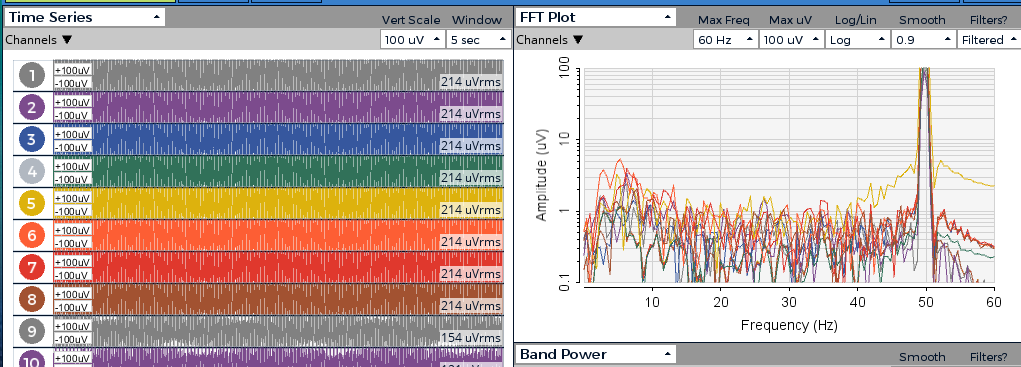
When I first turned it on, it was only detecting about 6 channels (out of 16) but the notch filter was working perfectly. I then got the rest of the electrodes to work and I was back to the familiar situation. The notch filter reduces the 50 Hz component, but only from a giant value to a large one. For a moment, I thought the extension cord had solved all my issues and completely removed the 50 Hz noise in the Time Series part of the GUI.
I wanted to get this working before I then move on to using BrainFlow to record some data in a more experimental fashion and I know I will have more options there to do with tweaking the filters. Ideally, I wanted to see it work and do some troubleshooting in the GUI first (i.e. close eyes, look for alpha peaks, look for blink-responses etc.) but I just can't remove the 50 Hz line noise - only reduce it.
This is a screenshot without the 50 Hz notch filter.
And this is with it.
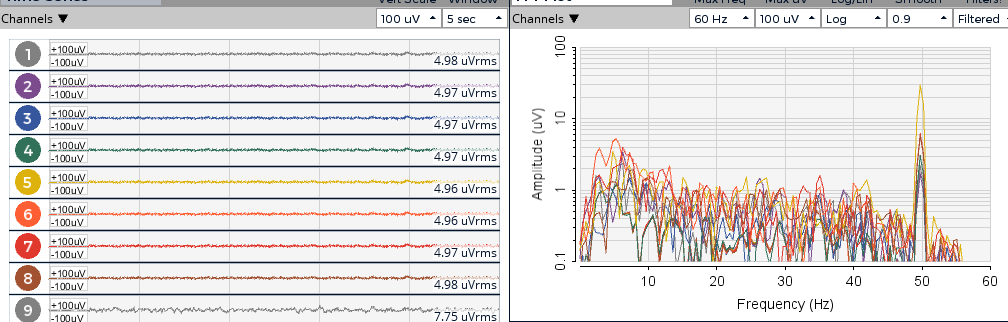
What can I do, in the GUI (if anything) to try to ameliorate the line noise? That first time, with only a few channels working, the data was so clean and responsive to alpha and blinks. It was almost beautiful. I just would love to have that again, where the 50 Hz disappeared, for all my 16 channels. I imagine it's something to do with the window of the notch filter, but I can't see where I would change this in the GUI?
Thanks!
Alex
Comments
GUI 5.0.5 uses BrainFlow notch filter. This is a hardware/environment related issue.
Hi, retiutut.
Thanks for your answer. I'm not really sure what I'm supposed to do with it though. I was asking about tweaking filter parameters in the OpenBCI GUI. Is it possible? I know where the error comes from, it's just the filter isn't really working - hence needs tweaking.
Alex, hi.
You can never completely eliminate mains line noise, because it is so ubiquitous in the environment. The best strategy is to position your body and your equipment away from sources of the fields: power supplies, extension cords, wall warts, conduits (in walls, floors, ceilings), lamps, wireless equipment, etc. Are you using a laptop that is plugged into the AC wall supply? Try running off the battery instead.
'Ground' configurations can also mess with line noise levels, as the power line ground lead is commonly contaminated with line noise. Metal desks, tables, support beams, reinforced concrete re-bar, etc., can also be sources of noise.
A USB extension cord will allow you to get the headset closer to the dongle, so increases Bluetooth signal strength. But generally has no relation to line noise. Which is coming from power line sources or other equipment.
Adjustment of the notch filter parameters will not solve your environmental issues.
William
Hi, William!
Thanks for your reply. I was under the impression that if the width of the filter were wider, you could completely remove a signal that exists around a specific fixed point. It seems odd to suggest that after strong filtering, filters are unable to remove frequencies around their target frequencies of removal. As with the USB extension cord, I thought the point of it was to be physically more distant to the sources of noise so they would have less effect. I am surprised to hear that moving three metres away from the only sources of electrical interference would not have any effect whatsoever on the amplifier's picking-up of line noise.
I will try the setup from the battery-powered laptop as that seems to be the most promising solution that I think might work. I'll post back if it works out. Appreciate all the tips.
Alex
Filters have both a WIDTH and a FILTER ORDER (also called poles). The current notch filter is adequate in both aspects for normal amounts of mains noise. You have excessive mains noise that should be reduced by environmental means.
USB extension cord is to get the dongle RFduino closer to the mainboard RFduino, so as to reduce any excessive "packet loss" situations.
"...the only sources of electrical interference...", as mentioned in the last comment, these field sources are ubiquitous in almost all living spaces. every floor, wall, ceiling has many conduits invisibly behind the surface.
If your computer has a faulty ground connection to mains, then the usb cable shield (connected to chassis ground) actually is bringing that mains noise source CLOSER to you when using the USB extension.
"Ground loop" is another term for faulty equipment ground / mains noise:
https://www.google.com/search?q=laptop+power+cable+ground+loop
William