For any regular readers of this blog, you know that I really like to visualize EEG data using spectrograms. Unfortunately, when using OpenBCI, none of our software has a spectrogram display. As a result, all my spectrograms are made after the tests are done. While this is OK, it’s not as good as having a real-time spectrogram. So, I finally took the time to modify the OpenBCI GUI to include a live spectrogram.
As an example of how useful a spectrogram can be, look at the data below. The picture is a screenshot from my newly-modified OpenBCI Processing GUI. It shows EEG data recorded from the back of my head (O1-Fz). My eyes were closed for the entire recording. The screenshot was taken live (in the OpenBCI GUIs, press “m” to take a screenshot)…this is what the GUI was showing while the data was actually being recorded.
 |
| Screenshot from the OpenBCI “Simpler” Processing GUI. Note the newly-added spectrogram plot. I was recording Alpha waves from the back of my head (O1-Fz). |
What does this screenshot show? It shows alpha waves. Specifically, because my eyes were closed and because the electrode was on the back of my head, it is showing my posterior dominant rhythm. Based on the traditional spectrum plot on the left, it appears that my alpha waves are ~9 Hz in this recording. Looks fine.
Now look at the spectrogram on the right. it shows the same alpha wave signal, but now you can also see that the amplitude of my alpha increases and decreases through time (the color oscillates between red and light blue). It is not a steady signal. I find this very interesting. The ability to see in both time and in frequency *at the same time* is the beauty of a spectrogram.
As another example, the screenshot below shows some Mu waves. Here, I put an electrode on the left side of my head (C3) and tried to relax enough to make some Mu waves. Mu waves are really difficult for me. I cannot get long sustained Mu waves like I can do for Alpha waves. Instead, I can only seem to get 2-3 second long bits of Mu wave (as seen below).
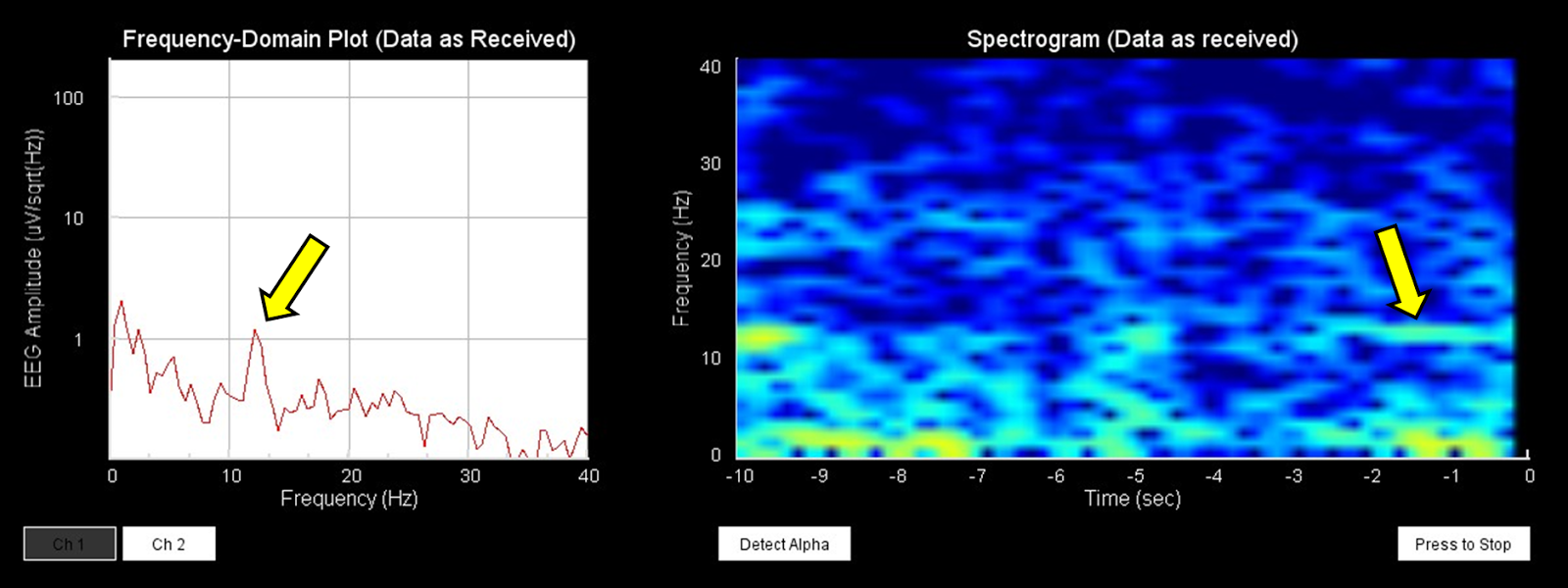 |
| A short segment of Mu waves recorded from the side of my head (C3-Fz) |
With the regular spectrum plot on the left, it is hard to tell how long my Mu waves are sustained. Now that I have the spectrogram, I can better see how long I’m sustaining my Mu waves, which means that I have better feedback for practicing making Mu waves. In this way, you could say that it’s a tool for neurofeedback.
Since I think that spectrograms are so useful, I’ve pushed this modified version of the “Simpler” Processing GUI up to the OpenBCI GitHub (link below). Note that the spectrogram is only in the “Simpler” version of the Processing GUI. The “Simpler” Processing GUI is designed to visualize just one or two channels of EEG data instead of all 8 channels that OpenBCI allows.
OpenBCI Processing GitHub: https://github.com/OpenBCI/OpenBCI/tree/master/Processing_GUI
Being limited to one or two channels means that this GUI might also be useful for OpenEEG (which is a two channel device). All I have to do is alter the routine that interprets the data from the OpenBCI board so that it instead knows how to interpret the data format used by OpenEEG. That should be pretty easy. Look for a future update!